
OPENSTAYS PRODUCT
Your direct bookings.
One connected system.
Take bookings on your website, WhatsApp and OpenStays.in. Keep your rooms, rates, payments and guest records together.
PRODUCT OVERVIEW · 3 MINUTES
OPENSTAYS / PRODUCT OVERVIEW
Your website.
Your WhatsApp.
One booking system.
0% commission on OpenStays bookings
Your payment choices direct UPI or a supported gateway
Your property rules rates, policies and AI reply schedule
YOUR DIRECT CHANNELS
Three ways in. One booking system.
Start with the channels your guests already use. Manage the bookings in one place.
Your own website
Give guests a direct booking flow on the website you already have. They can choose dates and rooms, review the price and pay under your configured policy.
Your WhatsApp
Answer enquiries using your property details and current availability. Connect an eligible WhatsApp Business number with coexistence so your team can keep using the app.
OpenStays.in
Publish a listing page where guests can discover your property, check dates and book directly. Those reservations join the same calendar as your website and WhatsApp bookings.
YOUR WEBSITE / DIRECT BOOKINGS
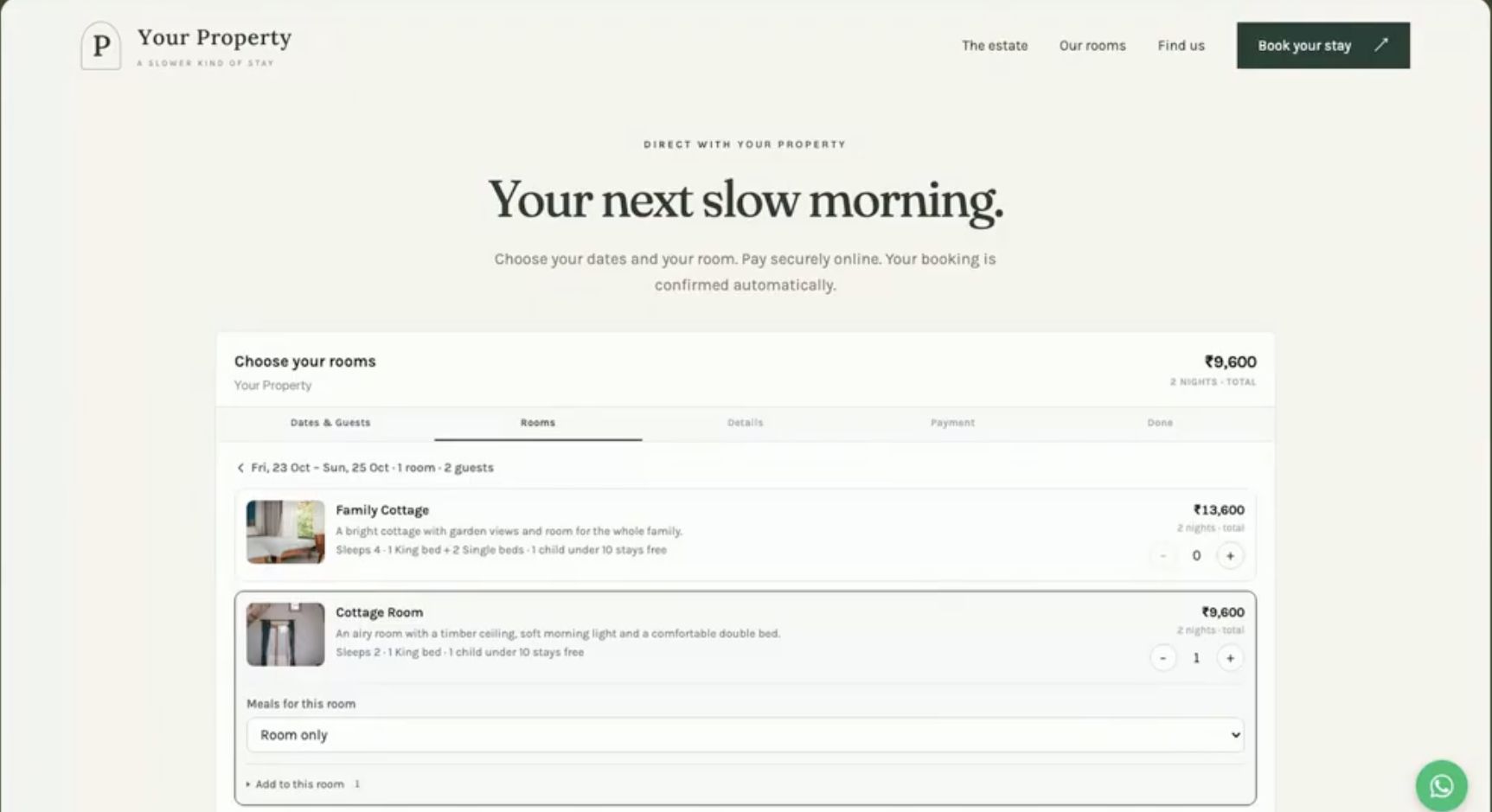
ON YOUR OWN WEBSITE
Your rooms.
Your booking flow.
Let guests choose dates and rooms without leaving your website. Show the price, collect guest details and take payment under your configured policy.
FROM ENQUIRY TO ARRIVAL
The work between a question and a stay.
A connected reservation system for independent hotels, resorts, homestays and BnBs.
Availability and bookings
See your occupancy calendar, add manual reservations and manage arrivals from the owner dashboard.
Conversational replies
Let the assistant use your rooms, rates, policies and knowledge base. Choose when it responds and step in yourself when needed.
Payment choices
Use direct UPI with manual verification or connect Razorpay for automatic payment confirmation. Collect full payment, an advance or payment at the property.
Rates and discounts
Configure room types, rate plans and seasonal prices. Keep any AI rate negotiation within the discount limits you approve.
Guest ID records
Request guest ID details on WhatsApp, keep guest records and flag Form C requirements. Your property handles required submissions.
Team and reports
Follow reservations, booked revenue and occupancy. Staff roles and multiple-property tools depend on your chosen plan.
Outgoing WhatsApp messages use prepaid credits and stop when the balance reaches zero. Gateway fees and applicable taxes are separate from your OpenStays subscription.
OWNER CONTROL
Make it yours before it answers.
Your assistant works with the information you give it. Your dashboard keeps the booking details available to your team.
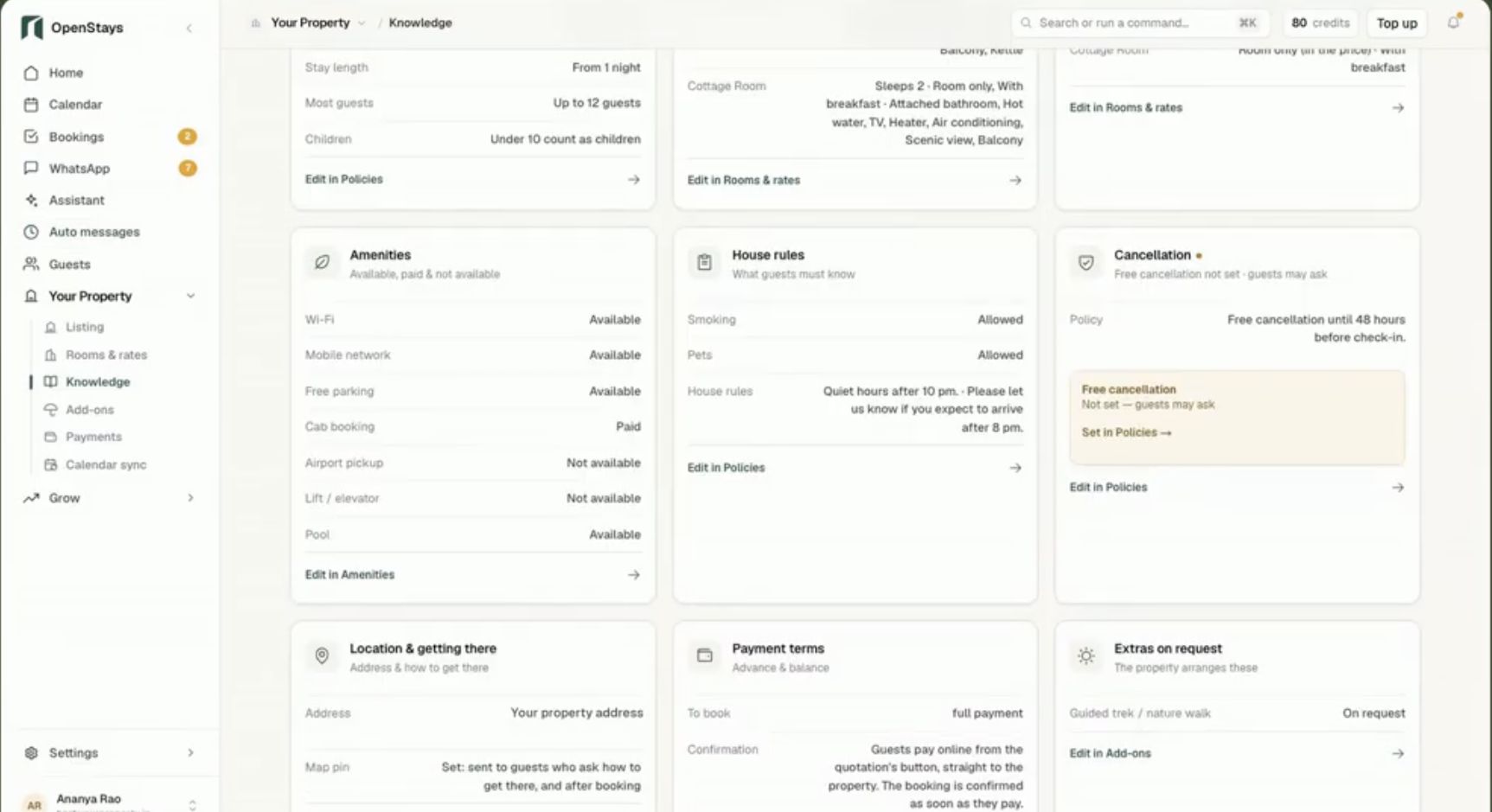
Your property knowledge
Add amenities, check-in details, food options and local tips. Update the knowledge base when your property details change.
Your confirmation rules
Confirm automatically after successful payment through a supported gateway or review and confirm manually after verifying direct UPI receipt.
PROPERTY KNOWLEDGE
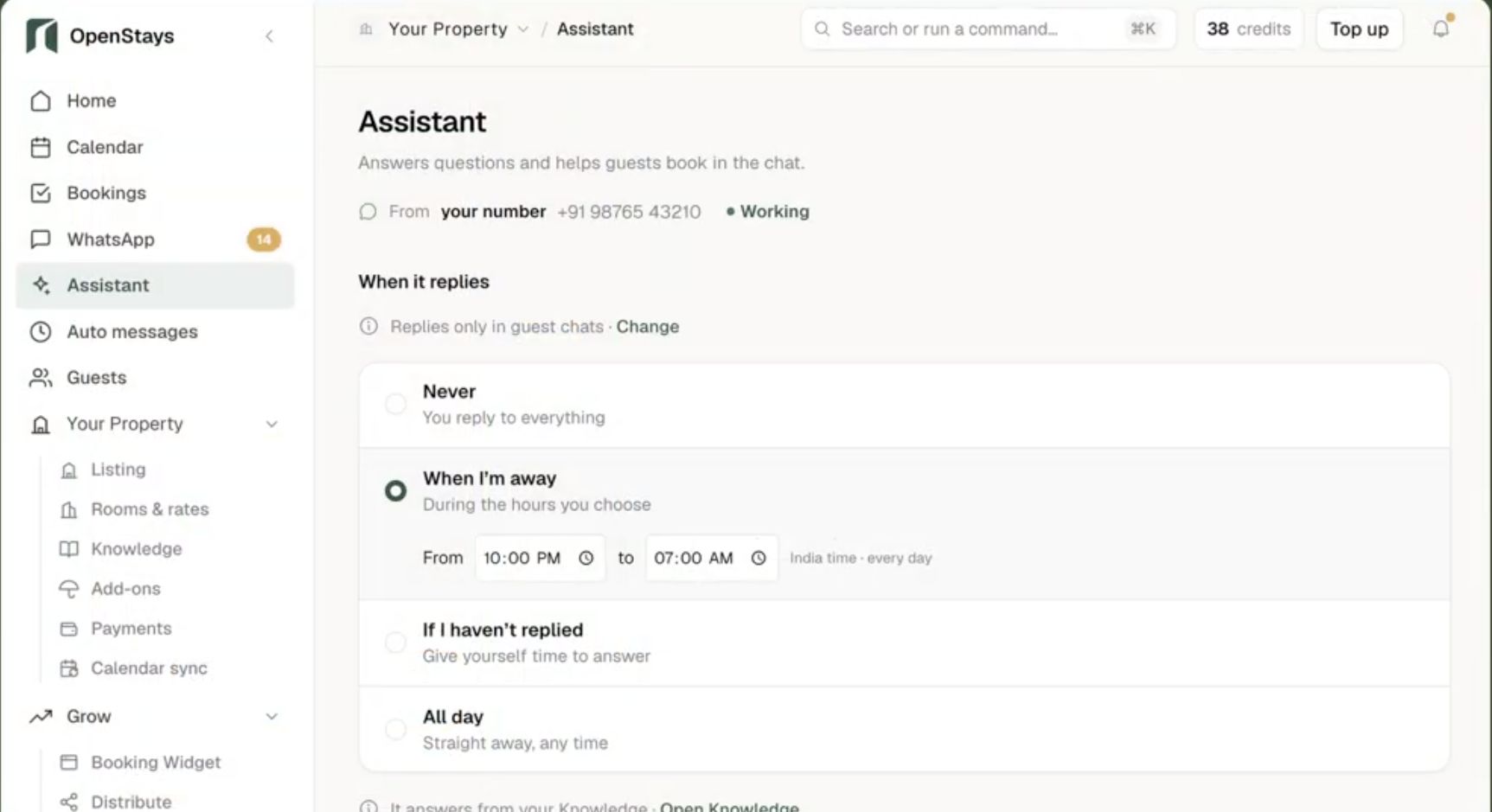
YOU CHOOSE WHEN
Your schedule.
Your WhatsApp.
Let the assistant reply during the hours you choose, after a reply delay or throughout the day. Use the mode that fits the way your team works.
With eligible coexistence, you can keep using the WhatsApp Business app and reply from your phone.
WHATSAPP / REPLY SCHEDULE
SEE IT IN ACTION
Set up around the way you work.
Use the walkthrough to prepare your listing, payments and booking settings. Provider verification and a complete property setup can take longer than the initial listing.
OPENSTAYS / PRODUCT OVERVIEW
Your website.
Your WhatsApp.
One booking system.
Automatic confirmation depends on a supported payment gateway and your configuration. Direct UPI needs manual verification. iCal shares blocked dates periodically, does not sync rates and cannot guarantee that double bookings will never occur. See iCal limitations →
Add your property
Enter rooms, photographs, rates and house rules. Review the listing page and checkout before sharing them.
Choose your collection method
Set your receiving UPI ID for manual verification or complete the supported gateway setup. Define your advance and balance policy.
Prepare your conversations
Review the knowledge base, connect an eligible WhatsApp number and choose the reply schedule. Send a sample enquiry before inviting guests.
BUILT FOR YOUR PROPERTY
From a few rooms to multiple properties.
Homestays and BnBs
Keep a small property organised while you host guests. Use your website or listing page for direct bookings and WhatsApp for everyday questions.
Hotels and resorts
Work with multiple room types, seasonal rates and staff roles. Give your front desk one place to manage reservations and guest records.
Groups and chains
Bring multiple properties into one account. Review group-level reporting, staff access and plan-specific controls with our team.
Room limits, staff access and support vary by plan. Compare plans and included features →
EXPLORE THE PRODUCT
Find the feature you need.
Direct bookings
WhatsApp conversations
Guest experience
Rooms and rates
Property operations
Voice AI, Google Free Booking Links and mobile apps are planned. They are not included as available features in the walkthrough above.
PRODUCT HELP
Before you get started.
Do I need my own website?
No. You can use your listing page on OpenStays.in. If you have a website, embed the booking widget so guests can book there too.
What does a small property get?
The Small plan covers up to six rooms with the booking engine, unlimited reservations, guest ID storage, the owner dashboard and email support. See the pricing page for current prices and plan conditions.
Does OpenStays charge booking commission?
OpenStays charges 0% booking commission. Your annual subscription, optional usage charges, payment-provider fees and applicable taxes are separate. Voice AI is planned and its pricing will be shown before activation.
How are guest payments and confirmation handled?
Choose direct UPI with manual verification or a supported gateway such as Razorpay for automatic confirmation after successful payment. Gateway fees and settlement terms apply. OpenStays does not hold guest funds. Your property issues accommodation invoices in its own name.
Can I keep using the WhatsApp Business app?
Yes, with eligible WhatsApp Business app coexistence. The assistant and your team use the connected number and your team can continue replying in the app. Account eligibility and provider setup requirements apply. See how coexistence works.
What happens if WhatsApp credits run out?
OpenStays cannot send outgoing WhatsApp messages when your credit balance reaches zero. This includes AI replies and automated guest messages. Top up to resume sending. Incoming messages do not use credits.
Can I continue using other booking channels?
Yes. Compatible channels can share blocked dates through iCal calendar sync. It is periodic, does not sync rates and cannot guarantee that conflicting bookings will never happen during refresh delays.
How long does setup take?
Start by adding your rooms, photos, rates and policies. Complete setup depends on your property details, payment-provider verification and WhatsApp configuration. Review the guest checkout and send a sample enquiry before sharing your booking link.
How does OpenStays help with guest ID records?
Collect guest ID details on WhatsApp, maintain guest records and use Form C flags and register exports. These tools support your process. Your property remains responsible for required checks and submissions. See guest ID guidance.
How should I manage guest ID data?
Limit staff access to the people who need guest records and follow your property’s applicable collection and retention requirements. See the Privacy Policy for how OpenStays handles personal information. Contact us if your property needs further details before uploading guest documents.
Can a guest’s AI agent make a direct booking?
OpenStays supports agentic booking through your embedded website booking engine and OpenStays.in. Availability, quotes and booking choices follow your configured property rules. See the AI agent bookings page for the process.
What if I need help?
Small and Medium plans include email support. Enterprise includes WhatsApp support and onboarding assistance. Optional scheduled support calls and assisted services are listed on the pricing page. Contact our team to discuss your setup.
Take bookings on your own terms.
Bring your rooms, rates and guest conversations into one system. Start with your property details or talk through your setup with our team.