
FOR HOMESTAYS, HOTELS & RESORTS
Online hotel reservations
A booking is not finished the moment a guest pays. It is pending, then confirmed, then checked in, then checked out and sometimes modified, cancelled or a no-show along the way. An online hotel reservation system is what tracks that whole lifecycle, for every booking, regardless of whether it arrived through an OTA, WhatsApp, your own booking link, or a phone call.
Built by property owners for property owners · 0% commission · Core feature, live today
ILLUSTRATIVE FEATURE OVERVIEW
Reservation journey
Enquiry
Capture the guest’s stay requirements
Quote
Share the room and rate
Payment
Follow your confirmation workflow
Stay
Keep the guest and booking details linked
From first enquiry to check-out
What happens to a booking after it is made
The direct booking engine handles the transaction and the reservations dashboard shows today’s snapshot. This page covers the record underneath both of them: one reservation, one status, from the moment it is made to the moment the guest checks out.
What follows covers what an online hotel reservation system needs to track beyond the initial booking, what most properties are doing instead, how OpenStays keeps one canonical record per reservation across every channel and how to evaluate any reservation system you are considering, OpenStays included.
A booking rarely stays exactly as it was made. A guest asks to move their dates by a day. A payment comes in as a partial advance and needs chasing for the balance. A guest simply does not show up and the room needs to be released for someone else. A stay that was booked for two nights gets cut short or extended at the front desk.
Most properties handle each of these as a one off conversation rather than a status change in a system. A cancellation gets noted verbally to whoever is at the desk that day. A modified date gets scribbled over the old one in a notebook. A no-show is discovered only when the guest never arrives and nobody thought to check whether the room should have been released earlier.
The booking itself, whether it came from an OTA, a WhatsApp conversation, or a booking link, is usually well recorded at the moment it happens. What tends to fall apart is everything after that moment, the sequence of small changes a reservation goes through on its way to an actual stay, because there is no single place tracking where a given booking currently stands.
An online hotel reservation system exists to close that gap, not by capturing the booking better, but by tracking what happens to it afterward, consistently, regardless of which channel it came from or which staff member is on shift when something changes.
The gap tends to widen with scale in an odd way. A single owner handling every booking personally can hold the whole lifecycle in their head, even if imperfectly, because they were there for the original conversation. The moment a second person, a co-owner, a manager, a relative helping out on weekends, starts touching reservations too, that shared memory stops being reliable and the property needs something outside anyone’s head to hold the current status of each booking.
The same gap shows up across channels, not just across people. A booking made on an OTA, one taken over WhatsApp and one confirmed by phone can each end up tracked a different way, on a different list, updated by whoever happens to be handling that channel that day. By the time a guest’s plans change, nobody can say for certain which version of the booking is the current one.
What an untracked reservation lifecycle actually costs
A cancellation nobody records anywhere formal leaves a room looking booked when it is actually free, which either turns away a guest who could have taken it, or gets discovered too late to sell it at all for that night.
A no-show that nobody flags stays occupying a room on paper long after it should have been released, the same problem in a different disguise, quietly costing a night of revenue that could have gone to someone else.
A date change relayed verbally between shifts, front desk to front desk, is exactly the kind of detail that gets lost in a handover, resulting in a guest arriving on a date the system still shows as someone else’s booking, or a room held empty for dates nobody is actually arriving on anymore.
A partial payment with no tracking of what is still owed becomes an awkward conversation at checkout, or worse, a balance that never gets collected because nobody was tracking that it was still due.
None of these individually sinks a property. Across a season of bookings, a percentage of which will always be modified, cancelled, or no-shows, the properties without a system tracking these changes lose a slow, steady trickle of revenue and spend real time on confusion that a clear status per reservation would have prevented.
There is also a trust cost that is harder to put a number on. A guest who calls to confirm a modified date and gets told the property has no record of the change loses confidence fast and a guest who arrives to find their room was released as a no-show when they were simply running late has every right to be frustrated. A reservation system that tracks status accurately is also, quietly, a guest experience feature, not just an operational one.
There is a reconciliation cost as well, one that lands squarely on whoever does the books. Matching OTA payouts against what was actually charged, or figuring out which of last month’s bookings were genuinely no-shows versus simply never updated, turns into hours of manual cross-checking every time it is left to memory and scattered notes instead of one consistent record.
What an online hotel reservation system actually tracks
Every reservation on OpenStays carries a status and that status moves through a defined sequence: pending, confirmed, checked in, checked out, with cancelled and no-show as the two paths a reservation can branch into instead of completing normally.
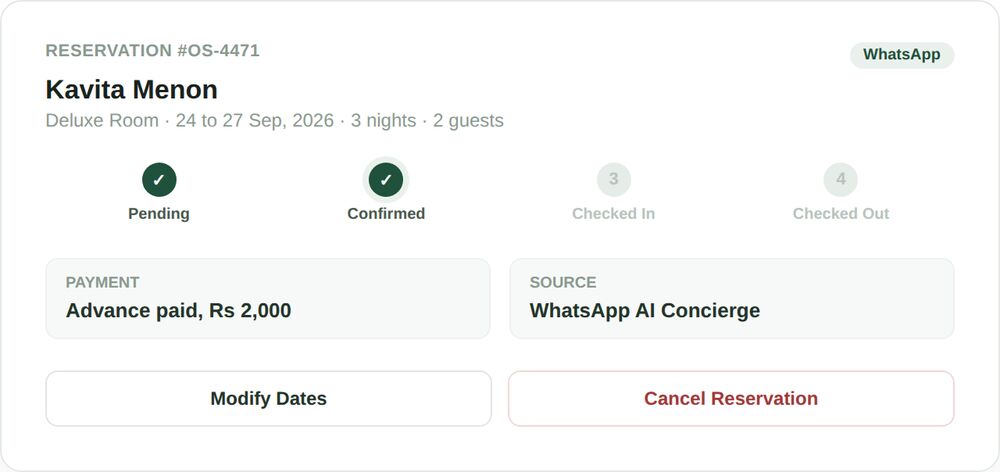
A booking starts as pending the moment a guest begins checkout, before payment is verified. It becomes confirmed once payment clears, whether that is instant through a gateway or manual once a UPI transfer is verified. It becomes checked in when the guest actually arrives and checked out when they leave, both of which a staff member marks with a tap rather than a note on paper.
A reservation can be modified at any point before checkout, a date change, a room change, an added guest and the record keeps a clear picture of its current details rather than a crossed out original booking. A cancellation similarly moves a reservation to a distinct status rather than deleting it, so the property still has a record of what was booked and why it did not happen.
Because every reservation, regardless of source, writes to this same status system, a WhatsApp booking, an OTA booking synced through channel management and a manually entered phone booking all look identical from this point forward: one record, one current status, one place to check it.
The status also carries a short history rather than just a current state. A reservation that was modified twice before check-in still shows what it originally was and what it became, so a question about what a guest actually agreed to is answered by the record itself instead of by whoever happens to remember the conversation.
Every reservation, every channel, one list
One record regardless of source
A booking made through the direct booking engine, the WhatsApp AI concierge, a synced OTA, or entered manually for a walk-in, all become the same kind of reservation record with the same status system applied.
Status changes staff can actually see
A cancelled, modified or no-show reservation is visible as a status on the same list every other reservation appears on, not a note that lives in someone’s memory or a separate spreadsheet.
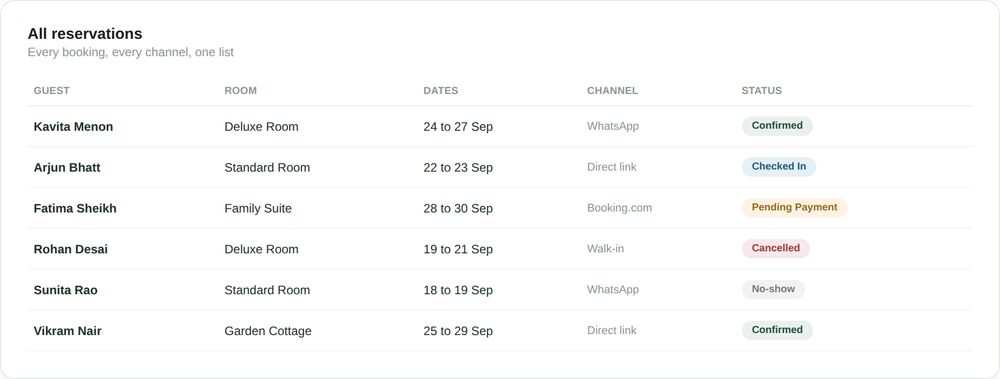
The list view exists precisely because a property rarely needs to think about just one reservation at a time. Filtering by status, everything pending payment, everything checked in today, everything cancelled this week, turns a question that used to require checking several places into a glance at one screen.
The stages a reservation actually moves through
Understanding the stages matters because each one is a point where something can go wrong if nobody is tracking it and a point where a small, deliberate action prevents that.
Pending to confirmed
A reservation sits as pending while payment is being completed or verified. It becomes confirmed the moment that payment clears, automatically for gateway payments, with one tap once a manual UPI transfer is checked against a bank alert.
Modified
Dates, room type or guest count can change after a reservation is confirmed. Each modification updates the same record rather than creating a second, conflicting one, so the calendar and the guest’s actual stay always agree.
Checked in to checked out
A staff member marks a reservation checked in on arrival and checked out on departure, both a single tap from the same record, giving an accurate, real time picture of who is actually on the property right now.
Cancelled or no-show
A guest who cancels or never arrives moves the reservation to a distinct status instead of leaving it looking active, freeing the room for someone else and keeping an honest record of what did not happen and why.
SEE IT IN ACTION
A homestay in Kodaikanal catches a no-show before it costs a night
Meena runs a five room homestay and used to lose track of bookings that simply did not show up, discovering it only when a guest called two hours after check in time asking where their room was, because the room they wanted no longer existed as available.
With reservation status tracking on, a booking that has not been checked in by a set point in the evening is flagged clearly on her list rather than sitting silently as confirmed. She can call the guest to confirm and if there is no answer, mark the reservation a no-show and release the room while there is still time to sell it to someone else that same night.
Over a few months, this alone recovers several room nights that would previously have sat empty on paper as booked while actually earning nothing. Meena also started noticing a pattern she had never had the visibility to see before, most of her no-shows were unpaid, pending bookings rather than confirmed, paid ones, which led her to tighten her advance policy for last minute requests specifically.
A twelve room hotel in Manali handles a wave of date changes calmly
Sanjay’s hotel got hit with an unseasonal weather warning that led to a dozen guests messaging within a day to shift their dates by a few days each. Previously this meant a dozen manual notes and a genuine risk of losing track of which booking now belonged to which new dates.
Each guest’s reservation gets modified directly on its existing record, new dates, same booking, same guest history, rather than creating a fresh entry that has to be manually reconciled with the old one. The occupancy calendar reflects every change instantly and by the end of the day Sanjay has a clear, accurate picture of exactly who is now arriving when, with nothing lost in the shuffle.
What struck him most was how uneventful it felt afterward. A dozen date changes in a single day would previously have meant a stressful evening cross checking a notebook against the calendar to make sure nothing had been double booked in the confusion. Instead, each modification simply updated its own reservation and the calendar caught up automatically.
A resort in alibaug reconciles OTA and direct bookings without duplicating work
Nikhil’s resort takes bookings through two OTAs alongside direct WhatsApp and website bookings. Before switching to a single reservation system, keeping straight which OTA booking had already checked in, which had cancelled and which direct bookings overlapped with them meant checking three different places every morning.
With OTA bookings synced through channel management into the same reservation system, every booking, regardless of where the guest actually found the resort, shows up on the same list with the same status options. A cancellation on the OTA side updates the same record channel management created, rather than needing anyone to notice and manually cross it off a separate list.
The morning routine changed the most. What used to be twenty minutes cross referencing two OTA extranets against a front desk notebook is now one list, filtered to today’s arrivals, regardless of which channel each guest actually booked through. Nikhil now spends that saved time on the property instead of on reconciliation.
Mistakes that come from tracking reservations informally
- Treating a cancellation as a conversation rather than a status change, so the room still looks booked to anyone not part of that conversation.
- Never marking no-shows, leaving rooms tied up on paper long after they should have been released back into inventory.
- Writing a modified date over the original in a notebook, losing any record of what the booking actually was before it changed.
- Relying on shift handovers to relay reservation changes verbally, which works until the one day it does not, usually the busiest one.
- Not distinguishing a pending, unpaid booking from a confirmed one, so unpaid holds quietly block rooms a paying guest could have taken.
- Keeping OTA reservations and direct reservations on separate lists that are never actually reconciled against each other.
- Marking a booking as cancelled in one place, a notebook or a private chat, while the calendar and the accounting still show it as active weeks later.
Each of these is a small, human mistake, not a failure of effort and each one is exactly what a reservation status that everyone can see is built to prevent. What they share is that none of them are visible until they cause a problem, a double booking, a guest calling about a change nobody recorded, a room sitting empty that should have been resold, which is exactly why they are worth fixing structurally rather than through more careful note taking.
One system, every booking channel
A reservation created by the direct booking engine, quoted and confirmed by the WhatsApp AI concierge, synced in from an OTA through channel management, or entered manually for a phone or walk-in guest, all land in the same reservation system with the same status options and the same list to check.
This matters most exactly when a property is busiest and least able to afford confusion, a festival weekend with bookings arriving from every direction at once. One system tracking every one of them the same way is what keeps that weekend manageable instead of chaotic.
It also means a status change only has to happen once. Marking a booking as a no-show or a modification updates the same record the dashboard reads, the calendar checks and the accounting eventually reconciles against, rather than needing to be repeated by hand in three different places by three different people.
How this fits with the rest of OpenStays
This is the record underneath the rest of the stack. The direct booking engine creates a reservation the moment a guest pays and this system is what tracks it from there. The reservations dashboard reads today’s arrivals and pending requests directly from these same records.
The occupancy calendar reflects a reservation’s status too, a cancelled or no-show booking frees the room on the calendar the moment its status changes. And the full OpenStays stack ties all of these pieces, along with room and rate setup, guest ID and WhatsApp automation, into one connected account.
Tracking reservation status vs. The alternatives
| Online reservation system | Verbal handover | Separate notebook or spreadsheet | |
|---|---|---|---|
| Cancellations reflected immediately | Yes, one status change | Only if remembered and relayed | Only if someone updates it |
| No-shows flagged automatically | Yes, visible on the list | No | No |
| Modified bookings keep one clean record | Yes | No, easy to lose the original | Depends on discipline |
| Works the same across every booking channel | Yes | Not really, informal by nature | Only if manually reconciled |
| Visible to every staff member at once | Yes | Depends who was told | Only if shared and current |
| Risk of a room looking booked when it is free | Low | High | Moderate, depends on updates |
A verbal handover costs nothing and works fine for a single owner running one or two rooms who is always the one person handling every change personally. It stops working the moment more than one person needs to know a reservation’s current status, which for most growing properties happens sooner than expected.
A shared spreadsheet is a real improvement over pure memory, but it depends entirely on someone remembering to update it every time something changes, with no automatic link back to the booking engine or the calendar that would keep it honest on its own.
The honest trade off is that a connected reservation system asks for nothing extra from staff beyond what they would do anyway, checking guests in, noting a cancellation, confirming a date change. The difference is that each of those actions updates a shared record automatically instead of living only in whoever happened to be at the desk that moment.
SETUP
Getting reservation status tracking working for you
There is nothing separate to set up. Reservation status tracking is active the moment your booking engine and dashboard are and works itself into daily use within the first week.
Reservation status tracking is active from day one and becomes daily habit within a week.
1. Check the pending list each morning
Anything sitting as pending overnight, usually an unpaid or unverified booking, is worth a quick look before it either confirms or needs a nudge.
2. Mark check-ins and check-outs as they happen
A tap at arrival and departure keeps the status accurate for anyone else checking the same reservation later that day.
3. Flag no-shows instead of leaving them confirmed
A guest who has not arrived by a sensible cutoff should be marked a no-show so the room can be released rather than sitting unsold.
4. Modify a booking on its existing record, not a new one
A date or room change should update the reservation directly, keeping one clean history instead of two records that need reconciling.
5. Review cancelled and no-show reservations weekly
A quick look at what did not go as planned each week surfaces patterns worth addressing, a channel with more no-shows than others, for example.
BEFORE YOU CHOOSE
What to check in any online hotel reservation system
- Does every booking channel write to the same reservation record, or does each channel keep its own separate list?
- Can a reservation be modified without losing the original booking details, or does a change create a confusing duplicate?
- Is there a clear way to flag and act on a no-show, or does an unconfirmed arrival just sit there indefinitely?
- Does cancelling a reservation immediately free the room on the calendar, or does that require a separate manual step?
- Can more than one staff member see a reservation’s current status at the same time, or does it depend on one person’s memory?
- Is the reservation history preserved after a cancellation, or does the record disappear entirely along with any useful context?
This applies whether or not you choose OpenStays. Worth checking against any reservations dashboard or direct booking engine you are already evaluating, since a reservation system is only as useful as the status tracking underneath it.
Who can see and change reservation status
Reservation records sit behind your OpenStays login, with access that can typically be limited to specific staff members rather than a single shared password everyone uses.
A status change, a check-in, a cancellation, a modified date, is reflected the moment it is saved, visible to anyone else logged in without needing to be relayed by message or found out the hard way at the front desk.
Cancelled and no-show reservations remain in the record rather than disappearing, so a property can look back at what happened and why, useful both for spotting patterns and for resolving any dispute about what was actually booked.
QUESTIONS
Frequently asked questions
What is an online hotel reservation system?
An online hotel reservation system tracks a booking through its full lifecycle, pending, confirmed, checked in, checked out, or cancelled and no-show, for every reservation regardless of which channel it came from.
How is this different from the direct booking engine?
The direct booking engine is the guest facing checkout that creates a reservation. The reservation system is what tracks that reservation’s status afterward, through modifications, check-in, check-out or cancellation.
How is this different from the reservations dashboard?
The dashboard is a daily snapshot, today’s arrivals and pending requests. The reservation system is the underlying record the dashboard reads from, tracking one specific booking’s status over its full lifecycle.
Does a cancelled reservation get deleted?
No. It moves to a cancelled status and stays in your records, so you retain a history of what was booked even though the stay did not happen.
How do I mark a guest as a no-show?
A reservation that has not been checked in by your chosen cutoff can be marked a no-show with one action, which frees the room and keeps an accurate record for later review.
Can I change a guest’s dates after the booking is confirmed?
Yes, a modification updates the same reservation record with the new details, rather than creating a second, separate booking that needs to be reconciled with the first.
Do OTA bookings show up in the same reservation system?
Yes, once connected through channel management, OTA bookings sync into the same list with the same status options as direct and WhatsApp bookings.
What happens if a guest pays only a partial advance?
The reservation reflects the amount paid and what remains due, so the balance is visible on the record rather than tracked separately or forgotten.
Can more than one staff member update reservation status?
Yes, any staff member with dashboard access can update a reservation’s status and the change is visible to everyone else immediately.
Does checking a guest in or out require special training?
No, marking a reservation checked in or checked out is a single action from the reservation record, no more complex than any other status update.
Is there a limit to how many reservations the system can track?
No practical limit, from a handful of bookings a month to a resort managing dozens of reservations at once.
What happens to reservation history over time?
Past reservations, including cancelled and no-show ones, remain accessible for review rather than being cleared out automatically.
Does this replace the occupancy calendar?
No, they work together. A reservation’s status change, a cancellation or a no-show, is what causes the room to show as free on the occupancy calendar.
Can a guest modify their own reservation, or only staff?
Guests can request changes through WhatsApp or by contacting the property and staff apply the modification to the reservation record. There is no separate guest self-service portal.
Is reservation status tracking included in the base OpenStays plan?
Yes, it is part of the core platform rather than a separate add on. Current plan details are on the pricing page.
How quickly does a status change reflect elsewhere, like the calendar?
Immediately. A status change saved on a reservation is reflected on the occupancy calendar and dashboard the moment it happens, with no delay or manual refresh needed.
What if I need to undo a cancellation by mistake?
A cancelled reservation’s details remain intact in the record, so restoring it to confirmed status is straightforward rather than needing to recreate the booking from scratch.
What changes in the first month
The most immediate change is that a cancelled or no-show booking stops silently occupying a room. Within the first week or two, staff get into the habit of checking the pending list each morning and marking arrivals and departures as they happen.
By the second or third week, a modified booking stops being a source of confusion, since there is one record per reservation that reflects its current details rather than a crossed out original and a note somewhere else.
Reconciling OTA bookings against direct ones, previously a daily exercise in checking two or three separate lists, becomes a non issue once every channel writes to the same reservation system.
None of this changes how a property fundamentally operates. What changes is that a reservation’s status is finally something anyone can check in one place, rather than something only whoever handled that particular booking happens to remember.
Who an online hotel reservation system actually helps
Properties taking bookings through more than one channel, OTAs alongside WhatsApp and a direct link, benefit most from one system reconciling all of them automatically instead of checking each channel separately.
Properties with more than one staff member benefit from a reservation’s status being visible to everyone at once, removing the dependency on whichever person originally handled that booking remembering the details.
Properties that see a meaningful share of cancellations, date changes or no-shows, common at homestays and resorts with flexible booking patterns, benefit from those changes being tracked as status updates rather than lost in conversation.
Any property already using the direct booking engine or the reservations dashboard gets more accurate results from both once the reservation status underneath them is being tracked properly.
Owners who are simply tired of being the single point of failure for every booking detail tend to notice the difference fastest. Once status lives in the system rather than in one person’s memory, stepping away for a day, a weekend, or a proper holiday stops meaning every reservation question waits until they are back.
Every reservation, tracked from booking to checkout.
An online hotel reservation system on OpenStays runs on the same account as your booking engine, WhatsApp concierge and occupancy calendar. Nothing new to install.