WhatsApp Coexistence

FOR HOMESTAYS, HOTELS & RESORTS

Keep Your WhatsApp Number. Add Real Automation.

WhatsApp coexistence lets your property run the ordinary WhatsApp Business app and OpenStays’ automation on the exact same number at the same time, so nothing about the number guests already message, save, and trust has to change.

No new number to announce. No lost chat history. No starting over with guests who already know you.

Set up once during onboarding. Your existing number, contacts and recent conversations carry straight through.

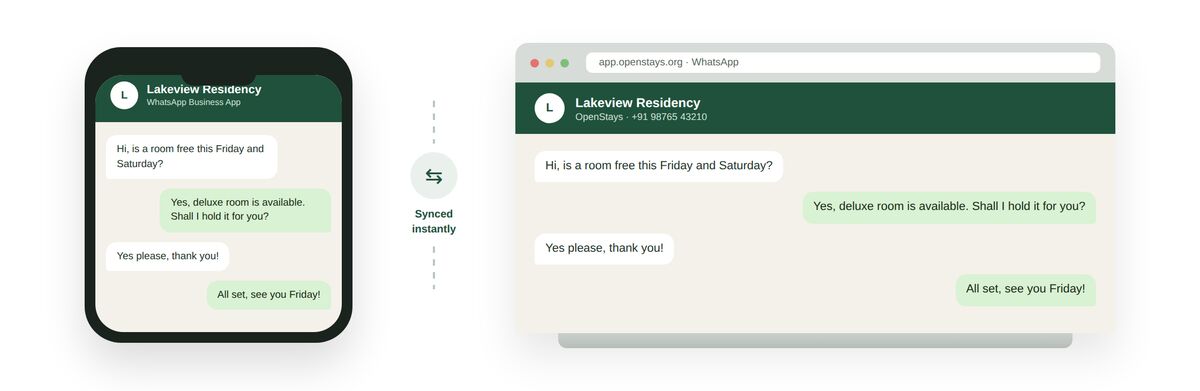
The same WhatsApp conversation showing side by side on a phone running the WhatsApp Business app and on a laptop browser running OpenStays, synced instantly on the same number

The same conversation, live on the phone and on the web at once, on the one number your property already uses.

What happens without WhatsApp coexistence

For years, a property that wanted to automate WhatsApp faced a genuinely unpleasant choice. Keep the free WhatsApp Business app, answer every enquiry by hand, and stay limited to whatever one person or a small team could manage. Or move to the WhatsApp Business API for real automation, and in doing so, give up the number guests already had saved, start over with a fresh business profile, and lose every conversation that came before.

That second option was rarely a real option at all. A property that has been on the same WhatsApp number for years has hundreds or thousands of guests with that number saved in their phone, past guests who might message again next season, repeat visitors who expect to be recognised, and a number printed on signage, a Google listing, and old booking confirmations that cannot simply be reprinted overnight.

Losing that number to gain automation meant losing the very thing automation was supposed to protect, the relationship with the guest. A guest who messages an old, familiar number and gets no reply, or is quietly redirected to an unfamiliar new one, does not read that as an upgrade. It reads as the property having changed, or worse, having shut down.

Without coexistence, properties were stuck choosing between two incomplete options. Stay small and manual forever, replying to every enquiry personally regardless of how much the business grows. Or accept a genuinely disruptive migration, new number, new QR codes, new signage, a guest facing message explaining the change, and the very real risk that a share of guests simply never notice and never message again.

Some properties tried to split the difference by running a second WhatsApp number for automation alongside the original number for manual replies. That fixed nothing, it just meant two numbers to check, two places a guest might message, and a genuine chance that a guest who happened to message the old number never got an automated reply at all, while staff wondered why the automation seemed to be missing enquiries.

The underlying problem was never that automation was a bad idea. Properties wanted faster replies, especially outside staffed hours, without wanting to gamble years of accumulated guest trust and a phone number that had become part of how the property is actually found and remembered.

This is exactly the gap coexistence closes, and it is worth understanding properly, because the old trade-off between keeping your number and getting automation genuinely does not exist anymore, even though plenty of hosts have not yet heard that it changed.

Word of this change has spread unevenly. A host who follows WhatsApp platform updates closely, or whose current provider happened to send a clear announcement, may already know. A host who does not follow that kind of news, which describes most property owners who are busy actually running a property, is often still making decisions based on a rule that quietly stopped applying some time ago.

What the old trade-off actually cost properties

The most direct cost was delayed automation. Properties that knew they needed faster WhatsApp replies put it off for months or years specifically because the only path they knew of meant a disruptive number change, and putting off automation meant continuing to lose enquiries to slow replies the whole time.

There was a cost in guests who simply never made the jump. Every old number that got quietly retired in favour of a new, automated one left behind a percentage of guests who never noticed the change, never received the message explaining it, and simply stopped hearing from the property, guests who represented real, if unmeasured, lost repeat business.

There was a cost in staff confusion during any migration that was attempted anyway. A front desk team used to one number, one chat list, one place to look for a guest conversation, suddenly had to check two numbers or relearn an entirely new one, exactly the kind of change that quietly increases the chance a message gets missed.

There was a cost in timing. Properties often discovered they needed automation right before a peak season, the exact moment a disruptive number migration is most dangerous to attempt, which meant either delaying automation past the season that needed it most, or risking a migration at the worst possible time.

There was a cost in the message itself. Even a well handled migration required telling every guest, past and present, that the number had changed, a message that, however carefully worded, introduces a moment of doubt about whether the business behind it is the same one they trusted before.

There was a reputational cost too, subtler but real. A property’s WhatsApp number, over years, becomes part of its identity in a guest’s phone, saved under the property’s name, referenced in old conversations, sometimes shared between friends planning a trip together. Changing it quietly erodes a small but genuine piece of brand recognition built up over years, for no reason connected to the guest experience itself.

None of this was really a cost of automation. It was a cost of how automation used to have to be adopted, bundled with a disruptive migration that had nothing to do with what automation itself actually does. This capability is what finally separates the two.

It is worth naming the scale of this properly. Across small hotels, homestays and resorts in India, the overwhelming majority of guest-facing WhatsApp numbers are still on the free app, not the API, precisely because the old migration cost felt too steep to justify against an automation benefit nobody could see yet. That is a very large number of properties who have effectively been paying the cost described above for years, without ever having made a conscious decision to accept it, simply by never getting to the point of weighing it at all.

What WhatsApp coexistence actually is

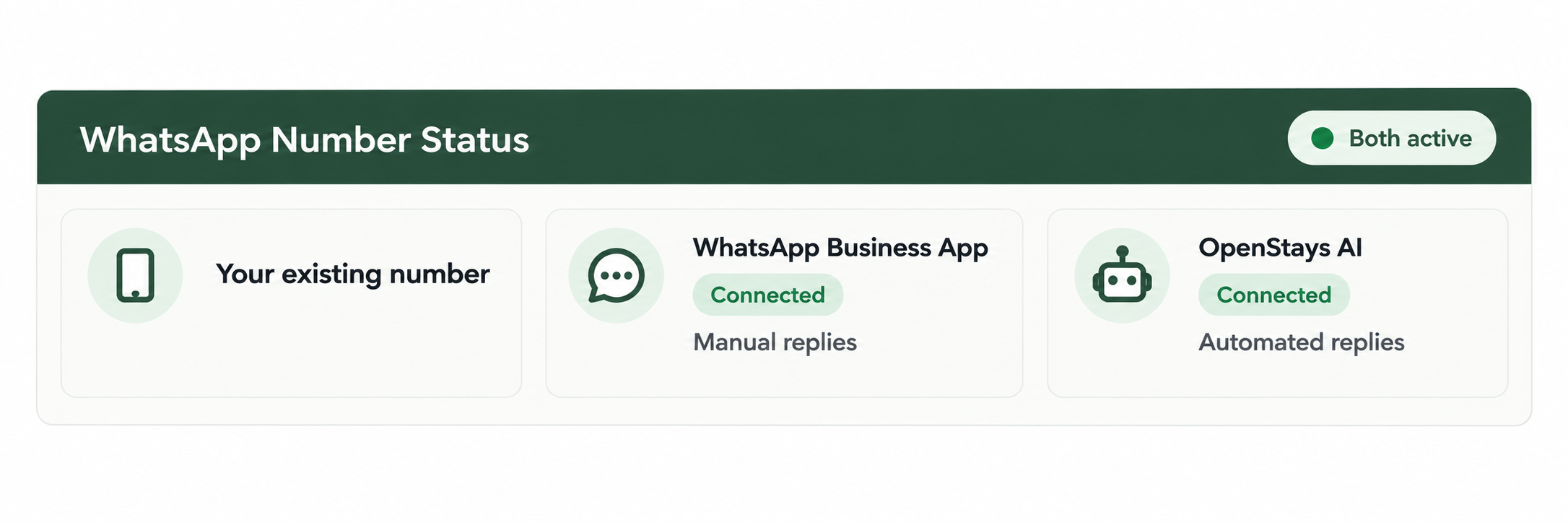
WhatsApp coexistence is a capability Meta added to the WhatsApp Business Platform that allows one phone number to be connected to both the ordinary WhatsApp Business app and the WhatsApp Business API, the automated version that software like OpenStays uses, at the same time. Both stay active on the same number simultaneously, rather than one replacing the other.

WhatsApp Number Status panel showing one connected number with both the WhatsApp Business App and OpenStays Automation via API connected simultaneously, with contacts synced and chat history carried over

One number, two connected channels. The app for manual replies, the API for automation, both live at once.

In practice, this means a property’s existing number keeps working exactly as it always has for manual conversations, front desk staff can still open the WhatsApp Business app, see the same chat list, and reply personally whenever they want to. At the same time, that same number gains the ability to send automated replies, quotes and confirmations through OpenStays, without a guest ever needing to know or care which side of the connection actually answered.

The number itself does not change. The business profile, the display name, the profile photo, all carry over exactly as they were. Contacts already saved on the number stay saved. Roughly the last six months of chat history syncs across, so a guest who messaged three months ago about a booking is not a stranger to the system the moment automation goes live.

This is different from every previous way of adding WhatsApp automation, which required either abandoning the app entirely in favour of the API, or running a second, separate number for automation. Coexistence means the choice between manual and automated finally stops being a choice about which number to use, and simply becomes a choice about which conversations get handled by a person and which get handled automatically.

How WhatsApp coexistence actually works

One number, two connected channels

The WhatsApp Business app and OpenStays’ automation both stay active on the same number, running side by side rather than one replacing the other.

Contacts and recent history carry over

Everyone already saved, and roughly the last six months of conversation, is there from the first day coexistence is switched on, nothing starts blank.

Nothing to migrate, nothing to announce

No new number, no new QR code, no message to send guests explaining a change, because from a guest’s side, nothing about the number has changed.

Staff keep the app they already know

Front desk can still open WhatsApp Business and reply personally any time they want, automation runs alongside that, not instead of it.

SEE IT IN ACTION

Whispering Pines Homestay switches on automation without switching numbers

Whispering Pines Homestay had been on the same WhatsApp number for four years, the number printed on their Instagram bio, saved by roughly two thousand past and prospective guests, and mentioned in dozens of old five star reviews. The owner wanted faster replies during the evening rush but had ruled out automation twice before, both times after learning it would mean a new number.

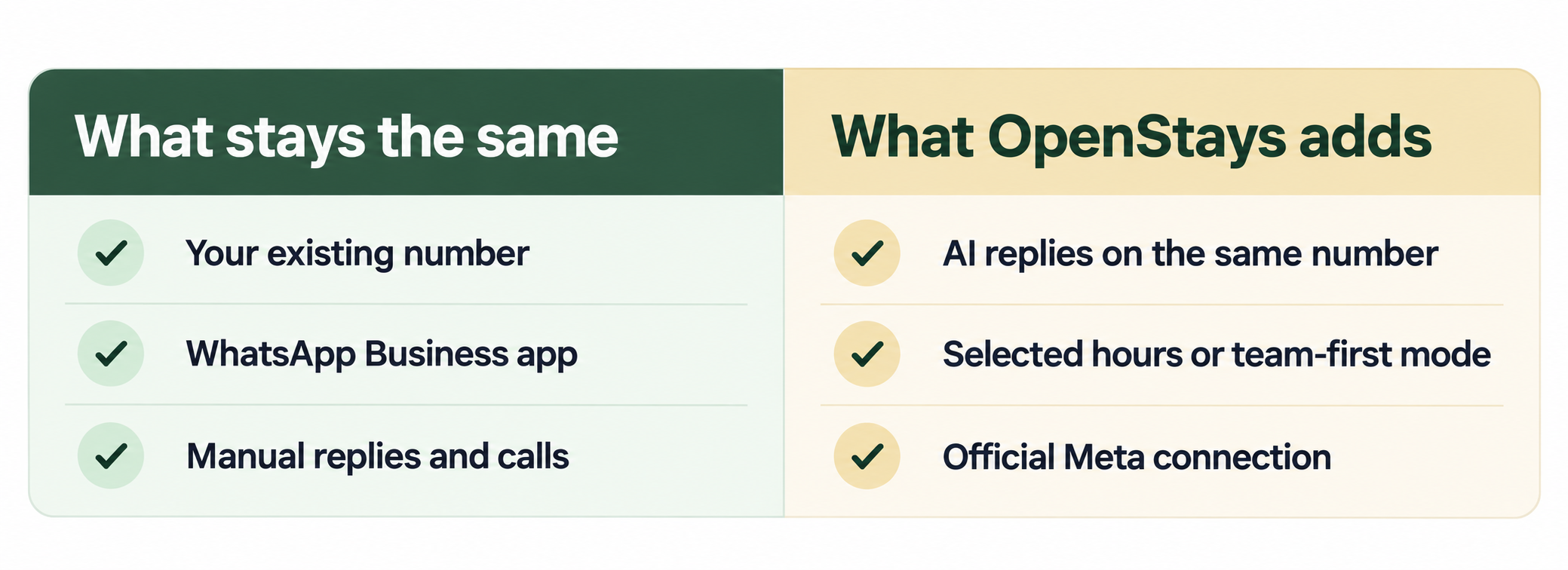
What Changes, What Doesn’t comparison panel showing existing number, contacts, chat history, manual replies and calls staying exactly the same, alongside what changes such as automated replies becoming possible and broadcast lists becoming read only

Everything guests already relied on stayed the same. What changed was what happened after hours.

During onboarding, OpenStays checked that the number qualified for coexistence and handled the technical connection directly, the owner did not touch an API console or manage a verification process personally. Within the same day, contacts and the last several months of chat history had synced across, and the WhatsApp Business app kept working exactly as before.

The very first test came that same evening. A guest messaged at 10 40pm asking about a weekend in November. Nobody was at the desk, but the automated reply went out within a minute, quoting the rate and asking for confirmation, on the exact same number the guest had messaged for two previous stays. The guest never noticed anything had changed, because nothing about the number had.

Two weeks in, the front desk still handled most daytime conversations personally, exactly as before, while automation quietly picked up the evening and early morning enquiries that used to simply wait until morning. The owner described it afterward as the update finally arriving without the disruption they had spent two years bracing for.

Mistakes properties make around this

  • Assuming automation still requires giving up the current number, and delaying automation for years based on outdated information.
  • Running a second WhatsApp number for automation, which splits conversations across two places instead of keeping everything on one.
  • Announcing a number change to guests that was never actually necessary, creating confusion for no real benefit.
  • Assuming every existing broadcast list keeps working exactly as before, without checking what specifically changes once coexistence is active.
  • Not testing the connection with a real conversation before relying on it, and finding out about an edge case during a busy weekend instead of a quiet Tuesday.
  • Believing coexistence requires technical setup the property has to manage itself, rather than letting the onboarding process handle it.

Almost all of these come from the old rule, that automation meant a new number, simply persisting in people’s minds after the rule itself stopped being true. Coexistence rolled out recently enough that plenty of experienced hosts genuinely have not heard it changed.

The other common mistake is treating coexistence as something that needs to be researched and configured independently before approaching a provider, when in a proper setup it is simply part of onboarding, handled the same way the underlying WhatsApp Business API connection itself is handled.

The same number, working the same way, every day

Once this connection is active, it does not need to be thought about again day to day. The app keeps working for manual replies exactly as it always has, and automation keeps running on the same number in the background, regardless of whether anyone at the property is paying attention to the fact that both are connected.

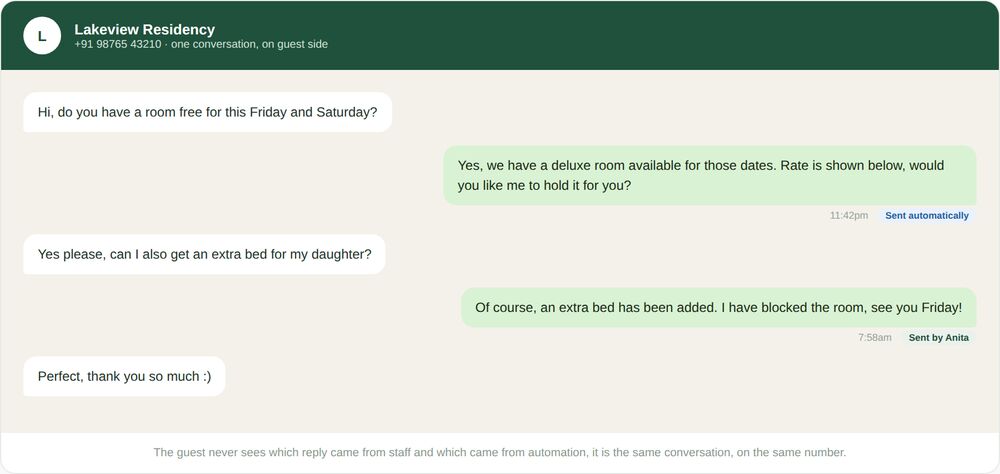
A single WhatsApp conversation on a guest’s phone, with one reply sent automatically and another sent manually by a staff member, both appearing as ordinary messages from the same property number

Same thread, same number. One reply came from Anita, one came from automation, the guest cannot tell which is which.

Nothing about it depends on staff remembering a new habit or checking a second inbox. A new hire at the front desk can be trained on the WhatsApp Business app exactly the way front desk staff have always been trained, since nothing about that side of the number changed, the automated side simply runs underneath without needing any explanation to do its job.

It holds up the same way whether a staff member replies to a guest personally or an automated quote goes out instead, both happen on the one number guests already know, and a guest cannot tell from their side which one is about to answer.

For a property running more than one location, each number keeps its own independent coexistence connection, so one property’s setup never affects another’s, and a manager overseeing several properties sees each number’s manual and automated activity kept cleanly separate.

This consistency is what makes coexistence something a property can trust rather than treat as a fragile workaround. It is a capability WhatsApp itself built and supports, not an unofficial trick that might stop working without warning.

Who this actually matters for

Any property currently on the free WhatsApp Business app that has been putting off automation specifically because of the number question is the most direct fit, coexistence removes the exact objection that was holding them back.

A property with a WhatsApp number that carries real history, years of saved guest contacts, a number printed on signage or a Google listing, a number woven into old reviews, benefits the most, since that is precisely the value a forced migration would have put at risk.

An owner who wants to test automation cautiously, rather than commit to it fully overnight, benefits from being able to let automation handle only after hours enquiries at first while staff keep answering personally during the day, all on the same number, with nothing to undo if the balance needs adjusting later.

A property that already tried WhatsApp automation once, years ago, and was put off by what a migration would have required, is worth revisiting the decision now specifically because the part that stopped them no longer applies.

A group managing more than one property benefits from being able to bring each number onto automation on its own timeline, without needing every location to migrate at once, since coexistence is set up per number, not as one disruptive change across an entire portfolio.

Front desk staff themselves benefit too, even though they are not the ones making the decision, because coexistence means their day to day tool, the WhatsApp Business app they already know, keeps working exactly the same, with automation simply picking up what they are not available to answer personally.

A property in the middle of comparing booking platforms benefits from asking about WhatsApp coexistence specifically, rather than assuming every option handles it the same way, since a platform that still requires a number change is, in effect, asking the property to pay a cost that better options no longer require at all.

How this fits with the rest of OpenStays

Coexistence is not a separate product, it is the connection underneath everything OpenStays does on WhatsApp. It is what lets the WhatsApp booking system quote and confirm bookings automatically and the AI WhatsApp concierge answer in-stay questions, all on the property’s existing number rather than a new one set up specifically for automation.

The same coexistence connection is what makes automated guest messaging possible without a second number to manage, and every enquiry it handles flows into the same enquiry pipeline as any other channel. OpenStays sets up and manages this connection during onboarding, your front desk never touches an API console or a verification process directly.

WhatsApp coexistence vs. the alternatives

Most properties are really comparing this against the two options that used to be the only ones available, stay on the free app manually forever, or migrate fully to the API and accept a new number.

Stay on the free app onlyMigrate fully to a new numberWhatsApp coexistence
Keep the existing, familiar numberYes, but no automationNo, a new number is requiredYes, automation on the same number
Contacts and chat history preservedYes, but nothing is automatedNo, migration starts freshYes, recent history carries over
Guests need to be told anything changedNo, but replies stay manual onlyYes, a disruptive announcementNo, nothing about the number changes
Automated replies outside staffed hoursNoYesYes
Staff keep using the app they knowYesNo, a new setup replaces itYes, alongside automation

THE PROCESS

How WhatsApp coexistence actually gets set up

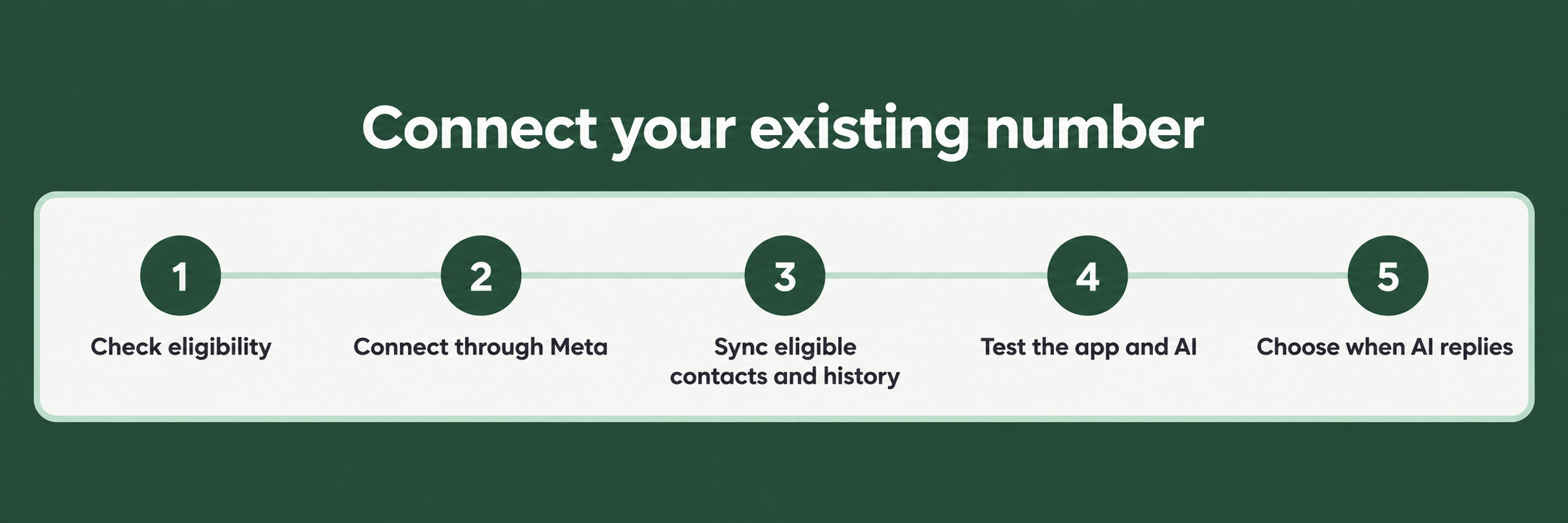
Five step timeline showing how coexistence gets set up, from checking the number qualifies during onboarding, to OpenStays making the connection, syncing contacts and history, the app continuing to work as before, and automation going live on the same number

Most of this happens the same day, and none of it requires a new number or a guest facing announcement.

How the WhatsApp Business app and the API are connected on the same existing number for a property on OpenStays.

Total Time: 10 minutes

OpenStays checks the number qualifies

During onboarding, OpenStays confirms the existing WhatsApp Business number is eligible for coexistence before starting anything, so there are no surprises partway through.

The connection is made from OpenStays’ side

OpenStays handles the technical connection between the number and its automation directly, nobody at the property manages an API console or a verification flow personally.

Contacts and recent history sync across

Saved contacts and roughly the last six months of chat history carry over automatically, so automation has real context from the very first conversation it handles.

The WhatsApp Business app keeps working

Front desk staff can keep using the app exactly as before, nothing about their day to day workflow needs to change unless the property wants it to.

Automation goes live on the same number

Once connected, OpenStays can start handling enquiries, quotes and confirmations automatically, on the number guests already have saved, with no announcement required.

What to check before assuming you need to migrate

  • Does the provider actually support running the app and the API together on one number, or do they still require a new number for automation?
  • Does contact and chat history genuinely carry over, or does automation start with no context about existing guests?
  • Does the WhatsApp Business app keep working normally afterward, for staff who want to reply personally?
  • Is the technical setup handled during onboarding, or does the property need to manage an API connection itself?
  • What specifically changes, broadcast lists, companion devices, group chats, and is that clearly explained upfront rather than discovered later?
  • Does this work the same way if the account covers more than one property number?

A provider that cannot answer these clearly, or that still talks about WhatsApp automation as something that requires a fresh number, is likely working from how things used to work rather than how they work now.

It is worth asking directly, before signing up anywhere, whether the current number and its chat history genuinely carry through, and getting a specific answer rather than a general reassurance. The honest answer should also include what does not carry over, since a provider unwilling to mention any limitation at all is usually not being fully straight about the rest either.

It is worth testing this against the actual number in question rather than taking a features list at face value. Ask, specifically, what happens to this property’s current number, its saved contacts, and its recent conversations. If the answer involves a new number or a guest facing announcement, that is exactly the gap this closes, and it pairs directly with what the WhatsApp booking system and the AI WhatsApp concierge already do on top of it.

What actually carries over, and what changes

The number itself, the business profile, the display name and photo, and every contact already saved carry over completely, none of it needs to be rebuilt or re-entered once coexistence is active.

Roughly the last six months of chat history syncs across from the app to the automated side, so a guest who messaged some months ago is not treated as a first time contact the moment automation starts handling conversations.

Manual replies, voice and video calls, status updates and the catalog all keep working from the WhatsApp Business app exactly as before. Nothing about how staff use the app day to day is removed or restricted by turning coexistence on.

A small number of things genuinely do change, and it is worth being upfront about them rather than pretending nothing is different. Existing broadcast lists in the app become read only, new ones are managed through OpenStays instead. Group chats do not carry over to the automated side, since groups work differently on WhatsApp’s platform. Any companion devices linked to the number, WhatsApp Web or a desktop app on a second device, get unlinked when coexistence is switched on, and would need to be reconnected separately if still needed.

There is also a combined message rate that applies across both the app and the automated side together, set by Meta rather than by OpenStays, which matters for very high volume properties but rarely affects a typical homestay, hotel or resort’s day to day WhatsApp traffic.

None of these changes affect the guest experience directly. A guest messaging the number sees no difference at all, they still reach the same business, at the same number, and get a reply either from a person or from automation depending on when they message and what they ask.

For a group managing more than one property, each number’s connection and its specific chat history and contacts stay fully independent, one property’s setup, and any of these small changes, never affects another property in the same account.

It is worth being specific about the six month figure too, since it is an approximation rather than a hard guarantee for every account. Some numbers sync a little more, some a little less, depending on how much history WhatsApp itself retains for that specific account at the moment the connection is made. The practical effect is the same either way, recent, relevant conversations are there, rather than automation starting with a completely blank slate.

Frequently asked questions

What is WhatsApp coexistence, in plain terms?

It is the ability to run the ordinary WhatsApp Business app and automated WhatsApp software on the exact same number at the same time, instead of having to choose one or the other.

Do I have to change my WhatsApp number to use this?

No. That is the entire point of this capability, the property keeps its existing number throughout.

Will my guests notice anything different?

No. Guests message the same number as always and get a reply either from staff or from automation, with nothing visibly different on their side.

What happens to my existing contacts and chat history?

Contacts carry over completely, and roughly the last six months of chat history syncs across, so automation has real context from day one.

Do I need technical knowledge to set this up?

No. OpenStays handles the connection during onboarding, nobody at the property manages an API console or verification process directly.

What actually changes once coexistence is switched on?

Existing broadcast lists in the app become read only, group chats do not carry over to the automated side, and any linked companion devices get unlinked. Manual replies, calls and the catalog keep working normally.

Can staff still reply manually from the WhatsApp Business app?

Yes, the app keeps working exactly as before, automation runs alongside it rather than replacing it.

Is there a limit to how many messages can be sent this way?

There is a combined rate limit across both the app and automation, set by Meta, which is rarely a practical concern for a typical property’s message volume.

What if I run more than one property, each with its own number?

Each number has its own independent coexistence connection, one property’s setup never affects another’s.

Is this an official WhatsApp feature, or a workaround?

It is an official capability Meta built into the WhatsApp Business Platform, not an unsupported workaround.

What if I already tried WhatsApp automation before and it required a new number?

That was likely before this capability existed. It is worth revisiting the decision now, since the requirement that stopped you no longer applies.

Does this affect the phone the WhatsApp Business app is installed on?

No, the app keeps running on whatever device it already runs on, coexistence only affects how the number connects to automation.

What changes in the first month

The very first change is usually the absence of change, guests keep messaging the same number, staff keep using the same app, and nothing about the property’s WhatsApp presence looks any different from the outside.

The first genuinely visible difference tends to show up outside staffed hours, an enquiry that arrives at night or during a rush gets an automated reply instead of waiting until someone is free, on the exact number the guest already messaged.

A quieter shift follows over the next few weeks, as staff notice which conversations automation handles well on its own and which ones they still prefer to take personally, a balance that can keep adjusting without ever requiring a second number or a new setup.

By the second month, most properties describe the number question as something they simply stop thinking about, it was the one thing that used to make automation feel risky, and once it is resolved, the rest of the decision becomes a much simpler one about what to automate and when.

For a property heading into its first peak season with coexistence already active, the advantage compounds, automation is already trusted and already tested on the real number guests use, rather than being a new, unfamiliar system introduced right when there is least room for anything to go wrong.

A year in, most owners describe this as the detail that quietly made the rest of their automation decision easy, not because it was itself the exciting part, but because it removed the one objection that used to make every other WhatsApp feature feel like a bigger risk than it actually was.

Looking back, most owners also say the anticlimax was the point. A change that genuinely mattered to the business, adding real automation to the property’s busiest guest channel, arrived without a single guest noticing anything different, which is a strange thing to feel relieved about until you remember how disruptive the alternative used to be.

Add automation without losing the number guests already trust

Set up once during onboarding. Your existing number, contacts and recent conversations carry straight through.

WhatsApp Us