
FOR HOMESTAYS, HOTELS & RESORTS
Seasonal pricing
Weekend rates, festival week markups, monsoon discounts and early bird pricing do not have to be changed by hand on every room, every date, every season. Seasonal pricing for hotels applies your own rules automatically, across every date they touch, the moment you set them.
Built by property owners for property owners · 0% commission · Core feature, live today
ILLUSTRATIVE FEATURE OVERVIEW
Rate calendar
Base rates
Set your starting prices
Seasonal periods
Choose the dates that need a different rate
Pricing rules
Configure the changes for those periods
Direct quotes
Use the configured rate for the stay
Your rates for every season
How rates actually get changed today
This is not dynamic, algorithm driven pricing that changes rates without telling you. Every rule is written by you, visible to you and applied exactly the way you configured it.
This page covers how seasonal rate rules work, how they sit on top of your base rate, how this differs from the reservations dashboard and the calendar sync tools you may already use on OpenStays and how it differs from dynamic, algorithm driven pricing, since the two are often mistaken for each other.
Most independent properties know, roughly, that weekends should cost more than weekdays, that a major festival week deserves a markup and that a slow monsoon month might need a discount to fill rooms at all. Knowing this and actually doing it, night after night, room after room, are different things.
Changing a rate by hand means opening a calendar, finding the right date and typing in a new number, then repeating that for every room type and again for every date the change applies to. A five night festival week across four room types is twenty separate edits. A weekend rate that should apply every Friday and Saturday for the rest of the year is fifty two separate edits a year, unless someone remembers to do it every single week.
In practice, most properties do this inconsistently. The base rate gets set once, a big festival gets a manual bump if someone remembers in time and the quieter, more frequent adjustment, the weekend markup, the early bird discount, the monsoon rate, either does not happen at all or happens for a few weeks before the habit lapses.
Seasonal pricing for hotels exists to make the rule permanent instead of the adjustment manual. A weekend rate set once applies to every Friday and Saturday going forward, without anyone needing to remember it exists.
Seasonal pricing is not the same as dynamic, algorithm driven pricing
Some booking platforms offer algorithm driven dynamic pricing, where rates shift automatically based on demand signals the system infers on its own, often without a clear explanation of why a rate moved. That is a different tool solving a different problem and it depends on a volume of booking data most independent properties simply do not generate.
Seasonal pricing for hotels on OpenStays works the other way round. You decide the rules: a weekend markup of a certain percentage, a festival week at a higher fixed rate, a monsoon discount, a minimum stay requirement on long weekends. The system applies exactly those rules, exactly as written, to every relevant date. Nothing changes a rate you have not explicitly told it to change and nothing is inferred from booking patterns behind the scenes.
This matters most the first time a rule needs adjusting. A dynamic pricing algorithm can be hard to reason about when a rate looks wrong. A rule you wrote yourself, weekend plus twenty percent, is something you can find, read and correct in the same place you set it. If you are weighing rules against an algorithm, or against simply doing it by hand, we compare all three on dynamic pricing versus manual pricing.
What manual rate changes actually cost
The most direct cost is revenue left on the table. A weekend that quietly sells at the weekday rate because nobody updated it in time is full price given away for nothing and it tends to happen most often during genuinely busy periods, exactly when a property can least afford to be undercharging.
The second cost runs the other way: a festival week rate that was never applied at all, because the date crept up faster than expected, or a rate manually raised but never lowered again once the festival passed, leaving rooms empty at a price nobody would pay for an ordinary week.
There is a time cost too, separate from the revenue one. Manually adjusting rates across several room types and a stretch of dates is exactly the kind of repetitive task that gets pushed to the bottom of a busy owner’s list, done late, done partially, or not done at all during the weeks that matter most.
Put a rough shape on it: a property with four room types that manually adjusts for eight weekends and two festival weeks a year is looking at somewhere around fifty separate rate edits annually, each one an opportunity to forget a room type, mistype a number, or simply run out of time before the date arrives. A rule set once removes all fifty edits at once and removes the risk of any of them being missed.
None of these costs are dramatic on their own, which is exactly why they persist. A missed weekend markup here, a forgotten festival rate there, none of it looks like a crisis in the moment. Added up across a full year, the gap between rates set deliberately and rates changed inconsistently, or not at all, is usually larger than most owners assume until they actually sit down and calculate it.
What seasonal pricing for hotels actually does
A base rate exists for each room type, the price that applies on an ordinary night with no rule in effect. Season rate rules sit on top of that base rate and apply automatically whenever their conditions are met: a weekend rule triggers every Friday and Saturday, a festival rule triggers on the specific dates you set, a monsoon rule triggers across a date range you define.
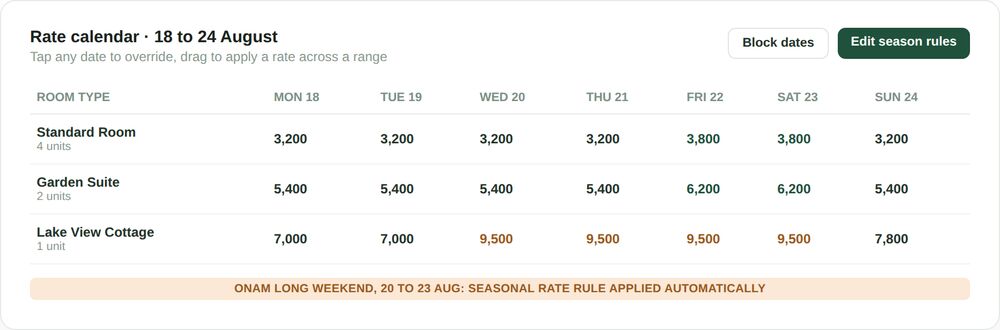
The rate calendar shows the result of every rule at once, room by room, date by date, so you can see exactly what a guest would be quoted on any given night before they ever ask. A markup from a weekend rule and a further markup from a festival rule occurring on the same date both apply together, in the order you set them, rather than one silently overriding the other.
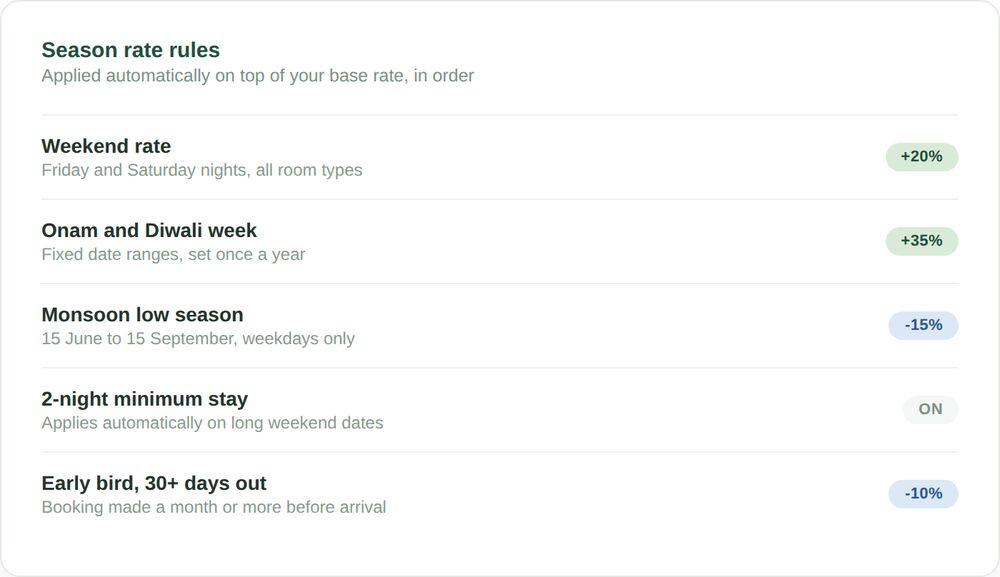
Rules can be as simple as a single weekend percentage, or as layered as a full season calendar: a monsoon discount for weekdays across three months, a festival week markup on fixed dates, an early bird discount for bookings made well in advance and a minimum stay requirement that only kicks in on long weekends. Each rule is visible individually, so it is always possible to see which rule caused which rate and to switch any single one off without touching the others.
Setting a rule takes the same handful of inputs regardless of type: which room types it applies to, which dates or days it triggers on and the markup or discount to apply. There is no separate configuration language to learn for a festival rule versus a weekend rule, the same simple form is used for every kind of season rate rule a property is likely to need.
What season rate rules are built to do
Applies automatically, every time
A weekend rule set once continues applying to every Friday and Saturday indefinitely, with no need to re-enter it week after week.
Layers cleanly, does not overwrite
A festival rule and a weekend rule landing on the same date both apply together, in a defined order, rather than one silently replacing the other.
Visible before it is charged
The rate calendar shows the exact price a guest would be quoted on any date, for any room type, before a single booking is made.
Every rule editable on its own
Switch off a single rule, a monsoon discount that is no longer needed, without touching the weekend or festival rules sitting alongside it.
These four pieces work together rather than as separate tools bolted onto each other. A rule set once, applying automatically, layering cleanly, visible before it is charged and editable on its own, is what makes seasonal pricing for hotels something you configure a handful of times a year rather than something you manage every single week.
The kinds of rules properties actually set
Look at how seasonal pricing gets used across different property types and a handful of rule categories cover almost everything. Most properties never need more than three or four rules active at once, the trick is picking the right ones for how demand actually moves at that specific property, rather than copying a generic list.
Weekend and weekday split
The most common rule of all: a fixed markup for Friday and Saturday nights, applied automatically across every room type, every week of the year.
Festival and long weekend weeks
Fixed date ranges set once a year, Diwali, Onam, a major long weekend, at a rate you decide, without needing to remember to apply or remove it.
Low season discounts
A monsoon or off season discount across a defined date range, useful for keeping occupancy up during genuinely slower months rather than leaving rooms empty at full price.
Booking behaviour rules
Early bird discounts for bookings made well ahead of arrival and minimum stay requirements that only apply on selected high demand dates.
None of these require touching the base rate itself. The base rate stays a stable reference point and every seasonal adjustment is a rule layered on top of it, which is also what makes it straightforward to see exactly why a given night is priced the way it is. Good seasonal pricing for hotels is rarely one rule working alone, it is usually two or three of these categories layered together, each handling a different, predictable pattern in demand.
SEE IT IN ACTION
A festival week at a homestay in Kodaikanal
Meera runs a four room homestay and has always known Diwali week sells out regardless of price, but for two years running she forgot to raise rates until the week itself had already started, by which point half the rooms were already booked at the ordinary rate.
This year she set a festival rule in early September, a fixed rate for the five days spanning Diwali, applied automatically the moment the rule was saved. When bookings started arriving in October, every single one already reflected the festival rate, without her needing to remember the date was approaching or manually change anything as it got closer.
The rate calendar showed her exactly what each of her four room types would cost on each festival date, weeks before the first booking came in, which meant she also caught that one room type’s festival rate looked too low compared to the others and corrected it before a single guest had booked at the wrong price.
A slow monsoon month at a resort in Wayanad
Anand’s resort fills easily from October through March and sits close to empty across the wettest weeks of the monsoon. For years the response was an occasional manual discount, applied inconsistently depending on how the booking numbers were looking that particular week.
He set a standing monsoon rule instead: a fixed discount across the weekday nights of the wettest ten weeks, left switched on permanently rather than reconsidered each time. Weekend nights inside the same window stayed closer to the standard rate, since even in the slow season, weekend demand held up reasonably well on its own.
The result was not a dramatic transformation, monsoon occupancy at a wilderness resort has real limits no rate can fully solve, but a rate that was consistently a little more attractive, applied automatically across the entire slow season rather than sporadically when someone remembered, brought in bookings that would otherwise have gone to a competitor willing to discount.
A ten room hotel in Udaipur setting rules for the first time
Deepak took over rate decisions at his family’s hotel after years of rates being changed informally, whoever was at the desk on a given day sometimes bumped a rate up if the calendar looked full, with no consistent record of what had been changed or why.
Setting up seasonal pricing meant first agreeing on a base rate for each of the hotel’s three room types, something that had never actually been written down clearly before and then adding a weekend rule and two festival rules on top. The rate calendar immediately made visible something nobody had noticed: the previous informal weekend bumps had been wildly inconsistent, sometimes ten percent, sometimes forty, depending entirely on who was working that day.
The new rules replaced that inconsistency with a single, predictable weekend markup and for the first time, any staff member could look at the rate calendar and see exactly what a guest should be quoted, rather than relying on whoever happened to be at the desk remembering what the rate was supposed to be that week.
Five ways properties get less out of seasonal pricing
The rules only help if they are set up thoughtfully and revisited occasionally. A handful of habits separate a rate calendar that works quietly in the background from one that causes more confusion than the manual process it replaced.
- Setting a festival rule and forgetting to remove it once the festival ends. A rule with no end date can quietly keep charging a festival rate long after the demand that justified it has passed.
- Stacking too many overlapping rules without checking the combined result. A weekend rule and a festival rule together can produce a rate that looks reasonable individually but surprising when combined, which is exactly what the rate calendar view is for checking.
- Never revisiting the base rate itself. Seasonal rules adjust around a base rate, but if that base rate has not been reconsidered in a year or two, every seasonal adjustment is built on a number that may no longer reflect the market.
- Applying the same seasonal pattern to every room type identically. A premium room and a standard room do not always see the same seasonal demand and a single blanket rule can undercharge one or overcharge the other.
- Setting rules once and never checking the rate calendar again. The calendar view exists specifically to catch a rule that behaved differently than expected before a guest ever sees the rate, not after.
- Copying a rule from a completely different property without adjusting it. A weekend markup that made sense for a beach resort in peak season is not automatically the right number for a hill station homestay and rules are worth setting from your own demand pattern rather than a generic template.
Most of these are easy to catch simply by looking at the rate calendar every few weeks, rather than treating seasonal pricing as a one time setup task that never needs revisiting.
It applies to every booking channel, not just direct ones
A season rate rule applies to the rate shown on your OpenStays booking engine and quoted through WhatsApp enquiry handling, since both draw from the same rate calendar. A guest enquiring on a festival weekend is quoted the festival rate automatically, the same rate that would show on the calendar if you looked it up yourself.
Rates for OTA listings you manage separately still need to be updated on each OTAs own extranet, since those platforms do not read rates from OpenStays automatically. What the rate calendar does provide is a single, reliable reference for what those OTA rates should be set to on any given date, rather than needing to work it out separately each time.
This consistency matters more than it first appears. A guest who checks your website and then messages on WhatsApp to confirm should see the same rate both times and a rule based system guarantees that by definition, since both channels are reading the identical calendar rather than two separately maintained numbers that can drift apart over time.
How seasonal pricing fits with the rest of OpenStays
Seasonal pricing sits directly underneath the reservations dashboard: the revenue and occupancy figures shown on the dashboard already reflect whatever seasonal rules are active, so a busy festival week correctly shows a higher revenue figure without any separate calculation. The two features share the same underlying booking and rate data rather than needing to be reconciled against each other.
Calendar and availability sync, keeping your OpenStays calendar aligned with any external calendars you use, works alongside seasonal pricing rather than in place of it. Availability sync answers whether a room is free on a given night, seasonal pricing answers what that room costs on that night and the two operate independently so that changing one never accidentally affects the other.
WhatsApp based enquiry handling reads the same rate calendar as well, so a guest asking about a festival weekend gets quoted the festival rate directly, without whoever is answering the message needing to check a separate rate sheet or remember what the current rule happens to be.
Seasonal rate rules vs. The alternatives
| Seasonal rate rules | Manual rate changes | One flat rate year round | |
|---|---|---|---|
| Applies automatically once set | Yes, every relevant date | No, requires a manual edit each time | Not applicable, nothing to apply |
| Risk of a missed or forgotten update | Low, the rule persists | High, depends on remembering | None, but revenue is left on the table |
| Effort to change a rule later | Edit one rule, done | Repeat the manual process again | One number, but under prices peak demand |
| Visibility before a guest books | Full calendar view, all dates | Only what was manually checked | Same rate, no variation to check |
| Captures weekend and festival demand | Yes, by design | Only if remembered in time | No, demand is ignored entirely |
| Setup effort | Minutes per rule, once | None, but repeated indefinitely | None |
A flat, unchanging rate is not irrational, some owners genuinely prefer the simplicity of one number and no calendar to think about. The honest trade off is revenue: a flat rate by definition either undercharges on the nights demand is highest or overcharges on the nights it is lowest, since one number cannot be correct for both.
Manual rate changes sit somewhere in between, capturing some of the benefit of variation without the reliability of a rule that persists on its own. Whether that middle ground is worth the ongoing effort tends to depend entirely on how consistently the person responsible actually remembers to make the change, week after week, which is precisely the part seasonal pricing for hotels is built to remove from anyone’s memory.
SETUP
Setting up your first season rules
Most properties have a working set of seasonal rules live within half an hour.
1. Confirm your base rate per room type
Season rules apply on top of the base rate, so it is worth making sure the base rate itself reflects an ordinary weekday before layering anything on top of it.
2. Set your weekend rule first
The most commonly used rule and usually the simplest place to start, a fixed markup applied to Friday and Saturday nights across your room types.
3. Add festival or long weekend dates
Set specific date ranges for the festivals or long weekends that matter to your property, each with its own rate.
4. Add a low season rule if relevant
A discount across a defined date range for the months that are genuinely slower, rather than leaving the base rate unchanged and rooms empty.
5. Check the rate calendar before going live
Look across the coming few months of dates to confirm the combined result of every rule matches what you actually intended to charge.
BEFORE YOU CHOOSE
How to evaluate any seasonal pricing tool
Rate management is a common feature across hotel software, but the details vary a lot. Whatever seasonal pricing for hotels you shortlist, including us, these are worth checking before you commit:
- Can you see the combined effect of overlapping rules before a guest books? A tool that only shows one rule at a time makes it easy to miss a surprising combined rate.
- Does a rule apply automatically going forward, or does it need to be reapplied each season? A weekend rule that has to be re-entered every few months barely improves on doing it manually.
- Can each rule be switched off individually? Removing a monsoon discount should not require rebuilding every other rule from scratch.
- Is pricing genuinely rule based, or an opaque algorithm you cannot fully see or explain? A rule you wrote yourself is one you can also explain to a guest who asks why a rate is what it is.
- Does the tool distinguish availability from price? A system that conflates the two can make it harder to reason about why a room shows a certain rate on a certain night.
- Does a rule apply consistently regardless of which channel quotes it? A rate that differs between what WhatsApp quotes and what the booking engine shows undermines the entire point of setting a rule in the first place.
Two features that work directly alongside seasonal pricing are worth checking at the same time: an iCal calendar sync that keeps availability aligned across the calendars you already use and a rate negotiation tool for the guest facing side of pricing, handling the back and forth a guest sometimes wants before booking.
Who can see and change your rates
Season rate rules are visible and editable to whoever has account access, typically the property owner and any staff responsible for pricing decisions. Access can be limited so that day to day staff can view rates without being able to change the rules behind them.
Rate rules are entirely yours to define. OpenStays does not adjust a rate on your behalf based on demand, competitor pricing, or any signal you have not explicitly configured as a rule. What you see on the rate calendar is what a guest is quoted, nothing more and nothing less.
A change to a rule takes effect immediately for future enquiries, it does not retroactively alter a rate already quoted or confirmed to a guest. A booking made under a previous rule keeps the rate it was made at, even if the rule behind it is later changed or removed.
QUESTIONS
Frequently asked questions
Is this dynamic pricing that changes rates based on demand automatically?
No. Every rule is written and set by you, a weekend markup, a festival rate, a seasonal discount. Nothing changes a rate based on demand signals you have not explicitly configured as a rule yourself.
Can I set a different weekend rate for each room type?
Yes. Rules can be applied at the room type level, so a premium room and a standard room can carry different weekend markups if that reflects how demand actually differs between them.
What happens if two rules apply to the same date?
Both apply together, in the order you have set them and the rate calendar shows the combined result before any guest ever sees it, so a surprising combination can be caught and corrected early.
Do I need to remove a festival rule after the festival ends?
Rules can be set with an end date so they stop applying automatically, or left open ended if you plan to remove them manually. Setting an end date is the safer default for a one time event.
Does this affect rates already shown on OTAs?
No, OTA rates are managed separately on each OTAs own extranet. Season rules affect the rate shown through your OpenStays booking engine and WhatsApp enquiries and give you a reliable reference for what to set OTA rates to as well.
Can a guest negotiate a rate that already includes a seasonal markup?
Yes, if your property allows rate negotiation, a guest can still ask and any bargaining happens against the seasonal rate as the starting point, not the base rate.
How far in advance can I set a festival rule?
As far ahead as you like. Many owners set the coming year’s major festival dates in one sitting, so the rule is already active well before the first enquiry for that period arrives.
Is there a limit to how many rules I can set?
No practical limit. A property with a simple weekend rule and one with a dozen layered seasonal and behavioural rules both work the same way.
Can I preview a rate before publishing the rule?
Yes, the rate calendar shows the result of a rule immediately after it is saved, across every affected date, so you can check it before any guest sees or books at that rate.
Does a minimum stay rule turn away shorter bookings automatically?
Yes, on the dates it is configured for. A two night minimum on a long weekend, for example, means a one night enquiry for that weekend is flagged rather than quoted as available.
What if I only want a discount, never a markup?
Rules work in either direction. A property that never wants to charge above its base rate can use only discount rules, for a low season or an early bird booking and skip markup rules entirely.
Is seasonal pricing included, or a separate cost?
It is part of the core OpenStays platform rather than a separate add on. Current plan details are covered on our pricing page.
Can I set rules that apply only to specific days of the week beyond weekends?
Yes, a rule can be scoped to any combination of days, not only Friday and Saturday, useful for properties whose actual peak days differ from the usual weekend pattern.
Does changing a base rate affect existing seasonal rules?
Seasonal rules are typically defined as a markup or discount relative to the base rate, so raising or lowering the base rate adjusts every rule built on top of it proportionally, rather than requiring each rule to be edited individually.
Can I copy a rule from last year instead of rebuilding it?
Yes, a rule from a previous season, last year’s Diwali week rate for example, can be reused as a starting point and adjusted for the new dates, rather than built from scratch every year.
What changes in the first month
The first difference most owners notice is simply not having to think about the next weekend’s rate as a separate task. Once a weekend rule is set, Friday and Saturday nights price themselves correctly without anyone opening the calendar to check.
The next thing that tends to change is confidence heading into a known busy period. A festival week set weeks in advance means every booking that arrives already reflects the right rate, rather than a scramble to raise prices once the dates are already close and half the rooms are already booked at the ordinary rate.
By the second or third season, the rate calendar becomes something owners actually consult before making a decision, rather than something set up once and left alone. Adjusting a monsoon discount that turned out too generous, or a weekend markup that turned out too conservative, becomes a five minute edit rather than a rethink of the whole pricing approach.
None of this requires giving up manual control. Every rule remains visible, editable and removable at any time, the difference is simply that the default behaviour, night after night, no longer depends on someone remembering to act.
Owners who look back after a full year of using seasonal pricing for hotels tend to describe it the same way: not a single dramatic revenue jump, but a steady accumulation of nights that priced correctly instead of by accident, weekend after weekend, festival after festival, without anyone having to remember any of them individually.
Who seasonal pricing actually helps
A small homestay with a handful of predictable local festivals benefits most from a couple of well set festival rules and a standing weekend markup, set once a year and then left alone, quietly capturing demand that used to be missed simply because nobody raised the rate in time.
A hotel with a front desk team benefits from rules that do not depend on any one staff member remembering to apply them. A weekend rate set as a rule applies identically regardless of who is on shift, removing the inconsistency that comes from different staff members applying informal, undocumented pricing habits.
A resort with a genuinely slow season benefits most from a standing low season discount that runs automatically across the months that need it, rather than a rate that stays high through a quiet season simply because changing it manually always felt like a task for later.
Properties running on tighter margins tend to benefit fastest of all, since even a modest weekend markup or festival rate, applied consistently across every relevant date rather than sporadically, adds up to a meaningful difference over a full year without requiring any change to how the property is actually run day to day.
Set your rules once. Let every date price itself.
Seasonal pricing runs on the same OpenStays account as your booking engine and reservations dashboard. Nothing new to install.