
FOR HOMESTAYS, HOTELS & RESORTS
Room and rate plan setup
Every booking your property takes, on the website, over WhatsApp, through an OTA or by phone, depends on one thing being right first: a clear, accurate list of what rooms you have, what each one costs and which rate plans apply to it. Room and rate plan setup for hotels is where that foundation gets built, once, correctly.
Built by property owners for property owners · 0% commission · Core feature, live today
ILLUSTRATIVE FEATURE OVERVIEW
Room configuration
Room types
Describe your accommodation
Occupancy
Set the guest capacity
Rate plans
Organise your pricing options
Availability
Connect your setup with direct bookings
Structure every stay you sell
Where room and rate details actually live today
This is not seasonal pricing and it is not the occupancy calendar. Those tools adjust rates over time and show you who is booked. This is the setup underneath both of them: the room types, base rates and rate plans everything else is built on.
This page covers how room types and rate plans work on OpenStays, what a rate plan actually is, how this setup feeds the booking engine, WhatsApp quoting, the reservations dashboard and seasonal pricing and how it differs from the two tools it is most often confused with.
Ask most independent property owners exactly how many Deluxe Rooms they have, what each one costs on a normal weekday and whether a corporate guest gets a different rate than a leisure guest and the honest answer usually involves checking two or three different places before giving a confident number.
A room count lives in the owner’s head, updated the last time a room was converted or a wall came down during renovation. A base rate lives in an OTA extranet, possibly out of date since the last manual change. A rate plan for long stays or corporate bookings lives nowhere formal at all, just an informal understanding that gets applied inconsistently depending on who answers the phone.
None of this is a small property’s fault. Most booking software treats room and rate setup as a one time configuration step buried in onboarding, rarely revisited and rarely built to be the single source of truth every other tool draws from. The result is that the booking engine, the OTA listing and the front desk notebook can each show a slightly different picture of the same property.
Room and rate plan setup for hotels exists to fix that by being the one place this information lives, the place every other OpenStays feature, the booking engine, WhatsApp quoting, the dashboard and seasonal pricing, reads from directly.
Not seasonal pricing and not the occupancy calendar
Seasonal pricing applies rules on top of a base rate: a weekend markup, a festival week premium, a monsoon discount. Those rules need a base rate to apply on top of in the first place and that base rate, along with the room type it belongs to, is defined here, in room and rate plan setup for hotels, not in the seasonal pricing rules themselves.
The occupancy calendar shows which rooms are booked, blocked or open on which nights. It is a view of bookings against inventory that already exists. Room and rate plan setup for hotels is what creates that inventory: the room types, the unit counts and the rate plans a guest can actually book. Without this step done first, there is nothing for a calendar to display or a seasonal rule to adjust.
Put together, the three features form a stack. Room and rate plan setup for hotels defines what you sell and its base price. Seasonal pricing adjusts that base price automatically for weekends, festivals and low season. The occupancy calendar shows the result: which of those rooms are actually booked on which nights. Each does one job and each depends on the one below it being set up correctly.
What a messy setup actually costs
A room type with an unclear description gets booked by the wrong guest, someone expecting a balcony who gets an interior room, someone expecting an extra bed who is quoted a rate that does not include one. Sorting that out at check in costs a front desk conversation that should never have needed to happen and sometimes costs a discount or an upgrade offered on the spot to keep the guest happy.
A base rate that is out of date on one channel but not another creates a rate parity problem, the same room showing two different prices to two different guests depending on where they looked. Guests who notice this and many do, lose some trust in the property regardless of which price was actually correct.
A missing rate plan means a genuine business case, a corporate guest who always stays five nights, a family that wants breakfast included, gets handled as a one off manual exception every single time instead of a rate plan a guest can simply select. The exception never becomes easier because it was never turned into a standing option.
A room type that quietly changed, converted for storage, taken offline for renovation, but was never marked as such in the system, keeps showing up as available until a booking arrives for a room that does not exist to sell, forcing an awkward call to relocate or cancel a guest who already paid.
There is also a quieter, ongoing time cost. Every manual recalculation, working out what a five night corporate stay should cost after a verbal discount, checking whether a rate quoted last week still applies, is a few minutes that add up across a busy week into a genuine drain on whoever is answering guest questions, time that a standing rate plan would have made unnecessary.
None of these individually feels like a crisis. Added up across a full year of bookings, the gap between a property with a clean, current room and rate setup and one without it is usually a meaningful amount of avoidable friction, most of it invisible until a guest experiences it directly.
What room and rate plan setup for hotels actually looks like
Every property starts with room types: named categories like Standard Room, Deluxe Room or Family Suite, each with a unit count, a maximum guest capacity, a short description of what makes it different and a base rate that applies on an ordinary night with no rule or rate plan layered on top.
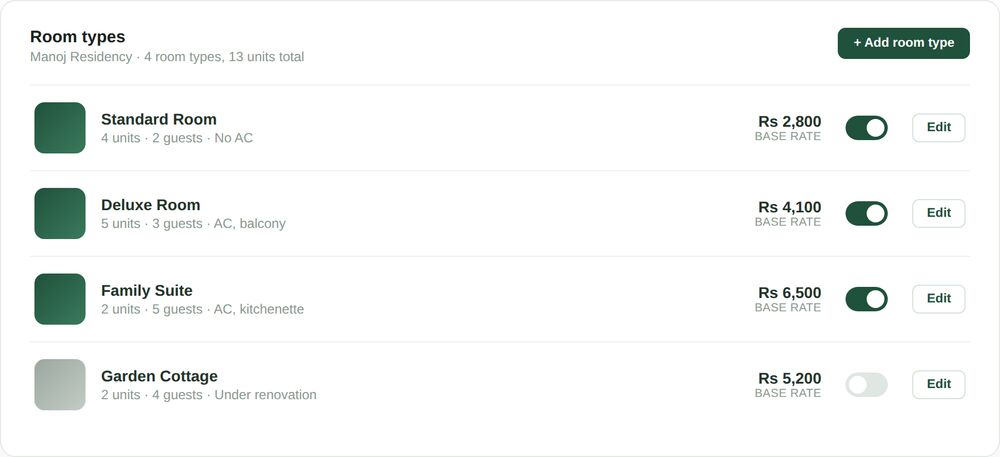
A room type can be switched active or inactive without deleting it. A room under renovation gets marked inactive so it stops appearing as bookable everywhere at once, on the website, over WhatsApp and on connected OTAs, rather than needing to be manually hidden in three different places.
Base rates are set once per room type and stay stable as a reference point. They are not meant to change week to week; that is what seasonal pricing rules are for, applying automatically on top of a base rate that itself rarely needs to move.
Editing a room type updates it everywhere at once. A corrected guest capacity, a new description, a base rate change, all take effect on the booking engine, in WhatsApp quoting and on the dashboard the moment they are saved, with no separate update needed anywhere else.
Unit counts matter more than they first appear to. Four physically identical Standard Rooms are one room type with a unit count of four, not four separate entries, since that is what lets the system correctly show three rooms of that type as booked and one still available, rather than treating each room as its own isolated listing with its own separately tracked availability.
What rate plans are built to do
More than one price per room
A single room type can have several rate plans at once, a standard flexible rate, a cheaper non-refundable option, a discounted long stay plan, each visible to guests as a distinct, selectable choice rather than a manual exception.
Priced relative to the base rate
Every rate plan is expressed as a percentage or fixed adjustment against the room’s base rate, so a base rate change updates every rate plan built on top of it automatically, rather than needing each one edited separately.
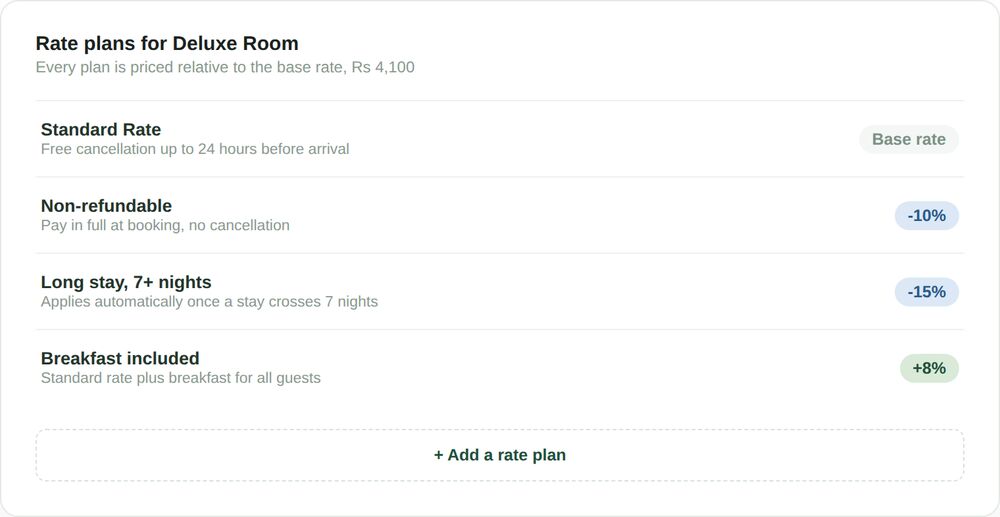
A rate plan is not a seasonal rule. Seasonal pricing adjusts a rate by date, a weekend or a festival week. A rate plan adjusts a rate by the terms of the booking itself, whether it is refundable, how long the stay is, whether breakfast is included. The two apply independently and stack on top of each other: a non-refundable rate plan during a festival week reflects both the rate plan discount and the seasonal markup at once.
The kinds of rate plans properties actually set
Most properties never need more than three or four rate plans per room type, but the ones that matter tend to fall into a handful of recurring categories worth setting up deliberately rather than leaving as informal exceptions.
Standard and non-refundable
A flexible standard rate with free cancellation, alongside a cheaper non-refundable rate for guests willing to commit early and pay in full at booking.
Long stay discounts
A discount that applies automatically once a booking crosses a set number of nights, rewarding longer stays without needing a manual override each time one comes in.
Inclusions and add ons
A rate plan that bundles breakfast, airport pickup or another add on into a single selectable price, rather than handling it as a verbal add on arranged separately at check in.
Segment specific rates
A corporate or group rate visible only to guests who book through a specific link or WhatsApp flow, letting a property offer a different price to a specific audience without changing the public rate.
None of these require touching the base rate itself. The base rate stays a stable reference point and every rate plan is a defined variation on it, which is also what makes it straightforward to see exactly why a given quote came out the way it did, rather than wondering whether a rate was typed in correctly by hand.
SEE IT IN ACTION
A homestay near Munnar adds its first new room type
Lakshmi runs a four room homestay and is converting an unused storage room into a fifth room, a smaller single occupancy option she wants to price lower than her existing rooms to attract solo travelers and short business stays.
She adds it as a new room type, Cozy Single, sets a unit count of one, a guest capacity of one and a base rate lower than her Standard Room. She leaves it inactive while the paint dries, then switches it active once it is ready and it appears on her website, in WhatsApp quoting and to any OTA she has connected, all at the same moment, without a separate step for each.
A guest messaging her on WhatsApp two days later asking about a single room for one night gets an accurate quote immediately, because the room, its rate and its availability are already the single source of truth every part of her OpenStays account reads from.
A month later, Lakshmi notices the Cozy Single is booking out most weekends but sitting empty midweek. Rather than guessing at a fix, she adds a simple weekday discount as a seasonal rule on top of the base rate she already set, something that would not have been possible to reason about clearly if the room type and its base rate were not already defined on their own.
A ten room hotel in Ooty restructures its rate plans
Deepak’s hotel has always offered corporate guests a quiet, informal discount, arranged verbally whenever someone mentioned a company name at check in. It was never consistent and two staff members sometimes quoted two different corporate rates for the same room on the same night.
He sets up a formal Corporate rate plan on his two most booked room types, a fixed discount off the base rate, visible only through a dedicated booking link he shares directly with the companies he works with. The informal, inconsistent discount becomes a defined rate plan every staff member applies the same way, because there is nothing left to remember or negotiate.
Guests booking through the public website never see the corporate rate at all, since it only appears through the dedicated link, keeping the public rate and the negotiated rate cleanly separate without either one interfering with the other.
Six months on, Deepak adds a second corporate rate plan for a new client with slightly different terms, a shorter minimum stay in exchange for a smaller discount. Setting it up takes a few minutes and both corporate rates now sit alongside each other clearly, each tied to its own link, instead of relying on staff memory to keep two negotiated arrangements straight.
A resort in Wayanad sets up rooms and rates for the first time
Anand’s resort is moving onto OpenStays after years of running entirely through a single OTA listing and a paper register. The first task is not seasonal pricing or the calendar, it is defining the eleven rooms across three categories that make up his property, since nothing downstream works without that existing first.
He spends an afternoon entering each room type, its unit count, its base rate and a short description, then adds two rate plans per category, a standard flexible rate and a non-refundable rate at a ten percent discount. By the time he is done, his booking engine, WhatsApp quoting and dashboard all have an accurate, shared picture of his property for the first time.
Seasonal pricing rules and the occupancy calendar both become useful immediately afterward, not because they were complicated to turn on, but because the room and rate foundation they depend on was finally in place.
Setup mistakes that quietly cause problems later
A handful of avoidable mistakes account for most of the confusion properties run into after setup, almost all of them easy to prevent by treating this step as worth doing carefully the first time rather than rushing through it to get to the parts that feel more interesting.
- Leaving a room type active after it stops being sellable, rather than marking it inactive the moment it goes offline for renovation or repurposing.
- Setting a base rate that already includes an informal, undocumented discount, which then gets discounted again when a rate plan or seasonal rule applies on top of it.
- Creating near duplicate room types instead of one room type with an accurate unit count, which splits availability and revenue reporting across entries that should be a single line.
- Building a rate plan as a one time manual exception instead of a standing, selectable option, so the same negotiation happens again the next time a similar guest asks.
- Forgetting to update guest capacity after adding or removing an extra bed option, leading to bookings that do not match what the room can actually accommodate.
- Skipping a short description on a room type, leaving guests to guess what actually distinguishes a Deluxe Room from a Standard Room beyond the price.
Most of these surface as a guest complaint or a staff question weeks after setup, not immediately, which is exactly why they are worth getting right at the start rather than fixing reactively later.
One setup, every booking channel
A room type and its rate plans, once set up, apply identically whether a guest books through the OpenStays website widget, messages on WhatsApp, or is entered manually after a phone call or an agent booking. There is no separate rate list to maintain per channel.
OTA listings connected through channel management still need their own rates updated on each OTAs own extranet, since OTAs do not read live from OpenStays automatically. What OpenStays room and rate setup provides is a single, reliable reference for what those OTA rates should be, rather than each channel drifting from its own separately maintained numbers.
How room and rate plan setup for hotels fits with the rest of OpenStays
This is the layer everything else is built on. The booking engine and WhatsApp quoting both read room types, base rates and rate plans directly from here, so a guest asking about a Deluxe Room gets the same accurate answer regardless of which channel they asked through.
The reservations dashboard shows bookings against the room types defined here and its revenue and occupancy figures are only as accurate as the room and rate setup underneath them. Seasonal pricing applies its rules on top of the base rates set here, so a weekend markup or festival rule has an accurate number to adjust in the first place.
None of this requires setting up every piece at once. A property can define its rooms and rates on their own, start taking accurate bookings immediately and layer on seasonal pricing rules or lean on the dashboard whenever it makes sense, since each piece is useful independently once the foundation underneath it is in place.
The same setup also feeds a WhatsApp booking flow the moment a guest asks a question there. A guest messaging to ask what a Deluxe Room costs for three nights gets a quote built from the exact base rate and rate plans configured here, calculated the same way whether the conversation happens on WhatsApp, through the booking widget, or over a phone call a staff member logs manually afterward.
Structured setup vs. The alternatives
| Room & rate plan setup | Single flat rate | Spreadsheet tracking | |
|---|---|---|---|
| Reflects real room differences | Yes, by room type | No, one price for everything | Only as detailed as it is kept |
| Same rate across every channel | Yes, one source of truth | Trivially yes, but inflexible | Only if updated everywhere by hand |
| Supports flexible and non-refundable options | Yes, as separate rate plans | No | Manually tracked, easy to lose |
| Risk of quoting the wrong room or rate | Low | None, but underprices some rooms | High, depends on who is asked |
| Setup effort | Once, per room type | None | Ongoing, never really finished |
| Works with seasonal pricing and the calendar | Yes, built to feed both | Not applicable | No, entirely separate |
A single flat rate is not irrational for a very small property with genuinely identical rooms, but it leaves revenue on the table the moment rooms actually differ in size, view or amenities, since one number cannot correctly price rooms that are not equivalent.
A spreadsheet can track the same information in principle, but it depends entirely on someone keeping it current and manually relaying it to every booking channel, which is precisely the ongoing effort structured setup is built to remove.
The honest trade off with structured setup is the half hour or so it takes to do properly the first time, entering each room type, its base rate and its rate plans with some care rather than rushing to get to whichever feature feels more immediately useful. That time is spent once and every booking afterward draws on it without needing to be repeated.
SETUP
Setting up your rooms and rates
Most properties have a complete, accurate room and rate setup within half an hour, even when starting from nothing.
Most properties have a complete, accurate room and rate setup within half an hour.
1. List every room type you actually have
Group identical or near identical rooms into a single room type with an accurate unit count, rather than creating one entry per physical room.
2. Set an honest base rate per room type
Use the rate that applies on an ordinary night with no discount or markup in effect, since rate plans and seasonal rules both build on top of this number.
3. Add the rate plans you actually use
Start with a standard flexible rate and a non-refundable option, then add long stay, corporate or inclusion based plans only where there is a real, recurring case for them.
4. Write a short, honest description per room type
A sentence or two on what distinguishes the room is usually enough to stop guests guessing and stop mismatched bookings at check in.
5. Mark anything not currently sellable as inactive
A room under renovation or repurposed for another use should be switched inactive rather than left listed and hoped nobody books it.
BEFORE YOU CHOOSE
What to check in any room and rate setup tool
- Does a rate change made in one place apply everywhere, or does it need to be repeated per channel?
- Can a room be marked inactive without deleting its booking history or configuration?
- Are rate plans genuinely selectable by guests, or do they require a manual override every time?
- Does the tool show which rate plans and rules are stacking on a given quote, or just a final number with no explanation?
- Is there a real difference between a base rate, a rate plan and a seasonal rule, or are they all mixed into one confusing setting?
- Can setup be completed without needing support to walk through it, or does it depend on a lengthy onboarding call?
This applies whether or not you use OpenStays. The properties that struggle least with pricing consistency are the ones whose setup tool makes these distinctions clear from the start, which is also worth checking against a direct booking engine or a WhatsApp booking system you are already evaluating.
Who can see and change your room and rate setup
Room types and rate plans are visible to whoever has access to your OpenStays account and access can typically be limited to specific staff members rather than shared as a single login everyone uses.
A rate change is applied the moment it is saved and takes effect for any quote generated afterward, without needing anyone to manually refresh a channel or resend an update. There is no delay between a correction being made and it being reflected everywhere a guest might see it.
For a property with multiple owners or managers, the same account can typically be shared across everyone who needs to make changes, with each edit reflected instantly rather than depending on one person to relay updates to everyone else.
Removing a staff member’s access removes their ability to change room and rate setup immediately, without needing to track down and undo whatever changes they might otherwise still be able to make from an old login shared informally before they left.
QUESTIONS
Frequently asked questions
What is the difference between a base rate and a rate plan?
A base rate is the reference price for a room type on an ordinary night. A rate plan is a defined variation on that base rate, such as a non-refundable discount or a long stay discount, that a guest can select.
Do I need to set up rate plans, or is a base rate enough?
A base rate alone is enough to start taking bookings. Rate plans are optional and worth adding once there is a recurring case for them, such as guests who regularly want a non-refundable option.
Can I change a room’s base rate without affecting existing bookings?
Yes. A base rate change applies to new bookings made after the change. Guests who already booked at a previous rate keep the rate they booked at.
How does this relate to seasonal pricing?
Seasonal pricing rules apply automatically on top of the base rate set here. This page is where that base rate and the room type it belongs to are defined in the first place.
Can two room types share the same rate plans?
Rate plans are set per room type, so the same kind of rate plan, such as a non-refundable option, can be created individually for each room type it should apply to.
What happens if I mark a room type inactive?
It stops appearing as bookable on the website, in WhatsApp quoting and on any connected channel, without deleting its configuration or booking history, so it can be reactivated later without starting over.
Can I offer a rate plan to specific guests only, like a corporate rate?
Yes, a rate plan can be shared through a specific link rather than shown on the public rate list, keeping it visible only to the guests it is intended for.
Do OTA rates update automatically when I change a base rate here?
Rates for OTAs connected through channel management still need to be confirmed on that OTAs own extranet. This setup gives you a single accurate reference for what those rates should be.
Is there a limit to how many room types or rate plans I can create?
No practical limit. A small homestay with two room types and a large resort with a dozen both work the same way.
What if two rooms are physically identical but in different buildings?
They can usually be grouped as a single room type with a combined unit count, unless there is a genuine reason guests would care which building they are in, in which case separate room types make that distinction clear.
Can I require a minimum stay on a specific rate plan?
Yes, a rate plan can include its own minimum stay requirement, separate from any minimum stay set through a seasonal rule.
Does setting up rate plans require any technical knowledge?
No. Rate plans are configured through the same dashboard used for everyday reservations, with no separate system or technical setup involved.
What happens to a rate plan if the base rate changes?
Since rate plans are priced relative to the base rate, a base rate change updates every rate plan built on top of it automatically, without needing each one edited separately.
Can I preview what a guest will actually see before publishing changes?
Yes, changes to room types and rate plans are reflected in the live booking engine and WhatsApp quoting immediately, so you can check the guest facing result as soon as you save.
Is room and rate plan setup for hotels included in the base OpenStays plan?
Yes, it is part of the core platform rather than a separate add on. Current plan details are covered on our pricing page.
Can I set a different rate plan for weekday and weekend stays?
Weekday and weekend pricing is handled through a seasonal rule rather than a rate plan, since it applies by date rather than by the terms of the booking. A rate plan can still be combined with a weekend rule, applying both at once.
What happens if I delete a room type by mistake?
A room type marked inactive can be reactivated at any time with its configuration intact. Deleting a room type entirely is a separate, more deliberate action and is not something that happens accidentally through normal day to day use.
What changes in the first month
The most immediate change is consistency. A guest asking about a specific room type gets the same answer whether they asked on the website, over WhatsApp, or by phone, because every channel is reading from the same room and rate setup rather than three separately maintained lists.
By the second or third week, rate plans that used to be informal exceptions, a corporate discount, a long stay rate, start being used as standing options rather than one off negotiations, since staff can point a guest to a selectable rate plan instead of working out a discount on the spot.
Rate parity issues, the same room showing different prices on different channels, tend to become noticeably rarer once there is a single, current source of truth for what a room actually costs, rather than several places that can each drift independently.
None of this requires changing how the property is run day to day. What changes is that the information every booking depends on finally lives in one place, accurate and current, rather than scattered across a memory, a spreadsheet and an OTA extranet that do not always agree with each other.
Who room and rate plan setup for hotels actually helps
A new property onboarding for the first time benefits most, since a clean, accurate setup done once at the start avoids months of quietly accumulated inconsistency that would otherwise need to be untangled later.
A property adding or renovating rooms benefits from being able to introduce a new room type in minutes, active everywhere the moment it is ready, rather than needing to update a website, a WhatsApp script and an OTA listing separately.
A hotel or resort with a front desk team benefits from rate plans that apply the same way regardless of who is on shift, removing the inconsistency that comes from informal, undocumented discounting habits that vary by staff member.
Any property planning to use seasonal pricing or lean on the reservations dashboard benefits from doing this setup carefully first, since both of those tools are only as accurate as the room and rate foundation underneath them.
Set up your rooms and rates once. Use them everywhere.
Room and rate plan setup for hotels runs on the same OpenStays account as your booking engine, WhatsApp quoting and reservations dashboard. Nothing new to install.