
FOR HOTELS, RESORTS & GROUPS
Staff logins and roles
A shared login cannot tell you who comped a room, who changed a rate, or who checked a guest in at 2 AM. Separate staff logins, each with a role that matches what that person should actually be able to do, can.
No setup fee. No commission.
ILLUSTRATIVE FEATURE OVERVIEW
Team access
Property owner
Manage your property account
Team roles
Choose the permissions each role needs
Individual logins
Give staff their own sign-in
Your control
Review and update access as your team changes
Give each person their own access
What happens when everyone shares one login
Owners see everything. Managers can adjust rates and waive charges within limits. Front desk can check guests in and take payments, but cannot touch pricing or reports. Every action stays attached to the person who took it.
Most small properties start with one login, because for a while, one person is doing everything. The owner takes the booking, quotes the rate, checks the guest in and closes the register at night. A single shared password is not a real problem yet, because there is only one person to blame or credit for anything that happens.
The moment a second or third person starts touching the account, that stops being true. A front desk hire covering the evening shift has the same login as the owner. A relative helping out on a busy weekend can see the same revenue numbers and change the same rates as the person who built the business. Nothing in the system distinguishes between them, because as far as the software is concerned, they are all the same user.
This is rarely a trust problem at the start. Most staff are careful and well meaning. It becomes a problem the first time something goes wrong, a rate gets changed and nobody remembers doing it, a charge gets waived and nobody can explain why and there is no way to even ask the right person, because the login does not know who was actually behind the screen at that moment.
The gap widens with shift work specifically. A front desk team working morning, evening and night shifts hands the same login across three different people in twenty four hours. Whatever any of them does, changes a rate, comps a room, edits a booking, gets recorded as having been done by “the front desk account,” which by the next morning could mean any of three different people.
Properties that reach for staff logins with roles usually do so after the first time this actually causes a problem, not before. That is understandable, setting up separate logins feels like extra admin when the team is small and everyone is trusted. The cost of skipping it simply stays invisible until the exact week it stops being invisible, usually the busiest week of the year, when three people are covering shifts and something goes wrong that nobody can trace.
What a shared login actually costs
The most direct cost is accountability. A rate that gets discounted below what the owner intended, a room comped for a guest complaint that was never actually escalated, a charge waived as a favour, all of these are invisible under a shared login. The owner can see that something happened, but not who did it, which means the conversation about why it happened never quite happens either.
There is a security cost too. A shared password that everyone on the team knows is a password that never really gets changed, because changing it means telling the whole team the new one, which usually means writing it somewhere insecure, a sticky note, a shared notes app, a WhatsApp message that never gets deleted.
There is also a cost when someone leaves. A former front desk employee who had the shared login still effectively has access until the whole property changes its password and tells everyone who remains, which in practice often does not happen promptly, or does not happen at all. The account keeps a door open long after the person who knew the key has walked away.
None of this shows up as a single dramatic incident most of the time. It shows up as a slow erosion of the numbers actually meaning what they should, a revenue report the owner no longer fully trusts, a rate history nobody can explain and a nagging sense that something is being missed without any way to point at what.
There is a fairness cost too, one that lands on the staff rather than the owner. A team member who genuinely did nothing wrong can end up under suspicion simply because the shared login makes it impossible to clear their name quickly. Being unable to prove you were not the one who made a mistake is its own quiet frustration and it tends to erode trust on both sides of the relationship, not just the owner’s trust in the numbers.
There is a scaling cost as well. A property that stays a single owner-operator forever can live with a shared login indefinitely. The moment that property wants to hire a manager, add a second shift, or eventually run a second property, the shared login has to be unwound at exactly the busiest, least convenient time to be redesigning how the team logs in.
Moving to staff logins with roles before that point, rather than after a specific incident forces the issue, tends to be far less disruptive. Setting it up while the team is still small and the history is still easy to reconstruct takes a few minutes per person. Doing it after six months of shared-login history, once nobody can quite remember which changes were whose, is a much bigger cleanup.
What staff logins with roles actually give you
Every person who touches the account gets their own login, tied to their own name and every login is assigned one of a small number of roles that determines what that person can see and do. The roles are not a custom permissions builder with forty checkboxes, they are three practical shapes that match how a small or mid sized property is actually staffed.
Owner is the full account: every booking, every rate, every revenue and payout report and the ability to add or remove other staff logins. Manager can run daily operations, change rates, waive charges within reason and see enough of the numbers to make good calls, but cannot add or remove staff or see full payout detail. Front desk can check guests in and out, take payments against a booking and answer guest questions, but cannot change a rate or comp a charge.
These three roles were chosen deliberately over a more granular, fully customisable permissions builder. A forty checkbox permissions screen sounds flexible, but in practice almost nobody at a small or mid sized property has the time to configure it carefully and an under-configured custom system ends up looser than a well designed default. Owner, manager and front desk cover the overwhelming majority of how these properties actually staff themselves, which means the useful protection is there from the first login, not buried behind a setup step most people would skip.
Every action taken under a login is recorded against that specific person, not against the property in general. A rate change, a comped charge, a booking edit, a cancelled reservation, all of it carries a name and a timestamp, visible later to anyone with the access to see it.
This is the practical difference between staff logins with roles and simply telling everyone to be careful with a shared password. Roles are enforced by the system itself, a front desk login cannot change a rate no matter how well meaning the person behind it is, rather than relying on everyone remembering and following an informal rule that nobody wrote down anywhere.
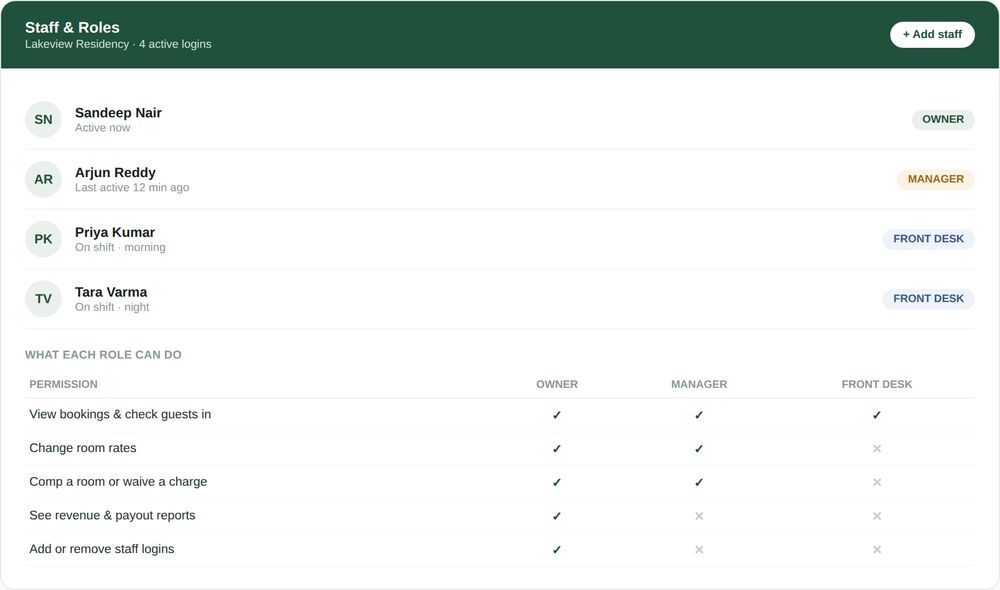
Four logins, three roles, one clear answer to who can do what.
Three roles, built around how properties are actually staffed
Owner sees everything
Full visibility into every booking, every rate change, every guest record and every rupee of revenue and payout. Only the owner role can add a new staff login or remove one, so the roster itself stays under one person’s control.
Manager runs the day
Can change rates, waive a charge within a set limit and see enough of the numbers to manage the property well, without full payout and financial detail reserved for the owner.
Front desk handles guests
Can check guests in and out, take payments against an existing booking and answer questions over WhatsApp or in person, without the ability to touch pricing, comp a charge or see revenue reports.
Every action has a name attached
A rate changed, a charge waived, a booking edited, a cancellation made, each one is recorded against the specific login that made it, not against the property as a whole.
SEE IT IN ACTION
A hotel in Manali traces a waived charge back in thirty seconds
Lakeview Residency runs with four logins: the owner, a manager and two front desk staff covering morning and night shifts. On a Tuesday morning, the owner notices a ₹1,200 late checkout charge was waived on Room 108 overnight and does not remember approving it.
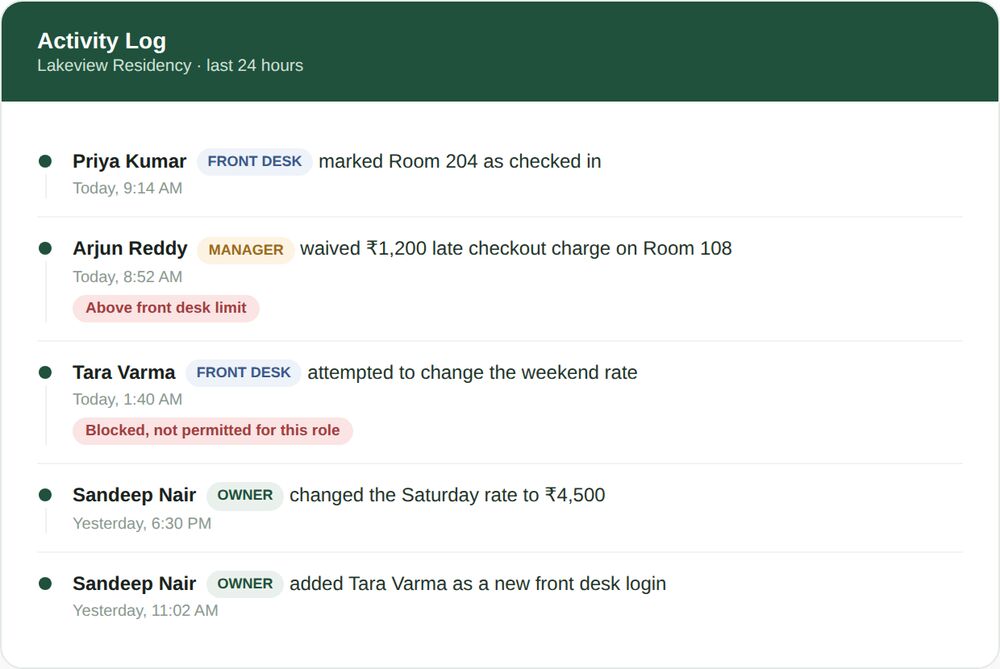
The activity log for Lakeview Residency, showing exactly who did what and when.
Instead of asking the whole team who remembers anything, the owner opens the activity log and sees it in seconds: Arjun, the manager, waived the charge at 8:52 AM, flagged automatically as above what a front desk login is permitted to approve on its own. A guest had complained about noise from the room next door and Arjun made a judgement call within his role’s limit.
The same log shows something else worth noticing. At 1:40 AM, Tara, on the night front desk shift, had tried to change the weekend rate and was blocked, because rate changes are not part of the front desk role. It turned out to be an honest mistake, Tara had misread a guest’s WhatsApp message as a rate negotiation rather than a simple date change request and the system stopping her prevented a rate error rather than causing a problem.
Neither of these took a phone call, a confrontation, or a guessing game to resolve. The owner had the full picture, who did what, when and whether it was within their role, in under a minute, from a login that only the owner has access to.
What changed afterward was small but real. The owner mentioned the waiver limit to Arjun the next time they spoke, not as a reprimand, since the decision had been reasonable, but as a quick confirmation that the limit was set at the right level. Tara’s blocked rate attempt became a two minute conversation about reading WhatsApp messages more carefully, rather than a mystery that quietly cost the property money without anyone noticing. Neither conversation would have happened at all under a shared login, because neither incident would have been traceable to a specific person in the first place.
Mistakes properties make without role-based logins
- Sharing one password across the whole team because setting up separate logins feels like unnecessary overhead for a small property.
- Giving every new hire full access by default, because it is faster than deciding what they actually need and never revisiting it later.
- Forgetting to remove a departed employee’s access, leaving a working login and password with someone who no longer works at the property.
- Discovering a pricing error or a waived charge and having no way to find out which of three shift staff was responsible.
- Writing the shared password somewhere insecure, a sticky note at the desk or an unlocked notes app, because everyone on the team needs to know it.
- Treating a manager and a front desk hire as functionally the same login, so a newer or more junior staff member ends up with the same pricing power as someone trusted with years of judgement.
- Assuming a verbal warning, telling the team informally not to change rates without asking, will hold up the same way an enforced role does, when in practice it depends entirely on everyone remembering and choosing to follow it under pressure.
None of these come from carelessness. They come from treating login access as an afterthought, something to set up once and never touch again, rather than something that should flex as the team, the shifts and the property itself grow.
It is worth noticing that the fix costs nothing extra in effort day to day. Once roles are set up, day to day work looks almost identical to sharing one login, everyone still logs in and does their job, the only difference is that the system now knows who is doing it.
A useful test for any property still on a shared login: ask whether anyone could confidently name who made the last three rate changes, or who approved the last waived charge, without checking with the whole team first. If the honest answer is no, that is exactly the gap staff logins with roles is built to close and it usually takes less time to fix than the next uncomfortable conversation about a discrepancy nobody can explain.
The same roles, whichever shift or property they are working
A rate changed from the front desk during a night shift, a charge waived by a manager covering for the owner on a day off, a booking edited by whoever happens to be on duty when a guest calls to modify their dates, all of it runs through the same role definitions, checked the same way every time.
This matters most exactly when a property is busiest and least able to afford a mistake, a full weekend with every shift covered by a different person and the owner unreachable. Roles that hold regardless of who is logged in or what time it is are what keep that weekend running smoothly instead of turning into a pricing free for all.
It also means the owner does not need to personally approve every small decision to stay in control. A manager can waive a reasonable charge without a phone call, a front desk hire can check a guest in without waiting for a go-ahead, because the boundaries of what each of them can do were already decided in advance, once, rather than negotiated fresh every single time something comes up.
How this fits with the rest of OpenStays
Staff logins sit underneath everything else in the account. The reservations dashboard already limits how much financial detail each login sees, this is what defines those limits in the first place and every rate change made through room and rate plan setup or seasonal pricing carries the name of the login that made it.
Guest ID records collected through hotel guest ID software stay visible to whichever roles need them for compliance, without being exposed to every login by default. For an operator running more than one property, this same role structure extends to multi-property management, where access is scoped per property on top of these same roles, so a manager at one property does not automatically see another.
Staff logins with roles vs. The alternatives
Most properties compare against whatever they are already doing rather than a competing piece of software, usually one shared login, or a paper sign-off sheet that tracks who is on shift but nothing about what they actually changed. Both feel adequate right up until the first time something needs to be traced back to a specific person.
| One shared login | A notebook sign-off sheet | Staff logins with roles | |
|---|---|---|---|
| Knows who did what | No, every action looks the same | Only if someone remembers to write it down | Yes, automatically, every time |
| Limits what a new hire can touch | No, full access from day one | No, paper cannot enforce anything | Yes, by role, from the first login |
| Survives a staff member leaving | No, the password has to change for everyone | No, the old habits and access remain | Yes, remove one login, nothing else changes |
| Works across shifts automatically | Password gets shared further each time | Depends on someone physically handing it over | Yes, each person logs in as themselves |
| Setup effort | None, but the cost shows up later | Low, but rarely kept up consistently | A few minutes per staff member, once |
GETTING STARTED
Setting up staff logins and roles
How to set up staff logins with roles on OpenStays.
1. Add each staff member as their own login
From the dashboard, add a login for each person on the team using their own name and phone number or email, rather than reusing one shared login for everyone.
2. Assign a role to each login
Choose Owner, Manager or Front Desk for each person based on what they actually need to do, not what feels convenient to grant.
3. Set any manager limits
Where relevant, set a limit on how much a manager login can waive or discount without needing the owner’s sign off.
4. Retire the old shared login
Once every current staff member has their own login, stop using any shared password that used to be passed around the team.
5. Review the roster periodically
Revisit the list of active logins every few months and remove access immediately when someone leaves the property.
What to check in any staff login system
- Does every staff member get their own login, or is the system still built around one shared account for the whole team?
- Are roles genuinely enforced, so a front desk login is technically blocked from changing a rate, not just asked nicely not to?
- Is every action, a rate change, a waived charge, a cancelled booking, recorded against the specific login that made it?
- Can a manager set a limit on what front desk or other managers can waive or discount without approval?
- Is removing a departed staff member’s access immediate, or does it require a support ticket or a delay?
- Does the same role structure extend cleanly if the property adds a second location later?
A system that cannot answer these clearly, OpenStays included, is worth asking harder questions about before the whole team is relying on it.
It is also worth asking how the system behaves at the edges, not just in the common case. What happens when a manager tries to exceed their waiver limit, does it block the action outright or simply log a warning that nobody reads? What happens the moment a login is removed, does access end immediately or only after the next time someone happens to check? Genuinely enforced staff logins with roles answer both of those with a clean, immediate no, not a soft suggestion that a determined person could work around.
What each role can and cannot see
An owner login sees the complete picture: every booking, every rate change, every guest record, full revenue and payout detail and the full list of staff logins on the account. This level of access exists for exactly one login per property by default, the person who holds ultimate responsibility for it.
A manager login sees enough to run daily operations well: bookings, guest details needed to serve them, the ability to change rates and waive charges within any limit the owner has set. Full payout and financial reporting detail stays with the owner unless explicitly extended.
A front desk login sees what is needed to handle guests directly: today’s arrivals and departures, the ability to check a guest in or out and take a payment against an existing booking and guest contact details for the stay in progress. Pricing controls, waivers and revenue reports are not visible from this role.
This is deliberately narrower than what many properties assume front desk staff need and that is by design. Checking a guest in, answering a question, taking a payment against a booking that already exists, none of it requires seeing what the property earned last month or what another guest paid for a different room. Narrowing what is visible by default is not a statement about trust, it simply matches access to the job actually being done.
Guest identity documents collected for compliance remain governed by the same guest ID controls used across OpenStays regardless of role, visible only to logins that legitimately need them, not exposed by default just because a login exists on the account.
None of these boundaries are visible to a guest and none of them slow down the parts of the job every role needs to do quickly, checking someone in, answering a WhatsApp question, confirming a booking. They only become visible at the exact moments they are meant to, when someone attempts something outside what their role, under staff logins with roles, is built to allow.
Frequently asked questions
How many staff logins can a property have?
The Medium plan for hotels and resorts supports multiple staff logins and the Enterprise plan for groups and chains supports multiple logins across multiple properties. The Small homestay plan is built around a single owner login. See the pricing page for exact plan details.
Can I create custom roles beyond Owner, Manager and Front Desk?
The three roles are built to match how most small and mid sized properties are actually staffed, rather than offering a granular permissions builder. If a property’s structure genuinely does not fit any of the three, reach out and it can be discussed directly.
What happens to a staff member’s login when they leave?
The owner or a manager with the right permission removes that login from the account. Access ends immediately, there is no delay or separate process to follow.
Can a manager set limits on what front desk staff can waive?
Yes. A manager or owner can set a limit on discounts and waivers that a front desk login can approve on its own, with anything above that limit requiring a manager or owner login.
Does each staff member need their own phone number or email?
Yes, each login needs its own way to be identified and, where relevant, verified. This is part of what makes the activity log meaningful, every login maps to one specific person.
Can staff log in from their own phone?
Yes. Each staff member logs in from their own device using their own credentials, there is no requirement to share a single device or account between shifts.
Will front desk staff know they are restricted, or does it just fail silently?
Front desk staff see a clear message when they attempt an action outside their role, such as changing a rate, rather than a silent failure or a confusing error.
Can I see a history of who changed a specific rate?
Yes. Rate changes are recorded with the login that made them and the time it happened, viewable from the dashboard by anyone with the access to see that detail.
Does this work the same way across multiple properties?
For an account managing more than one property, roles apply per property, so a manager at one location does not automatically have manager access at another unless explicitly granted.
Can the owner role be shared between co-owners?
Each co-owner can have their own Owner-level login rather than sharing one, so actions taken by each are still individually traceable.
Is there an extra cost for adding staff logins?
Staff logins with roles are included in the Medium and Enterprise plans at no extra per-login cost. Check the pricing page for current plan details.
What stops a front desk login from just asking the owner to approve everything by phone?
Nothing stops that as a workaround and for a genuinely urgent case it remains an option, but the limits exist so that it is the exception handled deliberately, not the default way charges get waived.
Can a role see guest ID documents?
Guest ID documents remain governed by OpenStays’ guest ID compliance controls, visible only to roles that need them for that purpose, not automatically exposed to every login.
What happens if I only have one person running the property?
A single owner login works exactly as it does today, nothing changes until a second person needs access, at which point roles are ready to use.
Can I downgrade a manager to front desk later?
Yes, a role can be changed for an existing login at any time from the dashboard, without needing to remove and recreate the login.
Does the activity log show actions taken through WhatsApp automation too?
Actions taken by the WhatsApp AI concierge on a guest’s behalf are logged separately from staff actions, so it stays clear which changes came from a person and which came from the automation.
What changes in the first month
The first week is mostly setup: adding each current staff member as their own login, assigning a role to each and agreeing on any manager limits for waivers and discounts. For a team of three or four people, this usually takes under half an hour in total.
The first time it visibly matters is usually the first small discrepancy after setup, a rate that looks different than expected, a charge that was waived and the owner checks the log instead of asking around the team and getting three different half-memories of what happened.
A handful of properties report a second, quieter effect: staff themselves start making slightly more careful decisions once they know an action is attached to their name rather than disappearing into a shared account. Nobody has to say this out loud for it to happen, knowing a waiver is traceable tends to be enough on its own.
By the end of the first month, checking who did what stops being a special investigation and becomes a normal, boring part of reviewing the week. Staff also tend to settle into their roles quickly, since most of what changes is invisible to their daily work, front desk still checks guests in the same way, they simply cannot accidentally, or otherwise, touch a rate that is not theirs to touch.
Owners who make the switch usually describe the same small shift in how they think about the property afterward: fewer moments of quietly wondering whether a number is right and more confidence signing off on a week’s numbers without having to double check them personally. That confidence is the actual point, the roles themselves are just the mechanism that gets there.
Give your team logins that match their job
No setup fee, no commission. Set up your first roles in about fifteen minutes.