
FOR GROUPS & CHAINS
Multi-property management
Running three properties should not mean three separate logins, three WhatsApp numbers to check and three sets of rates to update by hand. Multi-property management is what lets an owner or a small operations team see every property, every reservation and every guest conversation from a single account, without pretending a group is just one big property.
Built by property owners for property owners · 0% commission · Core feature, live today
ILLUSTRATIVE FEATURE OVERVIEW
Property portfolio
Property A
Its own rooms, rates and reservations
Property B
Separate availability and guest records
Property C
Manage another property from your account
Your team
Organise access for the people who help you
One login. Your properties.
What happens once there is more than one property
This page covers what changes once there is more than one property to run and how OpenStays keeps that manageable from a single account.
This page covers what breaks when property tools are built for one address at a time, what a genuinely group-aware setup looks like and how to evaluate any multi-property management option you are considering, OpenStays included.
Most booking tools, OpenStays included at its core, are built around a single property: one calendar, one rate sheet, one WhatsApp number, one dashboard. That works cleanly for a single address. The moment an owner opens a second homestay, or a hotel adds a sister property across town, the same tools either force a second, disconnected account or simply were not designed with a group in mind at all.
The practical result is fragmentation. A different login for each property. A separate WhatsApp number for each address, so a guest asking about availability at one property never reaches whoever is handling the others. Rates updated individually, property by property, with no shared view of what is happening across the group on any given day.
This is rarely a problem in the first few months after a second property opens. An owner who personally runs both places can hold the difference in their head for a while. It becomes a real problem once a small operations team is involved, once a manager is hired for one property but not the other, or once a third property makes it genuinely impossible for one person to keep every calendar and every conversation straight from memory.
The properties are often run by the same owner, the same small team and sometimes literally next door to each other and yet the software treats them as though they have nothing to do with one another.
This gap tends to appear earlier than owners expect. It is not something that only affects a chain with ten properties, it starts showing up the moment a second address exists, well before anyone would think to call what they are running a group at all.
The second property rarely arrives with warning either. It might be a homestay owner buying the house next door, or a hotel taking over a struggling neighbour’s lease and the software decision that made sense for one address stops making sense the same week the second one opens.
What running properties separately actually costs
The most immediate cost is missed messages. A guest messages the WhatsApp number for one property asking a general question about the group, or messages the wrong property by mistake and the reply either never comes or comes from someone with no visibility into the other address’s calendar.
There is a revenue-visibility cost too. An owner who wants to know how the group did this month, combined occupancy, combined revenue, which property is carrying the other, has to open each property separately and add the numbers up by hand, or simply stops checking as often as the decision actually deserves.
Staffing gets harder without a shared view. A team member who could genuinely help across two nearby properties instead needs two separate logins, two separate trainings and two separate habits, when the underlying work, replying to guests, checking a calendar, confirming a payment, is functionally identical from one property to the next.
Rate and policy consistency suffers as well. A group that wants the same cancellation policy or the same seasonal pricing logic across its properties has no easy way to apply a change once; each property has to be updated on its own and small inconsistencies creep in simply because nobody remembered to update every property the same way.
None of this is dramatic on any single day. It shows up gradually, as a slightly slower reply here, a slightly inconsistent rate there and an owner who genuinely could not tell you this month’s combined occupancy without opening three separate tabs and doing the arithmetic themselves.
The cost compounds specifically because it is invisible day to day. A single missed message or a single rate left out of sync rarely matters on its own, but a group running this way for a year accumulates dozens of small gaps, each individually forgivable, that together represent a meaningful amount of lost revenue and guest goodwill nobody ever quite traces back to its actual cause.
There is a hiring cost too. A group covering separate systems per property either needs someone dedicated to each one, which is expensive for a two or three property operation, or it needs the same one or two people learning several disconnected logins well enough to move between them without making mistakes.
What multi-property management actually looks like
On OpenStays, multi-property management means every property an owner or group runs sits under one account. A single login opens a portfolio view showing every property at once, or any one property individually, with the same booking engine and online payment gateway working the same way across all of them.
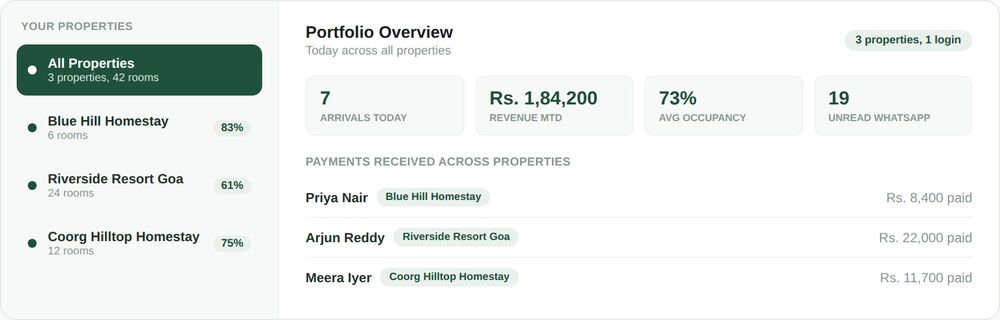
The portfolio view gives a combined picture across the group, today’s arrivals, revenue for the month, average occupancy, unread WhatsApp messages, all rolled up, alongside a per-property breakdown so an owner can see at a glance which address needs attention without opening it separately.
Switching into a single property from that view works exactly like the single-property dashboard, the same calendar, the same rate tools, the same reservation detail, scoped to just that address when that is what is actually needed.
None of this requires separate sign-ups or separate contracts per property. Adding a second or third property to an existing account is the same process as setting up the first one, just attached to the same login rather than starting over.
A WhatsApp inbox that spans the whole group
One inbox, every property tagged
Guest conversations from every property land in a single WhatsApp inbox, each one clearly tagged with which property it belongs to, so nothing gets missed simply because it came in on a different number.
Team access shared across properties
Staff and managers can be given access to the properties relevant to them from the same account, rather than a separate login and a separate training for each address they help with.
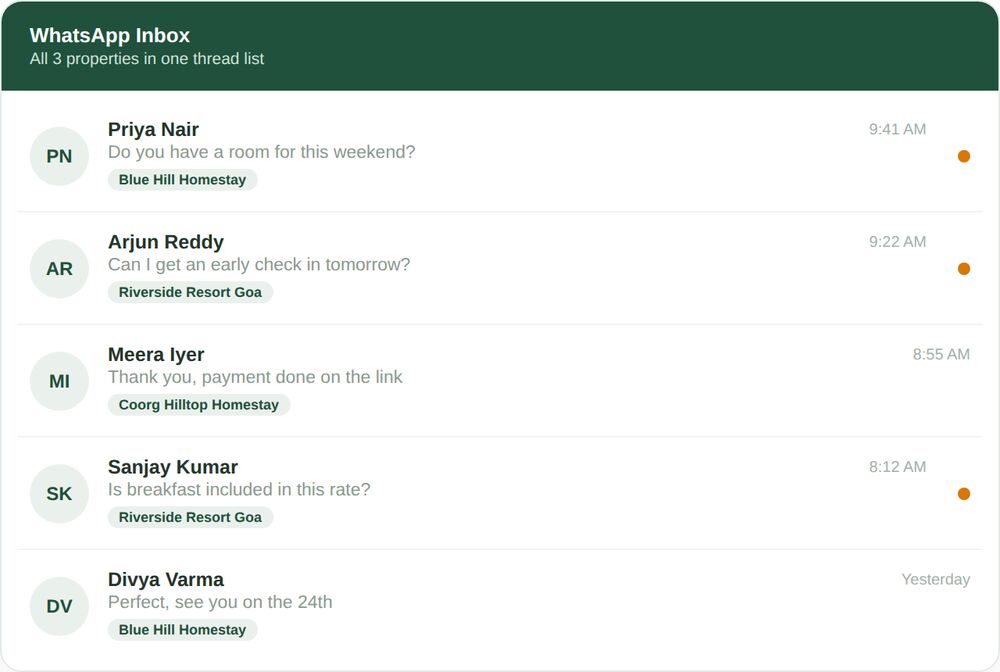
A guest asking a general question, or messaging the wrong property by habit, is still answered by whoever is covering the inbox that day, because the conversation is visible in the same place as every other property’s messages, not siloed off in a number nobody happens to be watching.
What a group account actually includes
A useful setup for running several properties covers four things well, rather than bolting a group label onto tools that were only ever designed for one address.
Booking engine and payment gateway, per property
Each property keeps its own booking engine and its own rooms, rates and calendar, so guests booking one address are never shown availability from another, while the underlying payment gateway works the same way across every property.
One combined view across the group
Arrivals, revenue and occupancy roll up into a single portfolio summary, so an owner can check how the whole group is doing without opening each property on its own.
Centralised WhatsApp inbox
Every property’s guest conversations sit in one inbox, tagged by property, so covering messages for the group does not mean watching several numbers separately.
Guest ID and compliance, per property
Long-stay guest records and C-Form flags stay scoped to the property a guest actually stayed at, keeping compliance accurate even when the same guest has stayed at more than one property in the group.
The guest ID and compliance piece deliberately stays property-specific rather than group-wide, since that is what the underlying legal record actually requires. It works the same way described in full on the hotel guest ID software page, just available from every property under the same account.
SEE IT IN ACTION
A homestay owner in Coorg adds a second property
Kavya ran a single six-room homestay for two years before opening a second, smaller property fifteen minutes away. Her first instinct was to simply repeat what already worked, a separate booking setup and a separate WhatsApp number for the new place, the same way she had done everything for the first property.
Within a month she noticed guests messaging the original number asking about the new property, since it was the number they already had saved from a previous stay and those messages were easy to miss because nobody was specifically watching for them. Moving both properties under one account put every conversation in a single inbox, tagged by property, so a message meant for the new homestay no longer depended on someone remembering to check a second phone.
The portfolio view also gave her, for the first time, a combined occupancy number across both properties on the same screen, useful on the handful of weekends when one property filled up and she wanted to offer the overflow guest the other one directly instead of losing the booking entirely.
A year on, Kavya describes the second property as feeling like a natural extension of the first rather than a second job bolted onto the original one, largely because checking on it never requires switching accounts, phones or trains of thought partway through her day.
A boutique hotel group across two cities keeps rates consistent
Rohan’s group runs a twelve-room hotel in one city and an eighteen-room property in another, both positioned with the same brand and the same cancellation policy. Before moving to one account, updating a policy change meant logging into two separate setups and making sure the wording matched, a step that occasionally got missed on one property and not the other.
With both properties under a single login, his small operations team can see both calendars from the same portfolio view and apply the same seasonal pricing logic without switching accounts. A staff member covering the WhatsApp inbox for one property while the other’s manager is on leave can do so from the same login they already use daily, rather than needing a second set of credentials created and then deactivated afterward.
Rohan now reviews combined revenue for the group every Monday morning from the portfolio summary alone, a five-minute check that previously meant compiling numbers from two separate dashboards by hand.
A resort group avoids a compliance mix-up across properties
A guest of Meenal’s resort group stayed at one property in March and a sister property in June. Because guest ID records stayed correctly scoped to each property while remaining visible from the same account, the front desk at the second property could see that the guest had stayed at the group before without the two properties’ compliance records ever being merged or confused with one another.
When a foreign national guest triggered a C-Form flag at the second property, it was raised against that specific stay at that specific property, exactly as the regulation requires, rather than getting tangled up with an unrelated stay elsewhere in the group months earlier.
Meenal has since made a habit of checking the group’s combined compliance status from one account before month-end, instead of asking each property’s front desk to confirm separately that nothing was missed.
Mistakes groups make without a shared account
- Running a second property on a completely separate booking setup, with no shared view of the two calendars or the two guest lists.
- Keeping a separate WhatsApp number per property with nobody covering all of them at once, so messages to a quieter property sit unanswered longer than they should.
- Updating a rate or policy change on one property and forgetting to repeat it on the others, so the group’s pricing quietly drifts out of sync.
- Creating and deleting separate staff logins every time someone needs to help cover a different property temporarily.
- Having no combined revenue or occupancy view, so a genuinely simple question, how did the group do this month, takes real effort to answer.
- Onboarding a new staff member separately for each property they might need to help with, instead of granting one login that already reflects which properties they are allowed to see.
None of these come from carelessness. They are what happens by default when a group grows out of tools built for a single address, one property at a time, with nobody deciding on purpose to fragment the operation this way.
The fix is not more discipline from the team. It is one account that already understands there is more than one property attached to it, so nothing has to be manually kept in sync across separate setups in the first place.
It is worth noticing that every mistake on this list is a coordination problem, not a hospitality problem. None of them happen because staff do not care about guests, they happen because the tools underneath were never told that more than one property existed.
One account, however many properties you add
Adding a second, third or further property to an existing OpenStays account uses the same setup steps as the first one, rooms, rates, calendar, WhatsApp number, just attached to the same login rather than a separate sign-up. There is no cap baked into the idea of a group account; a two-property homestay group and a twelve-property chain use the same underlying structure.
Staff access can be granted per property, so a manager who only runs one address in a larger group does not need visibility into every other property to do their job, while an owner or a small central team can see the whole portfolio from the same account.
Each property keeps its own identity, its own rooms, its own rates, its own booking page, guests booking one address never see another property’s availability mixed in. The group-level view is additive, a combined summary layered on top of properties that continue to operate independently underneath it.
How this fits with the rest of OpenStays
Each property still gets its own reservations dashboard for the day’s arrivals, revenue and WhatsApp activity and the same hotel booking software stack, booking engine, WhatsApp concierge, rooms and rates, occupancy calendar, guest ID, running underneath it. This page adds the layer on top, seeing and acting on all of it from one account instead of switching between separate logins for each address.
Each property under a group account still runs on the same direct booking engine and payment gateway as a single-property setup, the group layer sits on top rather than replacing what already works at the property level.
The WhatsApp AI concierge continues to answer guests for each property individually, now visible in the same shared inbox and each property’s occupancy calendar and guest ID compliance stay exactly as accurate as they would on their own, just reachable from one login instead of several.
Multi-property management vs. Running properties separately
| One group account | Separate accounts per property | Manual spreadsheet roll-up | |
|---|---|---|---|
| Combined revenue and occupancy view | Yes, built in | No, must be compiled manually | Possible, but manual and easy to fall behind on |
| Guest messages seen in one inbox | Yes, tagged by property | No, one number per property | Not applicable |
| Staff can be granted access across properties | Yes, from one login | No, separate credentials per property | No |
| Rate and policy changes applied consistently | Easier, visible side by side | Depends on remembering to repeat the change | Manual and error prone |
| Guest ID compliance stays property-accurate | Yes, scoped correctly per property | Yes, but isolated with no group visibility | Depends on the underlying system |
| Setup effort to add a new property | Same steps, same login | A full new account each time | Not applicable |
Separate accounts per property are not wrong, exactly, they simply were not built with a second address in mind, so a group ends up doing by hand whatever the software does not do for it, adding up revenue, checking two inboxes, remembering to repeat a policy change.
A spreadsheet roll-up is the honest middle ground many groups land on, useful for a monthly summary, but it depends entirely on someone reliably updating it and it never actually helps with the day-to-day work of answering guests or updating a calendar.
What changes with a genuine multi-property management setup is not that any single property works differently. It is that the group finally has one place to see, staff and run all of them, instead of treating multiple properties as multiple, unrelated businesses that happen to share an owner.
SETUP
Adding a second property to your account
If you already run one property on OpenStays, adding another takes the same steps as your first setup, just under the same login.
Add a second or further property to an existing OpenStays account without starting a new sign-up.
1. Open your account and choose to add a property
The same login used for your first property lets you add another rather than requiring a separate account.
2. Set up rooms, rates and the calendar for the new property
The same setup steps as your first property, kept entirely separate from any other property’s rooms and rates.
3. Connect a WhatsApp number for the new property
Conversations from the new number appear in the same shared inbox, tagged with the new property’s name.
4. Grant staff access to the properties they need
Give a manager or team member visibility into just the properties relevant to them, or the whole portfolio if their role needs it.
5. Check the portfolio view
Confirm the new property appears alongside your existing ones in the combined revenue, occupancy and WhatsApp summary.
BEFORE YOU CHOOSE
What to check in any multi-property management setup
- Does adding a second property require a genuinely separate account, or does it attach to the one you already have?
- Do guest messages from different properties land in one inbox, or does each property need its own number watched separately?
- Can staff be granted access to specific properties rather than an all-or-nothing view of the whole group?
- Is there a combined revenue and occupancy view, or does checking the group mean opening each property on its own?
- Does guest ID and compliance stay accurately scoped to the property a guest actually stayed at?
- Is there any hard limit on how many properties one account can hold and does pricing scale sensibly as a group grows?
This is worth checking against any option you are evaluating, OpenStays included. A single-property dashboard that simply gets duplicated per property is not the same thing as software genuinely built for a group.
Who can see what across a group account
Access across a group account is granted per property, an owner or central team can see the whole portfolio, while a property-level manager sees only the properties they are responsible for, rather than every guest and every conversation across the entire group by default.
A property’s guest data, bookings, WhatsApp conversations, guest ID records, stays tied to that property. The portfolio view surfaces combined numbers, revenue, occupancy, message counts, without exposing one property’s individual guest details to staff at another property who have no reason to see them.
Adding or removing a staff member’s access to a specific property takes effect immediately from the same account, no separate login needs to be created or deactivated on a different system when someone’s role or property assignment changes.
QUESTIONS
Frequently asked questions
What is multi-property management for a hotel group or chain?
Multi-property management is running more than one property from a single account, one login for the booking engine, WhatsApp inbox, staff access and guest ID compliance across every property in a group.
How is this different from the reservations dashboard?
The reservations dashboard covers one property’s daily view. This covers what changes once there is more than one property, a combined portfolio view plus the ability to move into any single property individually.
Do I need a separate OpenStays account for each property?
No, additional properties attach to the same login as your first one rather than requiring a new sign-up each time.
Do guest messages from different properties get mixed together?
No, every conversation is tagged with the property it belongs to, even though they all appear in the same inbox.
Can I give a manager access to only one property in the group?
Yes, access can be granted per property, so a property-level manager sees only what is relevant to their property rather than the whole group by default.
Does each property keep its own rooms and rates?
Yes, each property’s booking engine, rooms and rates stay entirely separate, guests booking one address never see another property’s availability.
Is there a limit to how many properties one account can hold?
No practical limit, the same account structure works whether a group runs two properties or considerably more.
How does guest ID compliance work across properties?
Guest ID and C-Form flags stay scoped to the specific property a guest actually stayed at, even if the same guest has stayed at more than one property in the group.
Can I see combined revenue across all my properties?
Yes, the portfolio view rolls up revenue, occupancy and WhatsApp activity across every property, alongside a per-property breakdown.
What happens if I only have one property today but plan to grow?
You can start with a single property and add more to the same account later, without migrating or rebuilding anything you have already set up.
Does the WhatsApp AI concierge work the same way across properties?
Yes, it continues to answer guests per property, now visible in the same shared inbox rather than a separate number for each address.
Can staff move between properties within the group?
Yes, a staff member’s access can be updated to cover a different property or additional properties at any time from the same account.
Is pricing different for a multi-property account?
Pricing scales with the number of properties and rooms in a group. Current details are on the pricing page.
Does each property need its own payment gateway setup?
The payment gateway works the same way across every property under the account, without a separate setup required for each one.
Can I remove a property from a group account later?
Yes, a property can be removed from the account without affecting the setup or history of the other properties in the group.
Is this suitable for a two-property homestay group, not just larger chains?
Yes, the same structure works for a two-property group as it does for a larger chain, there is no minimum size requirement.
What changes in the first month
The first visible change is usually the WhatsApp inbox, guest conversations that used to sit on a second phone or a separate number now show up in the same place as everything else, tagged clearly by property so nothing needs to be guessed at.
Within the first couple of weeks, checking the portfolio view before a Monday morning becomes a habit that replaces whatever manual roll-up, a spreadsheet, a set of separate logins, was previously being used to answer the simple question of how the group is doing.
Staff coverage gets easier almost immediately once access can be granted per property from one account, rather than a new login being created and later cleaned up every time someone needs to help cover a different address.
By the end of the first month, most owners report the biggest change is not any single feature but the fact that running a second or third property finally feels connected to the first, instead of feeling like operating two or three separate small businesses that happen to share a bank account.
A second, quieter shift tends to show up once rate or policy changes come up. Updating something once and seeing it reflected consistently, rather than remembering to repeat the change property by property, stops being something anyone has to think about at all.
Owners who were previously the only person who could answer a question about the whole group often notice, by month’s end, that a manager or a family member can now answer the same question just as easily from the same portfolio view, without needing to ask around first.
Who this actually helps
Owners who have opened, or are about to open, a second property benefit from starting on one account from day one, rather than migrating two separate setups together later once the fragmentation has already caused real friction.
Small hotel and homestay groups with a shared owner or central team benefit most directly, since the combined portfolio view and shared WhatsApp inbox replace exactly the manual coordination that groups of this size usually rely on instead.
Chains with dedicated managers per property still benefit, since access can be scoped so each manager sees only their own property while ownership retains the full group view above them.
Any group currently keeping two or more properties on entirely separate booking setups, with no shared view of revenue, occupancy or guest messages, is the clearest case for moving to one account, since that fragmentation is exactly what this replaces.
It is less necessary for an owner who intends to keep a second property permanently separate in every sense, run under a different brand, a different team and a different guest experience on purpose. Even then, the shared WhatsApp inbox and combined revenue view tend to be useful enough that few owners actually choose to keep things apart once they see the alternative.
Every property you run, one login away.
Multi-property management on OpenStays keeps each property’s booking engine, rates and guest ID compliance intact, while giving you one combined view and one WhatsApp inbox across the whole group.