
FOR HOMESTAYS, HOTELS & RESORTS
Occupancy calendar
Which rooms are booked tonight. Which are blocked for maintenance. Which are sitting open with nobody looking at them. An occupancy calendar for hotels puts every room against every date on one screen, so the answer is a glance rather than a search across three different places.
Built by property owners for property owners · 0% commission · Core feature, live today
ILLUSTRATIVE FEATURE OVERVIEW
Availability view
Available
Dates open for a direct booking
Reserved
Confirmed stays recorded in OpenStays
Blocked
Dates you have closed for sale
External calendars
Check availability while iCal refreshes
See your rooms and dates
How properties actually check what is free tonight
This is not the reservations dashboard and it is not a rate calendar. The dashboard summarizes arrivals, revenue and pending requests. A rate calendar shows what a room costs. This shows, room by room and night by night, exactly who or what is occupying it.
This page covers what an occupancy calendar for hotels actually shows, how it differs from the reservations dashboard and from room and rate plan setup, how blocking dates works and how it fits alongside seasonal pricing and the rest of OpenStays.
Ask a property owner whether Room 204 is free next Tuesday and the honest process usually involves checking a booking inbox, scrolling a WhatsApp thread and maybe opening an OTA extranet, before answering with something less than full confidence.
Each booking channel tends to know about its own reservations and nothing about the others. A direct booking made through the website is invisible to whoever is only looking at the OTA extranet. A stay confirmed over a phone call and written in a notebook is invisible to everyone except whoever wrote it down. None of these pictures is wrong on its own, but none of them is complete either.
The risk this creates is not hypothetical. A room genuinely available on one channel gets sold again on another before anyone notices the overlap and the property discovers the double booking only when two guests arrive expecting the same room on the same night.
The occupancy calendar shows each room against each date using reservations and blocks recorded in OpenStays. Direct bookings update the calendar. Compatible iCal feeds import blocked dates periodically and do not transfer full booking details.
This matters as much for a four room homestay as it does for a forty room resort, since the underlying problem, information about the same rooms scattered across places that do not talk to each other, does not go away just because a property is small. A homestay owner juggling a website widget and a single OTA runs into exactly the same kind of overlap a larger property runs into with five channels, just less often, which if anything makes it easier to miss when it does happen.
Not the dashboard and not a rate calendar
The reservations dashboard answers a different kind of question: who is arriving today, what needs a decision, how is revenue tracking this week. It is a summary built for quick daily checks, not a room by room grid.
A rate calendar, the kind seasonal pricing rules produce, shows what a room costs on a given night. An occupancy calendar shows something different: whether that room is actually booked, blocked or open on that night, regardless of what it costs. The two are related but answer different questions, one about price and one about availability.
Room and rate plan setup defines your room types and prices. The occupancy calendar shows reservations and blocks recorded against those rooms in OpenStays.
It helps to think of the three as answering three separate questions in sequence. Room and rate plan setup answers what do I sell and what does it cost. Seasonal pricing answers how should that cost change by date. The occupancy calendar answers, regardless of cost, is this room actually booked, blocked or open tonight. Confusing any two of these tends to be where properties get stuck, expecting a pricing tool to answer an availability question or the other way around.
What poor visibility into occupancy actually costs
A double booking discovered at check in is the most visible cost and usually the most expensive one, an apologetic conversation, a relocation to another property if one can be found on short notice and a guest who will remember the experience regardless of how well it is handled afterward.
A maintenance issue that never gets marked as a block keeps a room appearing available until a guest is checked into a room with a broken air conditioner or a leaking tap that staff already knew about but never removed from sale.
A long, genuinely empty stretch of nights on a specific room can go unnoticed for weeks if nobody is looking at occupancy directly, a gap that a modest discount or a bit of promotion could likely have filled, quietly costing revenue that nobody realized was on the table.
Staff time is its own cost. Cross checking three channels before confirming a booking takes minutes every time it happens and it happens every single day a property is taking reservations, adding up to a meaningful chunk of a week spent reconciling information that should have agreed with itself from the start.
There is a reputational cost too, harder to quantify but just as real. A guest who experiences a double booking, or arrives to a room that was supposed to be under maintenance, tends to describe that experience to others exactly as it happened, regardless of how graciously the property handles the recovery. Trust lost this way is slow to rebuild and costs nothing to have avoided in the first place.
What an occupancy calendar for hotels actually shows
Every room, from every room type, appears as its own row. Every date in the visible range appears as a column. Each cell shows the state of that room on that night: booked and showing which guest, blocked and showing it is intentionally offline, or open and available to sell.
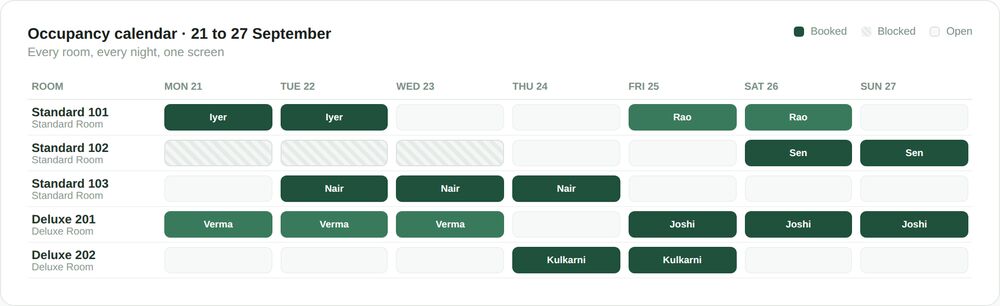
Bookings confirmed in OpenStays and reservations entered by staff appear against the relevant rooms and dates. An iCal feed can add external blocked dates after its next refresh. Imported blocks do not include a full OTA reservation record.
Tapping a booked cell shows the guest’s name, the length of stay and which channel it came through, without needing to leave the calendar to look it up elsewhere. Tapping an open cell is the fastest way to enter a manual booking directly against that exact room and date.
The calendar scrolls forward and back freely, so a property can look a week ahead for day to day operations or several months out when planning around a known event or festival season, without the view being limited to whatever window a smaller widget might otherwise impose.
What the calendar is built to do
Reservations and blocks, one grid
Direct, WhatsApp, agent and manually entered OTA bookings all appear on the same calendar, in the same format, so there is one place to check rather than several that might disagree.
Blocking without deleting
A room can be taken off sale for maintenance, a personal stay or any other reason, for a specific date range, without touching its configuration or affecting bookings outside that range.
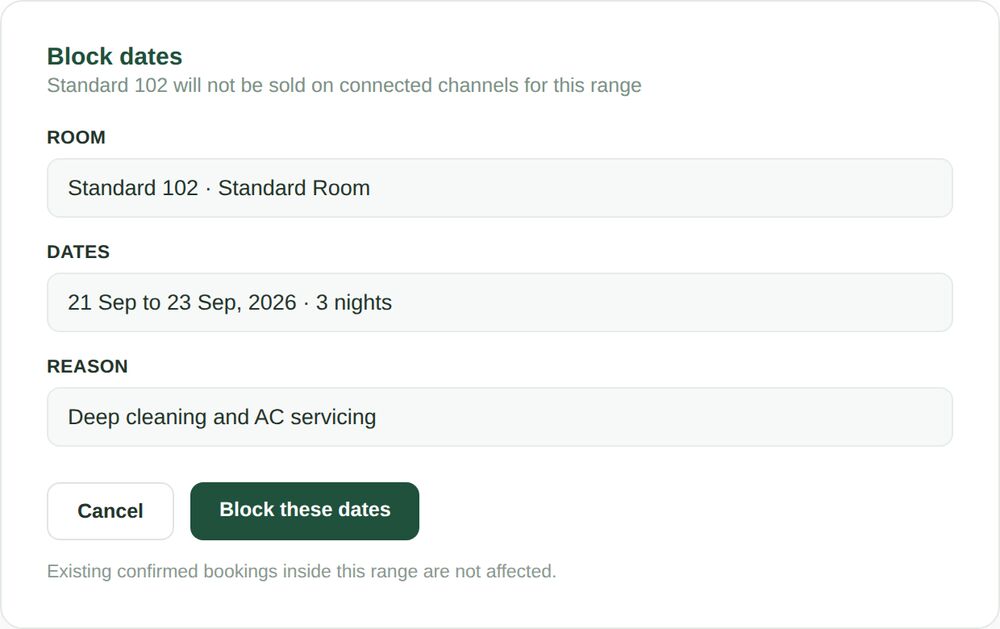
A block is visually distinct from a booking at a glance, so nobody mistakes a maintenance hold for an occupied room or vice versa when scanning across a week. Blocks and bookings can sit side by side on the same calendar without either one being ambiguous about which is which.
A block can also carry a short note, deep cleaning, a family stay, plumbing repair, so anyone scanning the calendar later understands the reason without needing to ask whoever set it up, which matters most on exactly the days that person is not around to answer.
What owners actually look for on the calendar
A handful of quick checks repeat across almost every property that uses an occupancy calendar for hotels regularly, regardless of size.
Are there any gaps worth filling
A short empty stretch on a specific room, worth a discount or a bit of outreach to fill before the dates pass by unused.
Did that block actually take effect
Confirming a room marked for maintenance is genuinely showing as blocked everywhere, not just in the place it was originally marked.
Is anything close to a double booking
Scanning for a room that looks unusually full across overlapping dates from different channels, worth a second look before it becomes a real conflict.
How does this week compare to next
A side by side sense of which week has more open nights, useful for deciding where to focus a promotion or a seasonal rule.
None of these checks require any special training. They are the same questions an owner would ask themselves regardless of the tool, answered faster because every room and every date are already on one screen instead of scattered across separate channels.
Many owners settle into checking the calendar at roughly the same point in their day, alongside a morning coffee or right before responding to overnight WhatsApp messages, the same way they might have once glanced at a paper register, except the picture is now complete rather than partial.
SEE IT IN ACTION
A homestay in Gokarna catches a near double booking
Priya runs a six room homestay and takes bookings directly, over WhatsApp and through two connected OTAs. Scanning her occupancy calendar on a Sunday evening, she notices Room 3 shows as booked from two different sources for an overlapping two night stretch the following weekend.
She checks both bookings directly from the calendar, confirms one was a WhatsApp enquiry that never actually completed payment and should have been released and cancels the stale hold before it becomes a real conflict. The whole check takes under five minutes, entirely from the calendar view, without needing to open a separate app or extranet.
Without the calendar, she would likely not have noticed the overlap until a guest arrived expecting a room that was, by then, genuinely double booked, at which point the options for fixing it would have been considerably worse.
She now makes the same scan a habit every Sunday evening, a five minute check that has caught two more near misses since, both stale WhatsApp holds that quietly aged past the point anyone was going to pay, exactly the kind of thing that is easy to miss without a single combined view to catch it.
A twenty room hotel in Manali blocks rooms during a shift handover
Vivek’s hotel is repainting two rooms on the top floor, work that will take four days. Rather than relying on the outgoing shift to verbally tell the incoming shift which rooms are off limits, he blocks both rooms on the calendar for the exact date range, with a note explaining why.
Every staff member checking the calendar for the rest of the week sees the same block, with the same reason, regardless of who is on shift or whether they were there for the verbal handover. A guest is never accidentally checked into a room mid repaint because the calendar itself is the single, current source of truth.
When maintenance finishes, remove the block to reopen those dates in OpenStays. Check connected external calendars after their refresh and update any unsupported channel separately.
A resort in Coorg spots a gap and fills it with a seasonal rule
Anand notices, scanning three weeks out on his occupancy calendar, that a normally popular room type shows an unusually long empty stretch across a set of midweek dates that would otherwise pass by unused.
Rather than guessing at a fix, he sets a short term discount as a seasonal rule for exactly those dates, then watches the calendar over the following days as the gap fills in with new bookings, giving him a direct, visible read on whether the discount worked.
The calendar told him where the problem was. Seasonal pricing gave him a tool to respond to it. Neither would have been as useful without the other, since a discount set blindly, without knowing which dates actually needed it, is far less likely to be well targeted.
A month later, the same midweek stretch is booking normally again and Anand lets the short term discount lapse rather than leaving it running indefinitely, checking the calendar periodically to confirm the gap has not quietly reopened before deciding the fix genuinely held.
Mistakes that quietly undermine the calendar’s usefulness
A calendar is only as reliable as the discipline behind keeping it current and a handful of recurring habits are worth avoiding.
- Taking a room offline informally, by telling staff verbally, instead of blocking it on the calendar where every channel and every staff member can see the same thing.
- Leaving a stale, unpaid WhatsApp enquiry marked as a hold long after the guest has gone quiet, instead of releasing it so the room shows accurately as open.
- Checking the calendar only when a problem is suspected, rather than as a quick regular habit that catches problems before they become guest facing.
- Blocking a wide date range out of caution when only a couple of nights are actually affected, needlessly hiding otherwise sellable nights from every channel.
- Assuming a block on one channel’s own extranet automatically applies everywhere, rather than checking the shared calendar to confirm every channel is showing the same thing.
Most of these are habits rather than technical problems and most fix themselves once checking the calendar becomes a normal, quick part of how a property runs day to day rather than something reached for only after something has already gone wrong.
Properties that settle into a quick daily or weekly habit of scanning the calendar tend to stop running into these mistakes almost entirely, since most of them are the kind of thing a five minute glance catches early, long before they turn into a guest facing problem.
Direct bookings and external calendar blocks
OpenStays bookings and manually entered reservations appear in the calendar. Compatible OTA iCal feeds share blocked dates on a periodic refresh. They do not sync room rates, guest details or complete reservation records.
This does not remove the need to keep OTA extranets themselves updated for rooms sold outside OpenStays entirely, but it does mean there is one reliable place to check the combined picture across every channel at once, rather than needing to open each channel separately to piece the same picture together by hand.
Before adding a channel, check whether it supports a compatible iCal feed. Track unsupported channels manually and review pending calendar updates before confirming the same room elsewhere.
How an occupancy calendar for hotels fits with the rest of OpenStays
The calendar shows the result of every booking made against your room setup, room types and rates included, updated in real time. The reservations dashboard draws on the same underlying booking data for its arrivals list and revenue figures, so the two stay consistent with each other rather than showing conflicting pictures.
When a seasonal pricing rule changes what a room costs on a given night, the calendar itself still shows the same thing it always shows: whether that room is booked, blocked or open. Price and occupancy are tracked separately and displayed together, which is what makes it possible to spot a gap on the calendar and respond to it with a pricing rule, the way Anand did with his resort in Coorg.
None of this requires switching between separate tools. The calendar, the dashboard and seasonal pricing all read from the same account, so a change made in one is reflected in the others without any manual step to keep them aligned.
Occupancy calendar for hotels vs. The alternatives
| Occupancy calendar | Checking each OTA separately | Paper or whiteboard | |
|---|---|---|---|
| Shows every channel together | OpenStays records and imported iCal blocks | No, one channel at a time | Only if updated by hand for each |
| Risk of a missed double booking | Reduced with current records; iCal delays remain | High, nothing cross checks | High, depends entirely on memory |
| Blocking a room for maintenance | A few taps in OpenStays; external refresh required | Must be repeated per channel | Easy to forget to note or erase |
| Speed of answering is a room free | Seconds | Minutes, checking each channel | Depends on whether it is current |
| Works from a phone | Yes | Depends on the OTA app | No |
| Setup required | None beyond room and rate setup | Not applicable | None, but constant upkeep |
Checking each OTA extranet separately is not unreasonable for a property with a single channel, but it stops scaling the moment a second or third channel is added, since nothing about checking three separate places gets easier with practice.
A paper calendar or whiteboard can work for a very small property with simple, infrequent bookings, but it depends entirely on someone remembering to update it the moment anything changes and it cannot be checked from anywhere except wherever the board physically is.
The honest case for an occupancy calendar for hotels is not that a whiteboard or a single OTA extranet is a bad tool. It is that neither one was built to represent every channel a modern property actually sells through and the gap between what they show and what is really happening only widens as more channels get added.
SETUP
Getting your occupancy calendar accurate
Most properties have a fully accurate calendar within the same day they finish room and rate setup, since the calendar is built directly on top of it.
Most properties have a fully accurate calendar within the same day they finish room and rate setup.
1. Confirm your room and rate setup is current
The calendar is only as accurate as the room types and units it is built on, so this is worth checking first if it has not been touched recently.
2. Connect any OTAs you sell through
Connect a compatible OTA iCal feed to import blocked dates. Refreshes are periodic and complete booking details are not imported. Enter other external reservations manually.
3. Enter any existing manual bookings
Phone or agent bookings already on the books before switching over should be added once so the calendar reflects reality from day one.
4. Block anything genuinely not sellable right now
Rooms under maintenance or reserved for personal use should be blocked immediately so they never show as available by mistake.
5. Make checking the calendar a daily habit
A quick daily glance is what catches a stale hold or a maintenance block that was never cleared before it becomes a guest facing problem.
BEFORE YOU CHOOSE
What to check in any occupancy calendar for hotels
- Does it show every booking channel on one grid, or does each channel need to be checked separately?
- Can a room be blocked for a specific date range without affecting bookings outside that range?
- Is it clear at a glance which cells are bookings and which are blocks, or do the two look similar enough to confuse?
- How quickly does a new booking from any channel actually appear on the calendar?
- Can it be checked from a phone, or does it require a desktop screen to be usable?
- Does tapping a booking show enough detail, guest name, length of stay, channel, to be useful without leaving the calendar?
This applies regardless of which platform a property ends up using. A calendar that genuinely combines every channel is worth checking for specifically, alongside calendar sync and guest ID handling if those are also part of what you are evaluating.
Who can see and change the calendar
The occupancy calendar is visible to whoever has access to your OpenStays account and access can typically be limited to specific staff members rather than shared as a single login used by everyone.
A block or a manual booking entered on the calendar takes effect immediately and is reflected the next time anyone, on any device, checks it, without a delay or a separate refresh step.
Guest details attached to a booking, including any identity documents collected, are stored under the same guest ID compliance controls used across OpenStays, rather than sitting loosely inside the calendar itself as an unsecured note.
Removing a staff member’s account access removes their ability to view or change the calendar immediately, without needing to separately track down whatever informal access they might have had through a shared login or a printed copy left lying around the front desk.
QUESTIONS
Frequently asked questions
How is this different from the reservations dashboard?
The dashboard is a daily summary: arrivals, revenue, pending requests. The occupancy calendar is a room by room, night by night grid showing exactly what is booked, blocked or open. Many owners check both, for different reasons.
Does a booking from an OTA appear automatically?
Compatible iCal feeds can import the OTA’s blocked dates after a refresh. Guest details and full booking records need to be recorded separately. Reservations from unsupported channels must be entered manually.
Can I block a room without giving a reason?
A reason is optional but recommended, since it helps other staff members understand why a room is unavailable without needing to ask.
What happens to a booking if I block a room by mistake?
An existing confirmed booking inside a blocked range is not affected or hidden. The block only prevents new bookings from being made against that room for those dates.
How far in advance does the calendar show?
There is no fixed limit. Most owners check a week or two ahead day to day and look further out when planning around a specific event or season.
Can I see which channel a booking came from?
Yes, tapping any booked cell shows the guest name, length of stay and the channel the booking came through.
Does the calendar prevent double bookings automatically?
OpenStays checks its current availability for direct reservations. iCal updates are not instant, so another channel can accept a booking before the next refresh. Review external availability during that delay and keep unsupported channels updated.
Can I use the calendar on my phone?
Yes, it is built to be checked from a phone as easily as from a desktop, since most day to day glances happen on mobile.
Is there a limit to how many rooms it can show?
No practical limit. A six room homestay and a forty room resort both use the same calendar.
Can staff with limited access still view the calendar?
Yes, view access can typically be granted without giving full edit permissions, so staff can check availability without being able to change bookings or blocks.
How do I unblock a room once maintenance is finished?
Removing a block takes a few taps and the room becomes immediately available again everywhere the calendar is checked.
Does the calendar show pricing?
No, pricing is shown on a rate calendar as part of seasonal pricing. The occupancy calendar focuses specifically on booked, blocked and open status.
Can I filter the calendar to show only one room type?
Yes, the calendar can be filtered down to a specific room type when a property has several and only wants to focus on one at a time.
What if two channels both show a room as available at the same time?
Check both channel records before confirming another reservation. iCal refresh delays can cause conflicts even when feeds are connected. Update the affected calendars and resolve any overlapping reservation with the guest.
Is the occupancy calendar included in the base OpenStays plan?
Yes, it is part of the core platform rather than a separate add on. Current plan details are covered on our pricing page.
Why does a property need an occupancy calendar for hotels instead of just checking each OTA?
Checking each OTA separately works only as long as there is one channel to check. The moment a second channel is added, nothing about checking two or three separate extranets gets faster or safer, which is the specific problem a combined calendar is built to remove.
Can I add a room to the calendar after it is already in use?
Yes, a new room type added through room and rate plan setup appears on the occupancy calendar immediately, with every night showing open until bookings or blocks are added against it.
What changes in the first month
The most immediate change is confidence. Answering whether a room is free next Tuesday stops requiring a check across three places and becomes a glance at one screen, accurate regardless of which channel the question came from.
By the second or third week, blocking a room for maintenance or a personal stay becomes a habit rather than something occasionally forgotten, since it takes seconds and is visible to everyone immediately, removing the awkward conversations that used to follow a guest being checked into a room that was supposed to be offline.
Near double bookings, the kind Priya caught on her Gokarna homestay, start getting noticed before they become real conflicts, simply because scanning the calendar surfaces an overlap that would otherwise have stayed invisible until a guest arrived.
None of this requires a new way of running the property. What changes is that the picture everyone, owner, staff and every connected channel, is looking at finally agrees with itself, rather than three separately maintained versions that only occasionally match.
Owners who track this kind of thing often describe the change less as a single dramatic fix and more as a steady reduction in small, avoidable mistakes, the kind that used to happen every few weeks and now mostly do not, simply because the information behind every decision is accurate before the decision gets made.
Who an occupancy calendar for hotels actually helps
A property selling across multiple channels, direct, WhatsApp and one or more OTAs, benefits most, since the risk of a channel level double booking rises with every additional channel that is not visible from a single combined view.
A hotel or resort can block rooms for maintenance in OpenStays so the team sees the same direct availability. Compatible external calendars reflect blocks after their next refresh. Unsupported channels need a separate update.
An owner who wants to spot revenue opportunities, an unusually empty stretch worth a discount, a room that keeps filling up faster than others, benefits from having occupancy visible at a glance rather than needing to infer it from scattered booking records.
Any property already using seasonal pricing or the reservations dashboard gets more value from both once the calendar is part of the daily routine, since it is the piece that shows, concretely, what those other tools are working with.
See every room, every night, on one calendar.
The occupancy calendar runs on the same OpenStays account as your booking engine and reservations dashboard. Nothing new to install.