
FOR HOMESTAYS, HOTELS & RESORTS
Hotel reservations dashboard
Direct bookings, WhatsApp enquiries, agent bookings and manually entered OTA stays end up in a dozen different places. A hotel reservations dashboard puts every reservation, every pending request and every rupee of revenue on one screen, updated the moment something changes.
Built by property owners for property owners · 0% commission · Core feature, live today
ILLUSTRATIVE FEATURE OVERVIEW
Reservation overview
Upcoming arrivals
Prepare for the next check-in
In-house guests
Find the bookings for current stays
New reservations
Review the details you need
Your calendar
See the wider booking picture
Your working day at a glance
Where reservation details actually live today
This is not a channel manager and it is not a spreadsheet template. It is the single screen you open first each morning and the one thing on your phone when a guest messages while you are away from the property.
This page covers what a reservations dashboard actually shows you, what it does not do and how it fits alongside the booking engine, WhatsApp automation and guest ID tools you may already use on OpenStays, plus how it differs from a channel manager, since the two get confused more often than they should.
Ask most independent property owners where to find out how many rooms are free next weekend and the honest answer involves at least two apps and a notebook. A booking made through the website lands in one inbox. A WhatsApp enquiry that turned into a stay lives in a chat thread. An agent booking arrives as a phone call, written down wherever a pen happened to be nearby. An OTA reservation sits inside that OTAs own extranet, invisible to everything else.
None of these systems talk to each other. A property owner juggling five channels is really running five separate, incomplete records of the same business and reconciling them by hand every evening is the quiet, unpaid second job that comes with running a small hospitality business. It works, mostly, right up until two of those systems disagree about whether a room is free on the same night.
The problem compounds with scale in an unintuitive way. A ten room hotel with two shifts has the added risk that whatever the morning shift knew about a pending request, the evening shift has to be told separately, out loud, or it simply gets missed. A homestay run by one family does not have a shift handover problem, but does have the problem of a single person needing to reconstruct the state of every booking from memory before answering a guest’s question.
A hotel reservations dashboard exists to collapse all of that into one place, a live, current view of every reservation and everything that needs a decision from you, regardless of which channel it originally came from.
A hotel reservations dashboard is not the same as a channel manager
The two get confused often enough that it is worth being precise. A channel manager pushes your rates and availability out to multiple OTAs so that a room sold on one platform is automatically blocked on the others. It solves a specific, real problem, but it is entirely about keeping external listings in sync with each other.
A hotel reservations dashboard solves a different problem: giving you, the property owner, a single current view of everything already happening across whichever channels you actually use, direct bookings, WhatsApp, agents and OTAs if you have them entered. It is the view you look at, not the pipe that pushes data between platforms.
Many properties need only one of the two. A homestay taking direct and WhatsApp bookings with no OTA presence has no channel manager problem to solve, but still benefits enormously from a dashboard that pulls its direct and WhatsApp bookings into one place. A larger hotel selling across three OTAs may well need both, a channel manager to prevent OTA double bookings and a dashboard to see everything, OTA included, on one screen.
What scattered reservation data actually costs
The most visible cost is the double booking, two guests confirmed for the same room on the same night because two different channels were checked at two different times. It does not happen often, but when it does, it costs a refund, an apology, sometimes a one star review and always more of your time than the original booking was worth.
The quieter cost is slower. A pending request sitting unseen in a WhatsApp thread while you are dealing with a checkout at the front desk is a guest waiting for an answer that has already arrived, just not anywhere you happened to be looking. A late checkout request approved an hour after the guest needed the answer is barely better than a request that was declined.
There is a financial blind spot too. Without one place that totals revenue across every channel, most owners can describe how a single big weekend went, from memory, but very few can say with confidence what last month’s occupancy actually was, or which channel is quietly outperforming the rest. Decisions about where to spend marketing effort or when to raise rates end up based on impression rather than a number in front of you.
Put a rough shape on it: a property juggling four channels by hand loses perhaps fifteen minutes a day to manually cross checking availability, plus the occasional hour spent untangling a double booking a few times a season, plus the harder to measure cost of a slow reply that a guest quietly remembers when writing a review. None of these show up as a single dramatic failure. They show up as a property that works harder than it needs to for the same result.
There is a staff cost too, separate from the guest facing one. A team member who has to check four places before answering a simple question, is a guest available for that room next Tuesday, ends up slower and more hesitant than the job actually requires. New staff take longer to become useful, because a meaningful part of the job is simply knowing where to look, not knowing what to do once the information is found. A hotel reservations dashboard removes that particular learning curve almost entirely, since there is only one place to look regardless of how long someone has worked there.
What a hotel reservations dashboard actually shows
Every confirmed and pending reservation, from every channel connected to your OpenStays account, appears on one screen the moment it happens. A booking made through your website, a stay confirmed over WhatsApp, a reservation entered manually because it came from an agent or a phone call, all of it lands in the same list, in the same format, with the same level of detail.
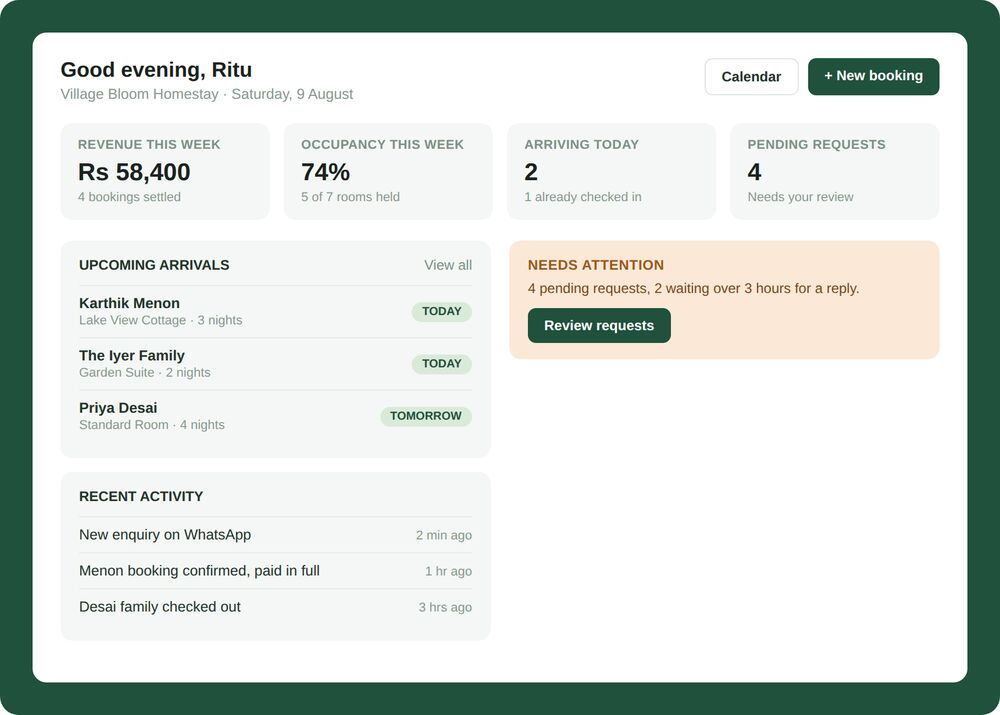
At the top, a handful of numbers answer the questions an owner actually asks first thing in the morning: how much revenue is booked for the coming week, what occupancy looks like, how many guests are arriving today and how many requests are sitting unanswered. Below that, upcoming arrivals are listed in order, each one showing the room, the length of stay and whether the guest has already checked in.
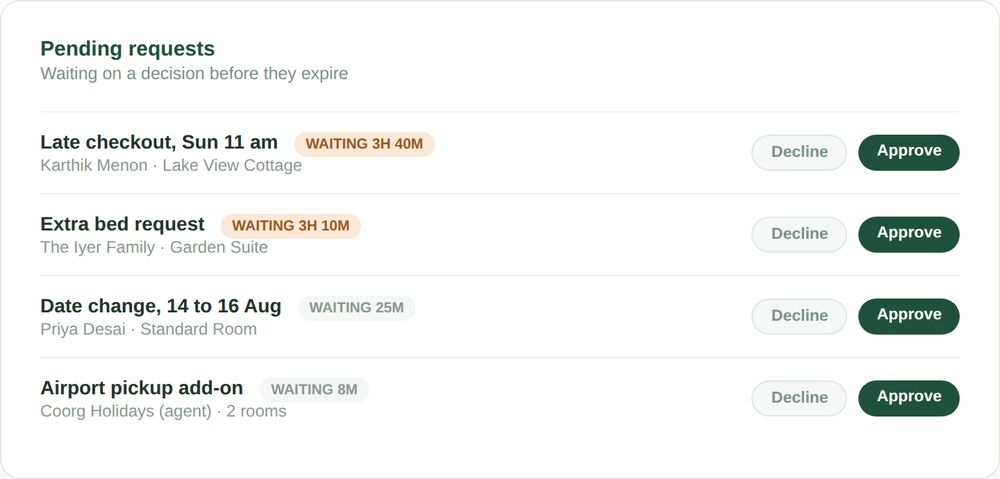
A separate panel exists specifically for what needs a decision from you: a late checkout request, an extra bed, a date change, an add on a guest has asked for. Each one shows how long it has been waiting, so a request sitting for three hours is visually distinct from one that arrived two minutes ago and nothing gets buried simply because it arrived during a busy hour.
It is worth being precise about what the dashboard is not. It does not replace your judgement about whether to approve a request, it surfaces the request so you can decide quickly. It does not set your rates for you, though it shows you the numbers a rate decision should be based on. It is a single, current view of a business that is genuinely happening across several channels at once, not a system that runs the business on its own.
The numbers update live rather than on a schedule. A booking confirmed a minute ago already counts toward this week’s revenue figure, a request approved seconds ago already disappears from the pending panel, a guest checked in through the front desk already shows as arrived rather than merely upcoming. There is no overnight sync, no refresh button to remember and no gap between something happening at the property and it being reflected on the screen.
What the dashboard is built to do
Every reservation, one list
Direct, WhatsApp, agent and manually entered OTA bookings all appear together, in the same format, updated the moment a booking is made or changed.
Requests flagged, not buried
Late checkouts, date changes and add on requests sit in their own panel, showing how long each has been waiting, so nothing sits unseen for hours.
Revenue and occupancy at a glance
Booked revenue, occupancy for the coming week and today’s arrivals and departures, shown as numbers you can read in five seconds, not numbers you have to calculate.
Works from your phone
The same dashboard opens on a phone browser as on a desktop, since most of the moments it gets checked are between other tasks, not sitting at a desk.
Each of these four pieces works on its own, but they are genuinely more useful together. A pending request only really matters once you know how it affects this week’s occupancy number and today’s arrivals list only really matters once you can act on a request without switching screens. The dashboard is built as one connected view rather than four separate widgets that happen to share a page.
What owners actually open the dashboard to check
Look at how the dashboard actually gets used across a normal day and a handful of moments repeat, regardless of whether the property is a two room homestay or a forty room resort.
Who is arriving today
Names, room numbers and length of stay for every guest checking in, so a welcome does not depend on someone remembering a WhatsApp thread from three days ago.
What is waiting on me
Every request that needs a yes or no, sorted by how long it has been waiting, so the oldest one gets seen first rather than whichever one happened to be scrolled past.
How the week is shaping up
Revenue booked and occupancy for the coming week, useful for deciding whether to open a discount or hold rates firm.
What happened while I was away
A simple activity log, new enquiries, confirmations, checkouts, so returning to the property after a few hours away does not mean starting from zero.
None of these four categories require a guest to ask for anything. They are the questions a property owner would ask themselves anyway, answered before they have to go looking for the answer across five different places. A hotel reservations dashboard earns its place as the first tab opened each morning precisely because it answers all four in the time it takes to glance at one screen, rather than the several minutes it used to take switching between apps.
SEE IT IN ACTION
A Saturday morning at a homestay near Coorg
Ritu runs a five room homestay with her husband. Most weekends look the same: two or three checkouts before eleven, two or three check ins after two and a stream of WhatsApp messages in between from guests already staying and guests still deciding whether to book.
On a Saturday morning she opens the dashboard before breakfast is even served. Four bookings are confirmed for the coming week, two are checking in today. A pending request sits at the top of the attention panel: a late checkout, waiting three hours and forty minutes because it arrived while she was dropping her daughter to a friend’s house. She approves it in one tap, the guest gets a WhatsApp reply within a minute of the approval and she has not had to reconstruct the request from the original message.
By early afternoon, the activity feed shows a booking confirmed for the following weekend, made by a guest she never spoke to directly, the enquiry, quote and payment all happened over WhatsApp while she was busy with checkouts. She would have found out eventually. The dashboard means she finds out within minutes, without having to check a separate inbox.
A Friday shift handover at a twenty room hotel in Manali
Deepak manages the front desk on the morning shift, Vivek takes over in the evening. Before the dashboard, a handover meant a rushed five minutes at the desk, or worse, a missed detail because the morning’s small changes never made it into the conversation.
Now the handover is mostly redundant. Vivek opens the dashboard at the start of his shift and sees exactly what Deepak saw at the end of his: three pending requests, one of them an extra bed that has been waiting since lunchtime, two guests arriving after 9 pm who called ahead to say they would be late and a revenue number for the week that already reflects a booking Deepak confirmed twenty minutes before clocking out.
Nothing about this replaces the two minute conversation between them at the desk, guest service still benefits from a human handover. What changes is that the handover starts from a shared, accurate picture instead of one person’s memory of a busy day.
A long weekend at a resort spread across three OTAs in Wayanad
Anand’s resort takes bookings directly, through WhatsApp and across three OTAs he has listed on for years. Before the dashboard, checking whether a room was actually available meant opening four separate apps and on a busy long weekend, that check happened often enough to eat a genuine chunk of the day.
Now the OTA bookings are entered into the reservations dashboard as they arrive, a two minute task each time and from that point forward they behave exactly like a direct booking: they block the room, they show up in the arrivals list, they count toward the week’s occupancy number. When a direct enquiry comes in over WhatsApp asking about the same weekend, the answer is immediate and correct, because the dashboard already reflects the OTA booking entered that morning.
The three OTAs still do not talk to each other, that gap has not gone away. What has changed is that Anand himself has one place to look before answering a guest, instead of needing to check four.
Five ways properties get less out of a reservations dashboard
The dashboard only replaces scattered records if the scattered records actually stop being used alongside it. A handful of habits determine whether that happens.
- Still keeping a parallel notebook “just in case.” A dashboard that is treated as a second copy of the truth, rather than the one copy, adds a reconciliation step instead of removing one.
- Not entering agent or phone bookings into the system at all. A reservation that only exists in someone’s memory cannot appear on a dashboard and it is exactly the kind of booking most likely to clash with something else.
- Ignoring the pending requests panel until end of day. The waiting time indicator only helps if someone actually looks at it during the day, not once as a end of shift cleanup task.
- Not checking the dashboard from a phone when away from the property. The moments a guest needs a fast answer most are often exactly the moments an owner is not sitting at a desk.
- Treating the revenue and occupancy numbers as historical trivia rather than a decision input. The numbers exist to inform whether to hold, raise, or discount a rate this week, not just to be glanced at.
- Giving every staff member the exact same access regardless of role. A dashboard shared too loosely tends to get checked by nobody in particular, since everyone assumes someone else is watching the pending requests panel.
Most of these are habit problems, not tool problems and most fade within a couple of weeks once opening the dashboard becomes the reflexive first step of the day rather than an extra screen to remember.
It tracks every booking, not just the ones made on OpenStays
A reservation made through the OpenStays booking engine or WhatsApp automation appears on the dashboard automatically. A booking that came from an OTA, an agent, or a phone call can be entered manually in under a minute and once it is entered, it behaves exactly like any other reservation: it blocks the room on the calendar, it shows up in the arrivals list, it counts toward the week’s occupancy and revenue numbers.
This matters because most properties are not going to move every booking channel onto one system overnight and a dashboard that only shows some of your business is not much more useful than the scattered records it is meant to replace. The goal is a single accurate picture of every room, on every night, regardless of how the guest found you.
How the dashboard fits with the rest of OpenStays
A hotel reservations dashboard is more useful the more of your booking activity actually flows through it. On OpenStays, a booking confirmed through the booking engine or through WhatsApp based enquiry handling lands on the dashboard the moment it happens, with no manual step in between. A guest whose identity document has been collected shows that against their reservation record rather than in a separate file.
Two other pieces of the platform build directly on the same reservation data the dashboard shows. Conversational, in-stay WhatsApp handling for guests who have already checked in relies on knowing who is currently staying, which the dashboard already tracks. Scheduled guest messaging, booking confirmations, pre-arrival reminders and checkout notes, is triggered by the same booking record the dashboard displays, so a reservation entered once feeds every downstream feature rather than needing to be entered again for each one.
None of this requires switching on every feature at once. A property can use the reservations dashboard on its own, purely as a way to see every booking in one place and add the conversational or scheduled messaging pieces later, whenever that makes sense for how the property is run.
Reservations dashboard vs. The alternatives
| Reservations dashboard | Spreadsheet or notebook | Checking each channel separately | |
|---|---|---|---|
| Single current view of all bookings | Yes, always | Only as current as the last manual update | No, one channel at a time |
| Flags requests waiting for a decision | Yes, with wait time shown | No, easy to miss | Depends on the channel |
| Risk of double booking across channels | Low, one shared calendar | High, depends on manual checking | High, nothing cross checks |
| Revenue and occupancy totals | Calculated automatically | Manual, if kept up to date | Not available in one place |
| Works from a phone | Yes | Awkward on small screens | Depends on each app |
| Setup effort | Minutes, once connected | None, but upkeep is constant | None, but checking is constant |
A spreadsheet is not a bad tool and plenty of well run properties use one successfully. The honest trade off is upkeep: a spreadsheet is only as accurate as the last time someone updated it by hand and a dashboard is accurate because it updates itself the moment a booking happens on a connected channel.
SETUP
Getting your dashboard live
Most properties are looking at a complete dashboard within a day of finishing setup.
1. Connect your booking channels
Your OpenStays booking engine and WhatsApp automation feed the dashboard automatically once your property is set up. No separate connection step is needed for these.
2. Add any bookings made outside OpenStays
Enter agent bookings, phone reservations, or existing OTA stays manually so the calendar reflects every room that is actually occupied.
3. Set who can see and approve requests
Decide whether one person or several staff members can approve pending requests, so approvals do not depend on one person being available.
4. Check the numbers match reality
Compare the dashboard’s occupancy and revenue figures against what you know to be true for the coming week and correct any manually entered bookings that look off.
5. Make it the first thing you open
The dashboard only replaces scattered records if it actually becomes the first place you check each morning, not an extra screen alongside the old habits.
BEFORE YOU CHOOSE
How to evaluate any reservations dashboard
Plenty of hotel software includes some kind of dashboard screen. Whatever hotel reservations dashboard you shortlist, including us, these are worth checking before you commit:
- Does it show bookings from every channel, or only the ones made inside that one system? A dashboard that only reflects part of your business recreates the same blind spot in a nicer interface.
- Can a manually entered booking block the calendar the same way an automatic one does? If not, a phone booking can silently overlap with a website booking.
- Does it show how long a request has been waiting, or just that a request exists? The waiting time is what actually prevents something from being missed.
- Does it work well on a phone, not just a desktop browser? Most of the moments a dashboard gets checked happen away from a desk.
- Can more than one person see and act on it? A dashboard that only one person can access recreates a single point of failure if that person is unavailable.
- Does adding a manual booking take seconds or minutes? A process cumbersome enough to skip on a busy day quietly reintroduces the exact blind spot the dashboard is meant to remove.
Two features that pair naturally with a reservations dashboard are worth checking at the same time: a direct booking engine that feeds confirmed bookings straight into the dashboard without manual entry and guest ID software that keeps identity documents attached to the same reservation record instead of a separate system.
Who can see what on the dashboard
Reservation details, guest names, dates, room numbers and revenue figures are visible to whoever you give account access to, typically the property owner and any staff involved in managing bookings. Access can be limited so that not everyone with a login sees the same level of financial detail.
The dashboard shows what is happening with your bookings, it does not hold or process guest payments itself. How guests pay you, whether by UPI, bank transfer or an online gateway, remains entirely your own arrangement, the dashboard simply reflects that a payment has been recorded against a booking.
Guest identity documents, where collected, are stored separately under the same guest ID compliance controls used across OpenStays, rather than sitting loosely in a reservation note. Removing a staff member’s account access removes their visibility into the dashboard immediately, since nothing is stored locally in a browser that would keep working after access is revoked.
For a property with multiple owners or partners, the same account can typically be shared across everyone who needs visibility, rather than forcing a single login to be passed around informally between family members or business partners.
QUESTIONS
Frequently asked questions
Does the dashboard replace a channel manager?
No. A channel manager synchronises availability across multiple OTAs so you do not get double booked between them. A reservations dashboard is about giving you one place to see and act on every booking you already have, from whichever channel it came from, including ones entered manually.
Do I need to manually enter every OTA booking?
Yes, for now. Bookings made through your OpenStays booking engine or WhatsApp automation appear automatically. Anything booked through a separate OTA extranet needs to be entered so the dashboard reflects that the room is occupied on those dates.
How current is the information on the dashboard?
Bookings and requests made through connected channels appear immediately. Manually entered bookings are as current as the last time someone entered them, the same as any manual record keeping.
Can staff see the dashboard, or only the owner?
Account access can be shared with staff who need it. Owners typically decide how much financial detail, like revenue figures, different staff accounts can see.
Does it work if I only take direct bookings, no OTAs?
Yes. Many properties on OpenStays run entirely on direct bookings and WhatsApp enquiries and the dashboard works the same way, simply with fewer manual entries needed since most bookings arrive through connected channels already.
What happens to a request I do not respond to?
It stays visible in the pending requests panel, with its waiting time continuing to increase, until it is approved, declined, or the guest withdraws it. Nothing disappears from view on its own.
Can I see past bookings, not just upcoming ones?
Yes, the dashboard’s primary view is forward looking, arrivals and pending requests, but booking history remains accessible for looking back at a previous week or season.
Does the dashboard set my rates?
No. It shows you the occupancy and revenue numbers a rate decision should be based on, but changing rates is a separate action you take deliberately, covered on our seasonal pricing page.
Is there a limit to how many bookings it can show?
No practical limit. Whether a property has three rooms or three hundred, the dashboard scales to show every current and upcoming reservation.
Can I export the data shown on the dashboard?
Booking and guest data can be exported in the same way covered on our guest ID compliance page, useful for accounting or for records required by local authorities.
Does it show which channel each booking came from?
Yes, every reservation is tagged with its source, direct website, WhatsApp, manually entered, so you can see at a glance where your bookings are actually coming from.
What if two channels show the same dates as available?
The dashboard reduces this risk by keeping one shared calendar for connected channels, but a booking made through an unconnected OTA still needs to be entered manually and promptly to avoid a clash.
Is the dashboard included, or a separate cost?
It is part of the core OpenStays platform rather than a separate add on. Current plan details are covered on our pricing page.
Can I use the dashboard on a shared front desk computer?
Yes, it works in any browser and does not require installing anything. Logging out at the end of a shift is still worth doing on a shared machine, the same as with any account holding guest information.
Does a new booking on the dashboard trigger the AI WhatsApp concierge?
The dashboard and the WhatsApp concierge run on the same underlying reservation data, so a guest who books through any connected channel is immediately recognised as a current or upcoming guest for concierge purposes, without any manual step connecting the two.
What changes in the first month
The first thing most owners notice is smaller than expected: fewer moments of genuinely not knowing what is going on with the property. A quick glance answers what used to require checking three apps and remembering a phone call from earlier in the week.
By the second or third week, the pending requests panel starts changing behaviour. Requests that used to sit for hours, simply because nobody happened to be looking at the right chat thread, start getting answered within minutes, because the panel makes them impossible to miss without deliberately ignoring them.
The revenue and occupancy numbers take a little longer to become useful, usually once there is a full week or two of data to compare against. That is when a rate decision stops being a guess and starts being informed by what the coming week already looks like, rather than what last month felt like from memory.
None of this requires giving up the channels or habits you already use to take bookings. What changes is that all of it becomes visible in one place and the small, avoidable failures, a missed request, a double booking, a rate decision made on a hunch, become noticeably rarer.
Owners who look back after a full season tend to describe the change the same way: nothing dramatic happened in any single week, but the accumulated total of small things that used to slip, a late reply, a forgotten manual entry, a rate left unchanged during a busy weekend, quietly stopped happening. That is the honest case for a reservations dashboard, a reliable, unglamorous removal of a specific kind of avoidable failure, not a new capability so much as the absence of an old one.
Who a reservations dashboard actually helps
A one or two room homestay run by a single family benefits less from the multi channel view, since there usually are not many channels to reconcile and more from simply not having to hold every booking detail in memory. A quick look before answering a guest’s question replaces a mental scramble through the last few days of messages.
A mid sized hotel with a front desk team benefits most from the shift handover angle: a shared, current view means the evening team is not dependent on the morning team remembering to mention something out loud. The pending requests panel in particular tends to matter most here, since a request approved late in a fast moving front desk is close to a request declined.
A resort or larger property managing bookings across a website, WhatsApp, a handful of agents and sometimes an OTA benefits most from the single source of truth angle: fewer double bookings, a genuine total revenue and occupancy picture and one place for every team member to check rather than several inboxes nobody has time to cross reference.
See every reservation in one place.
The dashboard runs on the same OpenStays account as your booking engine and WhatsApp automation. Nothing new to install.