
DIRECT BOOKINGS · OWNER CONTROL
Your property.
Your booking engine.
Embed a complete booking engine on your own website, or share your hosted booking link. Guests check availability, choose a room and book directly with you.
ILLUSTRATIVE GUEST JOURNEY
Your stay, booked direct.
One link. A complete booking flow.
▦Choose datesSee rooms available for the stay
⌂Choose a roomRoom details, rates and guest count
₹Choose how to payYour payment method and advance policy
✓Receive confirmationAfter payment verification or your approval
Your availability. Your rates. Your guest relationship.
FROM LINK TO RESERVATION
A booking journey guests can finish
Give guests a clear route from browsing your property to choosing their stay. Availability, prices and payment instructions belong in the same flow.
Open your listing
A guest arrives from your website, Instagram, Google Maps or a WhatsApp conversation. They see your property, photos, rooms and house rules.
Choose the stay
Guests pick dates, a room and the number of guests. The engine uses the availability and rate plans you have configured.
Pay & confirm
Guests follow your payment and advance policy. A connected gateway can confirm successful payments automatically; direct UPI needs your verification.
THE CORE OF YOUR RESERVATIONS
Four parts. One booking engine.
Your calendar, rates, payment choices and reservation records work together. Guests get a complete booking flow; you keep control of how your property is sold.
Availability that stays current
Your room calendar powers the availability guests see. Keep walk-ins and phone bookings recorded alongside online reservations, so your own channel reflects the rooms you can sell.
Rates that follow your rules
Configure seasonal and weekend rates, room-type prices and extra-person charges. The engine applies the relevant rules to the guest’s dates and party size.
Payments on your terms
Choose a supported gateway, your own UPI ID or pay at property. Set full payment or a partial advance. OpenStays does not hold guest funds; payment-provider fees and settlement terms may apply.
A reservation you can manage
Keep guest details and reservation records in your dashboard. Confirm pending payments when verified and use the same calendar to manage the stay.
ONE ENGINE, EVERY CHANNEL
Your website. A real booking flow.
Embed the booking engine on your own property website so guests can reserve from the place they already trust. If you do not have a website yet, start with your hosted listing and share its booking link.
Embed on your website
Add the OpenStays booking widget to your own reservation page. Keep your website’s branding and navigation while guests choose dates, rooms and their payment option. Explore the booking widget →
Use your hosted listing
Share one booking link with your property photos, room types, rules and availability. Start taking direct bookings without buying a domain or building a website.
Where guests find you
Put your link in your Instagram bio, Google Maps profile, WhatsApp replies or reception QR code. Each route uses the same availability and rates.
YOUR SIDE OF THE ENGINE
Everything configurable, nothing technical.
Your dashboard supplies the instructions the booking engine follows. Update your own rates and policies as your business changes.
- Rooms, room types, photos and house rules
- Seasonal and weekend rates, extra-person charges
- Payment mode and full or partial advance policy
- Manual reservations for walk-ins and phone guests
- Booking details and availability in one place

One room calendar connects your online and manual reservations.
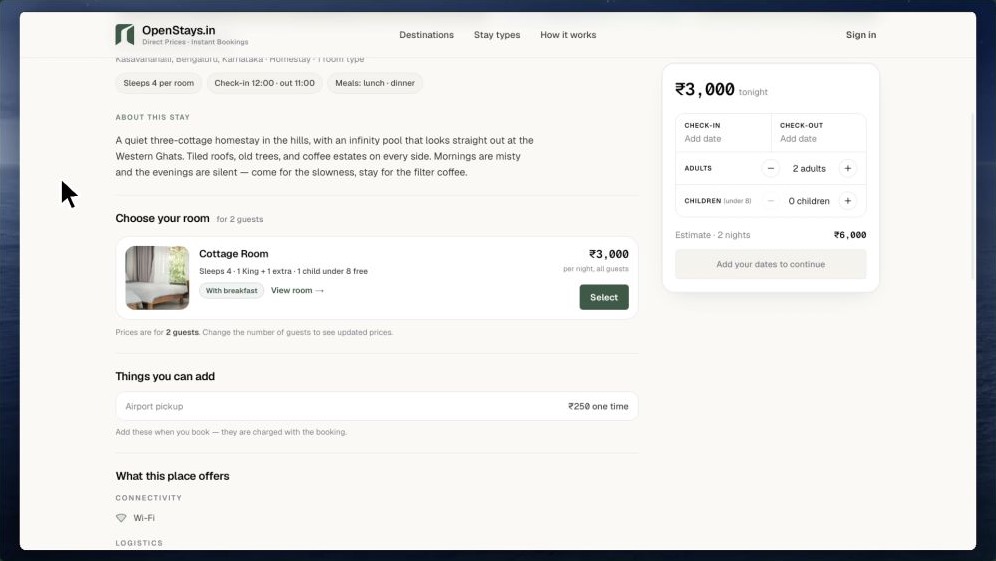
Product walkthrough · Guest checkout
SEE IT IN ACTION
From room choice to checkout
See how guests choose dates and rooms, review the price and follow your payment policy. Then use the property setup walkthrough to configure your own listing.
YOUR DIRECT BOOKING CHANNEL
More than an enquiry form.
An enquiry form starts a conversation. A booking engine gives guests the next steps: available rooms, the price for their stay and a payment route. Keep your direct channel alongside the platforms you use for discovery.
A contact form
Collects the guest’s enquiry. You still need to check availability, send a quote, agree payment and record the reservation.
Your booking engine
Shows your configured availability and prices, guides payment and keeps the reservation in your dashboard. OpenStays does not charge booking commission.
Your OTA listings
Can help new guests discover your property. Charges, payment handling and terms depend on the platform and your agreement.
Sync external calendars where supported. iCal can help exchange availability with connected channels. It is not a live rate-and-inventory channel manager; allow for each provider’s refresh interval. How iCal sync works →
GET READY TO TAKE BOOKINGS
Set up. Check. Share.
The guided setup brings your property, rooms, rates and payment policy together. Review the guest experience before sharing your booking link.
Add your property
Add room types, photos, rates and house rules. Check the details guests will see on your hosted listing.
Configure your policy
Choose your payment method and advance requirement. Review seasonal rates, guest charges and how pending payments are confirmed.
Share your link
Add it to your website and social profiles. Keep it visible in guest conversations and use your calendar for manual reservations too.
MAKE YOUR DIRECT CHANNEL WORK
Small habits that keep bookings flowing
A booking engine works best when guests can find it and the information stays current.
Keep the link visible
Place the booking link where guests already look: your website, Instagram bio, Maps profile and WhatsApp replies.
Set a clear advance policy
Tell guests what is due now and what is due later. Verify direct UPI receipt before confirming a pending reservation.
Keep rates & availability fresh
Review festival and weekend pricing before enquiries arrive. Record phone bookings and walk-ins promptly in the same calendar.
Help repeat guests book direct
Make the next stay easy to book through your own link. Your direct channel gives you a consistent way to manage the guest relationship.
Booking engine questions
What to expect from setup, payment and everyday reservation management.
What is a direct booking engine?
It lets guests view available rooms, choose dates, see the price and start a reservation through your own booking link or website. OpenStays connects that guest flow with your calendar, rate plans and payment policy.
Can I embed the engine on my own website?
Yes. Add the OpenStays booking widget to a reservation page on your property’s website. Your own branding and navigation remain around the embedded booking flow. See the live Areca County example or explore the website widget.
Do I need a website?
No. OpenStays provides a hosted property listing with a booking link. Share that link directly. If you have a website, you can add the booking widget.
Which payment methods can I offer?
Configure a supported payment gateway, your own UPI ID or payment at the property. Choose full payment or a partial advance under your property’s policy. Available gateway methods depend on your provider.
Are bookings always confirmed automatically?
A supported connected gateway can confirm after successful payment. With direct UPI, verify receipt in your bank or UPI app before confirming the pending reservation. Confirmation depends on the payment method and policy you configure.
Can I take only a partial advance?
Yes. Configure a partial advance and tell guests when the balance is due. If you want an initial qualifying UPI amount of ₹2,000 or less, check the resulting advance for each booking. Explore direct UPI and advances.
Is there a limit on reservations?
OpenStays supports unlimited reservations, including manual entries. Your software plan and any applicable usage or payment-provider charges remain separate from booking volume.
Does OpenStays charge a booking commission?
No. OpenStays does not take a percentage of your bookings. Software subscription and applicable usage charges apply and your bank or payment provider may charge for processing payments. See current pricing.
Can I configure different room types and rates?
Yes. Add room types and configure rate plans, seasonal and weekend pricing and extra-person charges. Guests see the relevant configured price for their dates and guest count.
Can I record walk-ins and phone bookings?
Yes. Enter manual reservations in your dashboard so the same room calendar supports your online and offline bookings.
Can I keep my OTA listings?
Yes. Your direct booking channel can run alongside your OTA listings. Use iCal where supported to exchange calendar availability, allowing for provider refresh intervals. iCal does not replace a live channel manager.
Does the booking flow work on mobile?
Yes. Guests can use your booking link in a mobile browser, including when they arrive from social media or WhatsApp. They do not need to download a separate guest app.
How long does setup take?
The guided wizard helps you add your property, rooms, photos, rates and payment policy. A simple setup can take around fifteen minutes; allow extra time to prepare content and review your listing.
Are Google Free Booking Links included today?
Google Free Booking Links are planned. You can use your hosted booking link, website widget and other sharing channels today. Check the product page for the latest feature availability.
Your bookings. Your guests. Your terms.
Give guests a clear way to reserve their next stay directly with you.